Hello,
I have my media on my Synology NAS and I want to share it to my Jellyfin LXC (installed with tteck scripts) with Proxmox, I am not interested in hardware accelleration I want use my jellyfin only for library to see media I will use the direct path mode.
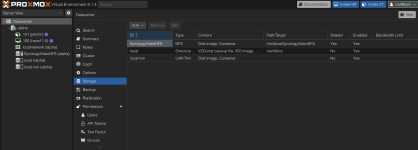
I can't understand how to share the NFS folder from Synology NAS to Jellyfin, I have read a lot of documentation but I can't find one that works for me, what I have done is to enable NFS on synology (that is working) and I have add this storage nfs on Data center in my proxmox ( I have attached a photo). I have also selected the type of disk to Container to render it visibile to Jellyfin container but it's not working.
Anyone can help me?
I have notice that on my Synology NFS folder now proxmox create dump, private and images folder that I don't want, I want only share content
I have my media on my Synology NAS and I want to share it to my Jellyfin LXC (installed with tteck scripts) with Proxmox, I am not interested in hardware accelleration I want use my jellyfin only for library to see media I will use the direct path mode.
I can't understand how to share the NFS folder from Synology NAS to Jellyfin, I have read a lot of documentation but I can't find one that works for me, what I have done is to enable NFS on synology (that is working) and I have add this storage nfs on Data center in my proxmox ( I have attached a photo). I have also selected the type of disk to Container to render it visibile to Jellyfin container but it's not working.
Anyone can help me?
I have notice that on my Synology NFS folder now proxmox create dump, private and images folder that I don't want, I want only share content