

Somehow I can only use about 10GB of a 50GB LV. Trying to write a backup to it and it's just not seeing the available space.
I created and mounted the LV as follows:
Added it to /etc/fstab and added it to the storage as a directory, specifying the mount point
lvdisplay:
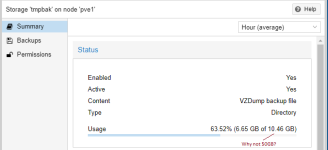
Did I perhaps create the LV in an area where there is only 10GB available? How can I check this?
Isn't 'vgs' showing me that I still have another 160GB free space?
I created and mounted the LV as follows:
lvcreate -L50G -ntmpbak pve
mkfs.ext4 /dev/pve/tmpbak
Added it to /etc/fstab and added it to the storage as a directory, specifying the mount point
lvdisplay:
 --- Logical volume ---
  LV Path                /dev/pve/tmpbak
  LV Name                tmpbak
  VG Name                pve
  LV UUID                6RmsNW-K8JJ-AnPD-VqDv-Jvth-XB4j-GkiyOw
  LV Write Access        read/write
  LV Creation host, time pve1, 2023-02-23 21:23:28 +1100
  LV Status              available
  # open                 0
  LV Size                50.00 GiB
  Current LE             12800
  Segments               1
  Allocation             inherit
  Read ahead sectors     auto
  - currently set to     256
  Block device           253:6
root@pve1:~# lvmdiskscan
  /dev/sda2 [     512.00 MiB]
  /dev/sda3 [     446.63 GiB] LVM physical volume
  0 disks
  1 partition
  0 LVM physical volume whole disks
  1 LVM physical volume
root@pve1:~# lvs
  LV            VG  Attr       LSize   Pool Origin Data%  Meta%  Move Log Cpy%Sync Convert
  backups       pve -wi-a-----  20.00g
  data          pve twi-aotz-- 200.00g             17.62  2.63
  root          pve -wi-ao----  10.00g
  swap          pve -wi-ao----   4.00g
  tmpbak        pve -wi-a-----  50.00g
  vm-100-disk-0 pve Vwi-aotz--   4.00g data        79.18
  vm-102-disk-1 pve Vwi-aotz--   4.00g data        36.50
  vm-103-disk-0 pve Vwi-aotz--   4.00g data        53.45
  vm-104-disk-0 pve Vwi-aotz--   4.00g data        36.21
  vm-104-disk-1 pve Vwi-aotz--   8.00g data        2.81
  vm-105-disk-0 pve Vwi-a-tz--   4.00g data        30.33
  vm-110-disk-0 pve Vwi-a-tz--  32.00g data        79.98
root@pve1:~# vgs
  VG  #PV #LV #SN Attr   VSize    VFree
  pve   1  12   0 wz--n- <446.63g <160.63g
Did I perhaps create the LV in an area where there is only 10GB available? How can I check this?
Isn't 'vgs' showing me that I still have another 160GB free space?


