

unable to install the bootloader - Dell R720

artware

New Member
Jun 23, 2011
3
0
1
Hello,
I have a Dell R720, dual Xeon E5-2620, 64GB Rdimm, 300Gb sas raid1, 500Gb sas raid1, PERC H310 Mini Raid Controller.
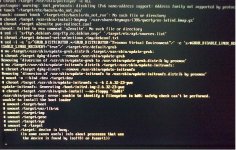
I try to install 5 times, an both raid array, everything is ok until installing bootloader, and give back this error, unable to install the bootloader.
I try with pveboot, see down errors.
Any ideea?
Thank you!pveboot.jpg
 
Hi,
Can you give some additionnal details? What kind of install from the Pve iso or debian+pve
I juste achieve a new install in a r720 server with perc h710 debian 7.1 and pve 6.1 without any problem.
 
Hi,
Can you give some additionnal details? What kind of install from the Pve iso or debian+pve
I juste achieve a new install in a r720 server with perc h710 debian 7.1 and pve 6.1 without any problem.

iso Proxmox 3.1, latest. Installed from usb and CD,...same problem.
Debian netinstall working without problems!
 
Last edited:
I can confirm same error as on screenshot and final result: unable to install the bootloader
at the end of installing last version of Proxmox 3.1

This is Intell SR2612URR with two E5620 and Adaptec 5405Z controller (made 2 raid partions).
Before it was successfully installed by Proxmox v2.3 but it was just for testing purpose and failover.
Now ready for production but couldn't install last version.
Should I try to install Proxmox v2.3 once again and upgrade to v3.1 ?
 
Good news, I've found workaround for my "unable to install the bootloader".
Extra volumes on controller Adaptec 5405Z rised this error.
So I just plugged out SAS cable from controller. Booted and installed Proxmox 3.1 from CD (by USB-DVD).
I had only one /dev/sda to install on it.
First start was successful. Power off.
Plug in SAS cable to controller. Power on. Controller read configuration from unchanged volumes.
Proxmox 3.1 running like a charm and I have my two volumes from SAS Raid available.

Guess it can solve issue on any system with same installation error.
 
Last edited:
Good news, I've found workaround for my "unable to install the bootloader".
Extra volumes on controller Adaptec 5405Z rised this error.
So I just plugged out SAS cable from controller. Booted and installed Proxmox 3.1 from CD (by USB-DVD).
I had only one /dev/sda to install on it.
First start was successful. Power off.
Plug in SAS cable to controller. Power on. Controller read configuration from unchanged volumes.
Proxmox 3.1 running like a charm and I have my two volumes from SAS Raid available.

Guess it can solve issue on any system with same installation error.

Great! I also had the "unable to install grub" error while trying to install from USB drive to one disk which was connected to a SATA controller with two other disks connected to it. I disconnected the two other disks, and TADAAA! no more errors :)
Thanks for sharing!