

Hi there,
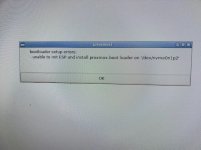
i am really at the end of my knowledge, because i cannot install PVE on our Lenovo ThinkSystem. I can boot from USB, and start the installation, then wheather choosing one as "ext4" or both onboard nvram drives as target, or using both as "zfsRAID1", at the end of the installation, an error, see screenshot occurs.
There is no hardware raid card installed, and i have not created any raid within the UEFI BIOS.
Many thanks for help
Alexander
i am really at the end of my knowledge, because i cannot install PVE on our Lenovo ThinkSystem. I can boot from USB, and start the installation, then wheather choosing one as "ext4" or both onboard nvram drives as target, or using both as "zfsRAID1", at the end of the installation, an error, see screenshot occurs.
There is no hardware raid card installed, and i have not created any raid within the UEFI BIOS.
Many thanks for help
Alexander
Attachments


Last edited:
