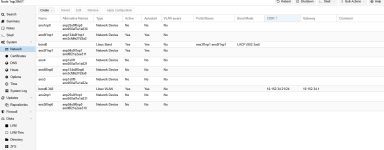
I have a ProxMox Cluster created from two Dell Servers. I was able to create a bond and get onto the network. I created a bridge (vmbr0) and attached the bridge to the virtual machine but the machine cannot get on the network. The IP Address for the VM is 10.152.34.100. I have attached the /etc/network/interfaces file of one of the Hypervisors. I also attached a screenshot of the GUI Network Setup. I am a newbie to networking and ProxMox so please be kind 
auto lo
iface lo inet loopback
auto ens3f1np1
iface ens3f1np1 inet manual
auto ens5f1np1
iface ens5f1np1 inet manual
iface eno3 inet manual
iface eno4 inet manual
iface eno1np0 inet manual
iface eno2np1 inet manual
iface ens3f0np0 inet manual
iface ens5f0np0 inet manual
auto bond0
iface bond0 inet manual
bond-slaves ens3f1np1 ens5f1np1
bond-miimon 340
bond-mode 802.3ad
bond-xmit-hash-policy layer3+4
auto bond0.340
iface bond0.340 inet static
address 10.152.34.22/24
gateway 10.152.34.1
auto vmbr0
iface vmbr0 inet manual
bridge-ports bond0
bridge-stp off
bridge-fd 0
bridge-vlan-aware yes
bridge-vids 2-4094
auto lo
iface lo inet loopback
auto ens3f1np1
iface ens3f1np1 inet manual
auto ens5f1np1
iface ens5f1np1 inet manual
iface eno3 inet manual
iface eno4 inet manual
iface eno1np0 inet manual
iface eno2np1 inet manual
iface ens3f0np0 inet manual
iface ens5f0np0 inet manual
auto bond0
iface bond0 inet manual
bond-slaves ens3f1np1 ens5f1np1
bond-miimon 340
bond-mode 802.3ad
bond-xmit-hash-policy layer3+4
auto bond0.340
iface bond0.340 inet static
address 10.152.34.22/24
gateway 10.152.34.1
auto vmbr0
iface vmbr0 inet manual
bridge-ports bond0
bridge-stp off
bridge-fd 0
bridge-vlan-aware yes
bridge-vids 2-4094