Unable to connect to Web GUI

dexter177

New Member
Feb 8, 2025
4
0
1
Hello,

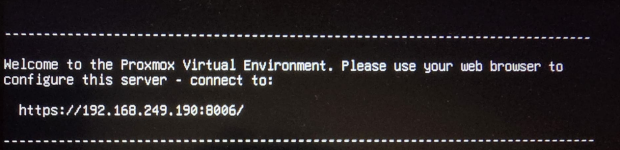
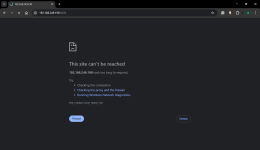
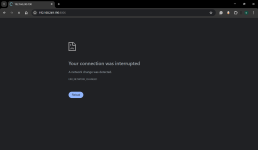
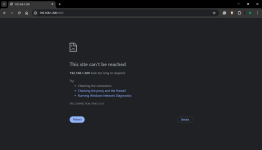
I am new to Proxmox, I enter my hostname in my google chrome browser but it does not load Proxmox. What am I doing wrong?

192.168.249.190:8006

IP address: 192.168.249.190 /24
Gateway: 192.168.249.1
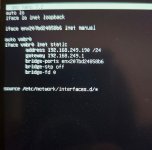
Code:
   IPv4 Address. . . . . . . . . . . : 192.168.1.50(Preferred)
   Subnet Mask . . . . . . . . . . . : 255.255.255.0
   Lease Obtained. . . . . . . . . . : 11 February 2025 22:33:57
   Lease Expires . . . . . . . . . . : 13 February 2025 20:10:33
   Default Gateway . . . . . . . . . : fe80::8269:1aff:fec3:1410%3
                                       192.168.1.1
   DHCP Server . . . . . . . . . . . : 192.168.1.1
   DHCPv6 IAID . . . . . . . . . . . : 57198252
   DHCPv6 Client DUID. . . . . . . . : 00-01-00-01-2F-28-49-AB-D0-C1-B5-50-21-2B
   DNS Servers . . . . . . . . . . . : 2a02:6b67:ef63:9200:8269:1aff:fec3:1410
                                       192.168.1.1
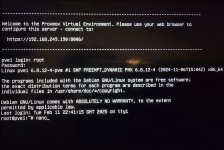
1739392179307.jpeg

1739392283012.png
1739392210033.png
1739392216869.png
 

Attachments

  • 1739392192501.jpeg
    1739392192501.jpeg
    250 KB · Views: 1
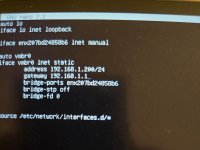
You put Proxmox on an entirely different network that does not use the same gateway. Give Proxmox a free static (not DHCP) IPv4 address between 192.168.1.2 and 192.168.1.254 and set the gateway to 192.168.1.1 (in /etc/network/interfaces and change /etc/hosts to match). Lots of threads about this on this forum.
 
Last edited:
I can't tell if there is an underscore (_) between 200 and pve1 or if that is the cursor (blinking).
It is the cursor blinking sorry for the bad picture

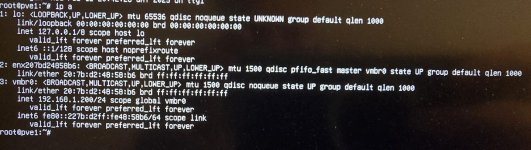
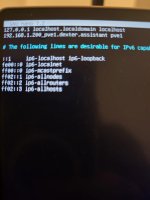
Did you reboot? What is the output of ip a?

I did reboot, this is the output of ip a:

1739395585143.jpeg


I have connected my ethernet cable, do we need to be connected via ethernet to connect to Proxmox?

Code:
Ethernet adapter Ethernet:

   Physical Address. . . . . . . . . : D0-C1-B5-50-21-2B
   DHCP Enabled. . . . . . . . . . . : Yes
   Autoconfiguration Enabled . . . . : Yes
   IPv6 Address. . . . . . . . . . . : 2a02:6b67:ef63:9200:75c6:5556:f061:3eae(Preferred)
   Temporary IPv6 Address. . . . . . : 2a02:6b67:ef63:9200:493a:3191:a46e:7519(Preferred)
   Link-local IPv6 Address . . . . . : fe80::da75:b961:9dfd:ed8e%18(Preferred)
   IPv4 Address. . . . . . . . . . . : 192.168.1.232(Preferred)
   Subnet Mask . . . . . . . . . . . : 255.255.255.0
   Default Gateway . . . . . . . . . : fe80::8269:1aff:fec3:1410%18
                                       192.168.1.1
   DHCP Server . . . . . . . . . . . : 192.168.1.1
   DHCPv6 IAID . . . . . . . . . . . : 102792146
   DHCPv6 Client DUID. . . . . . . . : 00-01-00-01-2F-28-49-AB-D0-C1-B5-50-21-2B
   DNS Servers . . . . . . . . . . . : 2a02:6b67:ef63:9200:8269:1aff:fec3:1410
                                       192.168.1.1
                                       2a02:6b67:ef63:9200:8269:1aff:fec3:1410
 
Last edited:
I did reboot, this is the output of ip a:

View attachment 82278


I have connected my ethernet cable, do we need to be connected via ethernet to connect to Proxmox?
Yes. PVE is an clustered enterprise hypervisor and WiFi almost never supports a bridged configuration. Also, lots of threads about this on this forum. There appears to be a working cable plugged in, which is good.
Are you sure 192.168.1.200 is not in the DHCP range of your router? Some routers block traffic from DHCP addresses when no DHCP (like Proxmox) is used.
 
I am honestly not sure, how would I check if it is or isn't?

This IP address for my ethernet cable has .2 at the end so wouldnt this imply that I cannot use an IP address with .2 at the end e.g. .200?

Code:
Ethernet adapter Ethernet:
Physical Address. . . . . . . . . : D0-C1-B5-50-21-2B
DHCP Enabled. . . . . . . . . . . : Yes
Autoconfiguration Enabled . . . . : Yes
IPv6 Address. . . . . . . . . . . : 2a02:6b67:ef63:9200:75c6:5556:f061:3eae(Preferred)
Temporary IPv6 Address. . . . . . : 2a02:6b67:ef63:9200:493a:3191:a46e:7519(Preferred)
Link-local IPv6 Address . . . . . : fe80::da75:b961:9dfd:ed8e%18(Preferred)
IPv4 Address. . . . . . . . . . . : 192.168.1.232(Preferred)
Subnet Mask . . . . . . . . . . . : 255.255.255.0
Default Gateway . . . . . . . . . : fe80::8269:1aff:fec3:1410%18
192.168.1.
DHCP Server . . . . . . . . . . . : 192.168.1.1
DHCPv6 IAID . . . . . . . . . . . : 102792146
DHCPv6 Client DUID. . . . . . . . : 00-01-00-01-2F-28-49-AB-D0-C1-B5-50-21-2B
DNS Servers . . . . . . . . . . . : 2a02:6b67:ef63:9200:8269:1aff:fec3:1410
192.168.1.1
2a02:6b67:ef63:9200:8269:1aff:fec3:1410
0
 
Last edited: