Hi all
New to PM and Linux, but love the potential of it.
Whilst exploring possibilities
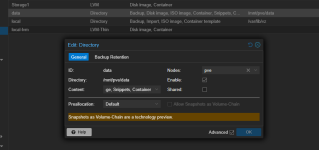
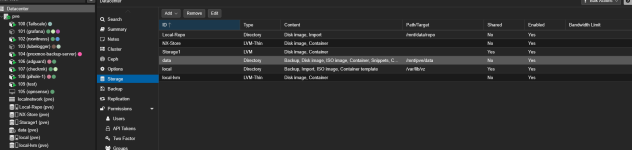
I inadvertently removed '/mnt/pve/data' from a partition.
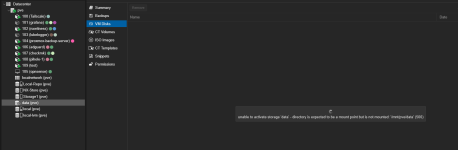
When selecting this disk, it displays
unable to activate storage 'data' - directory is expected to be a mount point but is not mounted: '/mnt/pve/data' (500)
lsblk output
root@pve:~# lsblk
NAME MAJ:MIN RM SIZE RO TYPE MOUNTPOINTS
sda 8:0 0 447.1G 0 disk
├─Storage1-vm--109--disk--0 252:10 0 8G 0 lvm
├─Storage1-vm--106--disk--0 252:11 0 10G 0 lvm
├─Storage1-vm--107--disk--0 252:12 0 6G 0 lvm
└─Storage1-vm--108--disk--0 252:15 0 10G 0 lvm
sdb 8:16 0 3.6T 0 disk
├─NX--Store-NX--Store_tmeta 252:6 0 15.9G 0 lvm
│ └─NX--Store-NX--Store-tpool 252:8 0 3.6T 0 lvm
│ ├─NX--Store-NX--Store 252:9 0 3.6T 1 lvm
│ └─NX--Store-vm--102--disk--0 252:17 0 2T 0 lvm
└─NX--Store-NX--Store_tdata 252:7 0 3.6T 0 lvm
└─NX--Store-NX--Store-tpool 252:8 0 3.6T 0 lvm
├─NX--Store-NX--Store 252:9 0 3.6T 1 lvm
└─NX--Store-vm--102--disk--0 252:17 0 2T 0 lvm
sdc 8:32 0 2.7T 0 disk
nvme0n1 259:0 0 238.5G 0 disk
├─nvme0n1p1 259:1 0 1007K 0 part
├─nvme0n1p2 259:2 0 1G 0 part /boot/efi
└─nvme0n1p3 259:3 0 237G 0 part
├─pve-swap 252:0 0 8G 0 lvm [SWAP]
├─pve-root 252:1 0 69.2G 0 lvm /
├─pve-data_tmeta 252:2 0 1.4G 0 lvm
│ └─pve-data-tpool 252:4 0 140.9G 0 lvm
│ ├─pve-data 252:5 0 140.9G 1 lvm
│ ├─pve-vm--104--disk--0 252:14 0 10G 0 lvm
│ ├─pve-vm--102--disk--0 252:16 0 8G 0 lvm
│ └─pve-vm--100--disk--0 252:18 0 2G 0 lvm
└─pve-data_tdata 252:3 0 140.9G 0 lvm
└─pve-data-tpool 252:4 0 140.9G 0 lvm
├─pve-data 252:5 0 140.9G 1 lvm
├─pve-vm--104--disk--0 252:14 0 10G 0 lvm
├─pve-vm--102--disk--0 252:16 0 8G 0 lvm
└─pve-vm--100--disk--0 252:18 0 2G 0 lvm
root@pve:/# cat etc/fstab
# <file system> <mount point> <type> <options> <dump> <pass>
/dev/pve/root / ext4 errors=remount-ro 0 1
UUID=4AD1-8169 /boot/efi vfat defaults 0 1
/dev/pve/swap none swap sw 0 0
proc /proc proc defaults 0 0
Can you please advise on how to resolve this.
Thx in advance
New to PM and Linux, but love the potential of it.
Whilst exploring possibilities
I inadvertently removed '/mnt/pve/data' from a partition.
When selecting this disk, it displays
unable to activate storage 'data' - directory is expected to be a mount point but is not mounted: '/mnt/pve/data' (500)
lsblk output
root@pve:~# lsblk
NAME MAJ:MIN RM SIZE RO TYPE MOUNTPOINTS
sda 8:0 0 447.1G 0 disk
├─Storage1-vm--109--disk--0 252:10 0 8G 0 lvm
├─Storage1-vm--106--disk--0 252:11 0 10G 0 lvm
├─Storage1-vm--107--disk--0 252:12 0 6G 0 lvm
└─Storage1-vm--108--disk--0 252:15 0 10G 0 lvm
sdb 8:16 0 3.6T 0 disk
├─NX--Store-NX--Store_tmeta 252:6 0 15.9G 0 lvm
│ └─NX--Store-NX--Store-tpool 252:8 0 3.6T 0 lvm
│ ├─NX--Store-NX--Store 252:9 0 3.6T 1 lvm
│ └─NX--Store-vm--102--disk--0 252:17 0 2T 0 lvm
└─NX--Store-NX--Store_tdata 252:7 0 3.6T 0 lvm
└─NX--Store-NX--Store-tpool 252:8 0 3.6T 0 lvm
├─NX--Store-NX--Store 252:9 0 3.6T 1 lvm
└─NX--Store-vm--102--disk--0 252:17 0 2T 0 lvm
sdc 8:32 0 2.7T 0 disk
nvme0n1 259:0 0 238.5G 0 disk
├─nvme0n1p1 259:1 0 1007K 0 part
├─nvme0n1p2 259:2 0 1G 0 part /boot/efi
└─nvme0n1p3 259:3 0 237G 0 part
├─pve-swap 252:0 0 8G 0 lvm [SWAP]
├─pve-root 252:1 0 69.2G 0 lvm /
├─pve-data_tmeta 252:2 0 1.4G 0 lvm
│ └─pve-data-tpool 252:4 0 140.9G 0 lvm
│ ├─pve-data 252:5 0 140.9G 1 lvm
│ ├─pve-vm--104--disk--0 252:14 0 10G 0 lvm
│ ├─pve-vm--102--disk--0 252:16 0 8G 0 lvm
│ └─pve-vm--100--disk--0 252:18 0 2G 0 lvm
└─pve-data_tdata 252:3 0 140.9G 0 lvm
└─pve-data-tpool 252:4 0 140.9G 0 lvm
├─pve-data 252:5 0 140.9G 1 lvm
├─pve-vm--104--disk--0 252:14 0 10G 0 lvm
├─pve-vm--102--disk--0 252:16 0 8G 0 lvm
└─pve-vm--100--disk--0 252:18 0 2G 0 lvm
root@pve:/# cat etc/fstab
# <file system> <mount point> <type> <options> <dump> <pass>
/dev/pve/root / ext4 errors=remount-ro 0 1
UUID=4AD1-8169 /boot/efi vfat defaults 0 1
/dev/pve/swap none swap sw 0 0
proc /proc proc defaults 0 0
Can you please advise on how to resolve this.
Thx in advance