Ugreen dxp4800+ iGPU 99% success (Win Server 2025)

mcpat

New Member
Feb 10, 2025
9
0
1
Austria
Hi all,

I have a Ugreen DXP4800+ (Intel Pentium Gold 8505 Prozessor), and installed a Windows Server 2025 with latest Intel graphics driver.

I can successfully run Windows with startup/boot screen with following configuration (i440fx)

1. /etc/default/grup
Code:
GRUB_CMDLINE_LINUX_DEFAULT="quiet intel_iommu=on iommu=pt"
2. /etc/modules
Code:
vfio
vfio_iommu_type1
vfio_pci
vfio_virqfd
3. /etc/modprobe.d/vfio.conf
Code:
options vfio-pci ids=8086:46b3,8086:51c8
4. /etc/pve/qemu-server/101.conf
Code:
balloon: 4096
bios: ovmf
boot: order=scsi0;ide0;ide2
cores: 5
cpu: host
efidisk0: local-lvm:vm-101-disk-0,efitype=4m,pre-enrolled-keys=1,size=4M
hostpci0: 0000:00:02.0,legacy-igd=1,romfile=gen12_igd.rom
hostpci1: 0000:00:1f.3,romfile=IntelGopDriver.rom
ide0: local:iso/virtio-win-0.1.266.iso,media=cdrom,size=707456K
ide2: local:iso/26100.1742.240906-0331.ge_release_svc_refresh_SERVER_EVAL_x64FRE_de-de.iso,media=cdrom,size=5916388K
machine: pc-i440fx-9.0
memory: 8192
meta: creation-qemu=9.0.2,ctime=1739235263
name: winserver
net0: virtio=BC:24:11:30:73:8A,bridge=vmbr0,firewall=1
numa: 0
ostype: win11
scsi0: local-lvm:vm-101-disk-1,iothread=1,size=82G
scsihw: virtio-scsi-single
smbios1: uuid=538b8b96-99c3-4b41-8e00-079a299ffdec
sockets: 1
tpmstate0: local-lvm:vm-101-disk-2,size=4M,version=v2.0
usb0: host=145f:01e5,usb3=1
usb1: host=045e:0053,usb3=1
vga: none
vmgenid: c8794363-2425-4a82-807e-ccce742f823e

But if I change to q35 (I only have to add the args line and remove legacy-igd from hostpci0)
Code:
args: -set device.hostpci0.x-igd-opregion=on
...
hostpci0: 0000:00:02.0,romfile=gen12_igd.rom
...
machine: pc-q35-9.0
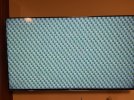
I get this screen on first boot:
Bildschirmfehler.jpg
After shutdown windows (via RTP) and start the VE again, everything is working.

if it helps:
Code:
root@proxmox:~# lspci -nnk
00:02.0 VGA compatible controller [0300]: Intel Corporation Alder Lake-UP3 GT1 [UHD Graphics] [8086:46b3] (rev 0c)
        DeviceName: Onboard - Video
        Kernel driver in use: vfio-pci
        Kernel modules: i915, xe

00:1f.3 Audio device [0403]: Intel Corporation Alder Lake PCH-P High Definition Audio Controller [8086:51c8] (rev 01)
        DeviceName: Onboard - Sound
        Kernel driver in use: vfio-pci
        Kernel modules: snd_hda_intel, snd_sof_pci_intel_tgl
I dumped my own IntelGopDriver.rom (with Hiren's BootCD PE x64 from here, the Aptio V AMI Firmware Update Utility from here, UBU tool latest version UBU_v1_80_b1, and finally converted from efi to rom with EfiRom -f 0x8086 -i 0x46b3 --output IntelGopDriver.rom -e IntelGopDriver.efi), so this should not be the problem. The gen12_igd.rom is downloaded from here. Graphics driver is from here.

So my question is, how can I get a normal picture on first boot of VM?

I really hope that someone can help!
 
Last edited:
The issue is likely due to PCIe GPU initialization timing with Q35. Try the following solutions:

1. Add Boot Delay for GPU Initialization:
Modify your VM config (/etc/pve/qemu-server/101.conf):
Code:
args: -set device.hostpci0.x-igd-opregion=on -set device.hostpci0.x-pci-bootdelay=5
This ensures the GPU initializes properly before Windows starts.

2. Enable UEFI GOP in VM BIOS Settings:
  • Ensure OVMF (UEFI) boot mode is correctly set.
  • Try using a different version of gen12_igd.rom.
3. Force Reinitialization of IGD After Boot:
Run this inside the VM after startup:
Code:
Restart-Service igfx
or
Code:
devcon restart "PCI\VEN_8086&DEV_46B3"
This forces Windows to reload the Intel GPU driver.

4. Try Disabling Fast Boot in Windows:
  • Open Power Options → Choose what the power buttons do
  • Disable Turn on fast startup
 
Last edited:
  • Like
Reactions: _gabriel
@shbaek No success, because

1. x-pci-bootdelay doesnt exist (I also cannot find any information in the net about this)
2. q35 bios has no setting for boot mode and I tried all idg.rom's I have. Either no working rom or I can see this blurred screen on first boot
3. devcon crash windows
Code:
[ 2228.991747] DMAR: DRHD: handling fault status reg 3
[ 2228.991753] DMAR: [DMA Write NO_PASID] Request device [00:02.0] fault addr 0x7f000000 [fault reason 0x05] PTE Write access is not set
[ 2228.995763] DMAR: DRHD: handling fault status reg 3
[ 2228.995765] DMAR: [DMA Write NO_PASID] Request device [00:02.0] fault addr 0x7f0a7000 [fault reason 0x05] PTE Write access is not set
[ 2228.997770] DMAR: DRHD: handling fault status reg 3
[ 2228.999781] DMAR: [DMA Write NO_PASID] Request device [00:02.0] fault addr 0x7f150000 [fault reason 0x05] PTE Write access is not set
[ 2229.001790] DMAR: DRHD: handling fault status reg 3
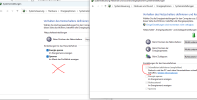
4. Windows 11 doesn't have this option anymore (see picture, left side is Windows 11 and right side is my Windows 10 laptop):
missingoption.PNG

Do you have any other ideas?
 
The issue seems to be related to Intel GPU passthrough on Q35 with Windows 11. Since x-pci-bootdelay doesn’t exist and Fast Boot is missing in Windows 11, try the following:

1️ Force GPU to Reinitialize in Windows 11​

Instead of devcon, use:
powershell
Code:
pnputil /restart-device "PCI\VEN_8086&DEV_46B3"
or
powershell
Code:
sc stop igfx && sc start igfx
This ensures the Intel GPU driver is properly reloaded.


2️ Enable Legacy Boot Mode in Windows 11 (Alternative to Fast Boot)​

Since Windows 11 removed the Fast Startup option, try enabling legacy boot mode via registry:
powershell
Code:
reg add "HKLM\SYSTEM\CurrentControlSet\Control\Session Manager\Power" /v HiberbootEnabled /t REG_DWORD /d 0 /f
Then reboot and check if the issue persists.


3️ Try pcie=1 in VM Configuration​

Since x-pci-bootdelay is unavailable, try forcing Q35 to handle the GPU differently:
Edit /etc/pve/qemu-server/101.conf:
Bash:
hostpci0: 0000:00:02.0,pcie=1

Restart the VM after making changes.


4️ Test Different Kernel Versions in Proxmox​

The DMA Write NO_PASID errors indicate an issue with IOMMU. Try booting with a different kernel:
Check current kernel:
Bash:
uname -r

List available kernels:
Bash:
pveversion -v

Switch to an older (or newer) kernel and reboot:
Code:
apt install pve-kernel-5.15
reboot


Conclusion:​

  • Try restarting the GPU driver manually in Windows 11 (pnputil or sc stop igfx).
  • Disable "Fast Boot" alternative via Windows registry.
  • Set pcie=1 in Proxmox VM config.
  • Check if another Proxmox kernel fixes the IOMMU issue.
 

Hi @shbaek ​

​

thank you for your help!​

​

1️ Force GPU to Reinitialize in Windows 11​

I added deviceid, after this, I can see shortly Windows in a VGA resolution (it seems like that in 4:3), but Windows crashed again
Code:
pnputil /restart-device /deviceid "PCI\VEN_8086&DEV_46B3"

Here is no reaction:
Code:
sc stop igfx && sc start igfx


2️ Enable Legacy Boot Mode in Windows 11 (Alternative to Fast Boot)​

issue persists.


3️ Try pcie=1 in VM Configuration​

issue persists.


4️ Test Different Kernel Versions in Proxmox​

Tested kernels
Code:
6.2.16-17-pve
6.8.12-4-pve
6.8.12-8-pve
issue persists.

I also tested another IGD.rom, but same issue...

If it helps, this is always written on starting vm:
Code:
root@proxmox:~# qm start 101
swtpm_setup: Not overwriting existing state file.
kvm: vfio: Cannot reset device 0000:00:1f.3, no available reset mechanism.

And what I found out, after starting vm (blurry screen), and qm shutdown 101 and starting again, the screen is working with sound! But if I start qm with blurry screen and then qm stop 101 and start again, screen is working without sound.
 
Last edited:
IGPU needs at boot some firmware injected.

Code:
[drm] Finished loading DMC firmware i915/dg2_dmc_ver2_08.bin
[drm] GT0: GuC firmware i915/dg2_guc_70.bin version 70.36.0
[drm] GT0: HuC firmware i915/dg2_huc_gsc.bin version 7.10.16

It maybe the reason youre getting issues.
Im not sure if this happens if you mount vfio-pci / blacklist the igpu.

However, there is a solution for that, you can load vfio-pci on igpu with a systemd service on boot.
So the Kernel or Initramfs can still load the neccessave firmware on early boot and on late boot process the systemd-service unmounts the gpu and mounts the vfio-pci driver on it, for passthrough reasons.

I did a howto and script for that, but i have to find the post again, its very old.... :-(

However, before doing all this work, check first if the firmware gets loaded.
Im not entirely sure if it will solve your issue or not, we need to try it simply.
 
@mcpat I am having the exact same issue as you! Been pulling my hair out trying to find a solution. Did the same steps as you in getting the gen12-igd.rom and IntelGopDriver.rom
 
IGPU needs at boot some firmware injected.

Code:
[drm] Finished loading DMC firmware i915/dg2_dmc_ver2_08.bin
[drm] GT0: GuC firmware i915/dg2_guc_70.bin version 70.36.0
[drm] GT0: HuC firmware i915/dg2_huc_gsc.bin version 7.10.16

It maybe the reason youre getting issues.
Im not sure if this happens if you mount vfio-pci / blacklist the igpu.

However, there is a solution for that, you can load vfio-pci on igpu with a systemd service on boot.
So the Kernel or Initramfs can still load the neccessave firmware on early boot and on late boot process the systemd-service unmounts the gpu and mounts the vfio-pci driver on it, for passthrough reasons.

I did a howto and script for that, but i have to find the post again, its very old.... :-(

However, before doing all this work, check first if the firmware gets loaded.
Im not entirely sure if it will solve your issue or not, we need to try it simply.
@Ramalama sorry for the very late reply, I was waiting for WD Red SSD and now I setup the complete system new.

Can you help me how to load the firmware and maybe if necessary show me how to the script should work?