

I have a 3 node cluster. I updated the first one & rebooted, went smoothly. Then I went to update and reboot the second, but it wouldn't boot up:
I rebooted and went into advanced options, and tried to load the kernel that was previously booted with and was working (6.17.2-2-pve). Now the system boots up, but I have no network (ethtool shows no link). Networking is via a single SFP+ cable (ixgbe driver) to a SFP+ port on my switch. All of which was working prior to the update.
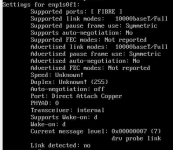
After a while I was able to get it to boot up running 7.0.14-4-pve (update-initframfs, proxmox-boot-tool refresh and update-grub). However, it says my NIC is offline. Interestingly, the switch side shows it as up.
Now it seems unlikely this is a hardware fault, because it was working perfectly prior to the reboot, plus it it boots and semi-works on the older kernel.
If it matters, the server is a Supermicro PIO-618U-TR4T+-ST031 (I know they're old, but this is all I've got to work with). I don't think its an interop issue because I updated another three at a different site (that weren't part of a this cluster) and it went smoothly.
Any ideas how I can fix this before I blow it away and start afresh?
Code:
VFS: Unable to mount root fs on unknown-block(0,0)I rebooted and went into advanced options, and tried to load the kernel that was previously booted with and was working (6.17.2-2-pve). Now the system boots up, but I have no network (ethtool shows no link). Networking is via a single SFP+ cable (ixgbe driver) to a SFP+ port on my switch. All of which was working prior to the update.
After a while I was able to get it to boot up running 7.0.14-4-pve (update-initframfs, proxmox-boot-tool refresh and update-grub). However, it says my NIC is offline. Interestingly, the switch side shows it as up.
Code:
ethtool enp1s0f1 | grep Link
        Link detected: no
Now it seems unlikely this is a hardware fault, because it was working perfectly prior to the reboot, plus it it boots and semi-works on the older kernel.
If it matters, the server is a Supermicro PIO-618U-TR4T+-ST031 (I know they're old, but this is all I've got to work with). I don't think its an interop issue because I updated another three at a different site (that weren't part of a this cluster) and it went smoothly.
Any ideas how I can fix this before I blow it away and start afresh?
Attachments
Last edited:
