

Hi there,
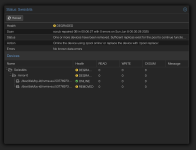
quick Q: I have been running a small homelab machine with Proxmox on it for the last couple of years and ran it with two additional quasi data SSDs in a ZFS mirror setup. One of those SSDs have failed and, given RMA/warranty not being a thing anymore and today's prices, I don't want to pay several thousands for a replacement.
Is there any way I can "turn" the zfs mirror into a single disk zfs setup without loosing the data? The remaining SSD is healthy & no data loss.. so I was wondering if there's a way to "convert" the mirror to a single disk one.
Thanks!
quick Q: I have been running a small homelab machine with Proxmox on it for the last couple of years and ran it with two additional quasi data SSDs in a ZFS mirror setup. One of those SSDs have failed and, given RMA/warranty not being a thing anymore and today's prices, I don't want to pay several thousands for a replacement.
Is there any way I can "turn" the zfs mirror into a single disk zfs setup without loosing the data? The remaining SSD is healthy & no data loss.. so I was wondering if there's a way to "convert" the mirror to a single disk one.
Thanks!
