

Have a new install of proxmox running on a Dell Poweredge 740 that is connected to a Juniper EX4600 via 10GB DAC cables LACP shows up on both Proxmox and the Juniper.
On the Juniper side we have the following configuration down to the Dell
And the following setup in proxmox. In this case I am working with vmbr1.

And here is what I applied to my VM
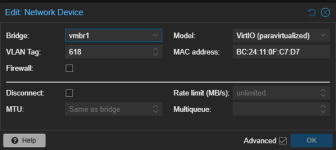
I am not learning the MAC of this VM on the Juniper side.
Any help would be greatly appreciated.
On the Juniper side we have the following configuration down to the Dell
Code:
description "To PowerEdge 740 NIC1P1 NIC1P2";
mtu 9216;
aggregated-ether-options {
    link-speed 10g;
    lacp {
        active;
        periodic fast;
    }
}
unit 0 {
    family ethernet-switching {
        interface-mode trunk;
        vlan {
            members all;
        }
    }
}
And the following setup in proxmox. In this case I am working with vmbr1.
And here is what I applied to my VM
I am not learning the MAC of this VM on the Juniper side.
Any help would be greatly appreciated.
