Hi,
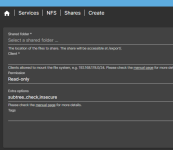
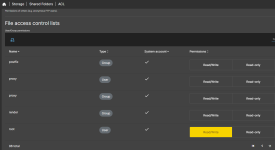
Long story short: if i have a NFS shared folder that i'm able to mount from and OMV VM into proxmox, but i can only read it, the issue is in the proxmox config or in the OMV config?
More details:
i've hosted a virtualized NAS before, with disk passthrough through PICe, and i'm very happy with this solution to provide NAS services to my network.
Then i wanted to expand the server capabilities, adding an *arr stack.
I choosed to host several LXC container, one for every arr app, and i thought i've solved the issue to provide access to the shared folder on the virtualized NAS.
I've read that a proper solution is to mount the NFS share directly on proxmox, and then use bind mount points to provide access to the LXC containers.
I've read the documentation and understood how to do so, now proxmox mount the NFS folder (after a delay, to let OMV boot properly) and the containers have their bind mountpoints.
The only issue is that they only have read access, they can't write.
Of course (not really, i didn't thought about it at the beginning) they can't, since even proxmox itself can't write that folder.
My NFS knowledge is limited, i don't understand why i can't write on that folder, my guess is that i'm using "root" user to try to access (but on the other hand i don't know how to allow an external root user and, most important, if this is the proper way to solve it.
Long story short: if i have a NFS shared folder that i'm able to mount from and OMV VM into proxmox, but i can only read it, the issue is in the proxmox config or in the OMV config?
More details:
i've hosted a virtualized NAS before, with disk passthrough through PICe, and i'm very happy with this solution to provide NAS services to my network.
Then i wanted to expand the server capabilities, adding an *arr stack.
I choosed to host several LXC container, one for every arr app, and i thought i've solved the issue to provide access to the shared folder on the virtualized NAS.
I've read that a proper solution is to mount the NFS share directly on proxmox, and then use bind mount points to provide access to the LXC containers.
I've read the documentation and understood how to do so, now proxmox mount the NFS folder (after a delay, to let OMV boot properly) and the containers have their bind mountpoints.
The only issue is that they only have read access, they can't write.
Of course (not really, i didn't thought about it at the beginning) they can't, since even proxmox itself can't write that folder.
My NFS knowledge is limited, i don't understand why i can't write on that folder, my guess is that i'm using "root" user to try to access (but on the other hand i don't know how to allow an external root user and, most important, if this is the proper way to solve it.