

[SOLVED] The RAM capacity is not displayed correctly in the VM's web UI

uzumo

Well-Known Member
Apr 5, 2025
544
160
48
I had the opportunity to test with hugepages: 1024 enabled, and I noticed that the RAM capacity displayed in the VM's web UI summary didn't match the actual capacity. Has this always been the case?

proxmox-ve: 9.2.0 (running kernel: 7.0.2-6-pve)
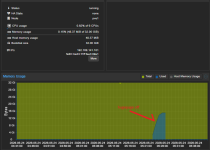
1.png

It works fine as long as `hugepages: 1024` is not set.
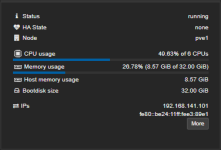
hugepageoff.png

Although virtual machines using PCIe passthrough are expected to consume all available memory, even those machines are shown as using only 0.55%.
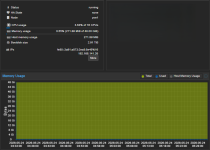
pcipassthrough.png

*Someone mentioned it while we were discussing a different issue, so I thought it might fix the problem and tried making the change, but nothing changed, so I ended up reverting it. It doesn’t really bother me.
*There was a time when I temporarily enabled it for testing purposes, but it has been disabled ever since. I enabled it again temporarily this time, but I’ve since disabled it once more.

I just want to know if this is how it’s supposed to be.
 
Last edited:
The 'Memory usage'-bar shows what the operating systems inside counts as used (when the ballooning device is enabled and the driver inside the VM is working). Enable the 'Host Memory Usage'-slider to see the actual host memory usage (grey line), which will be a little over 32 GiB. You can also check the free -h command inside the VM or with info balloon on the VM Monitor tab, as mentioned here. If any of this is incorrect then please show the full VM configuration (using qm config and what the Monitor and operating system inside the VM reports).

There have been many discussions over the year about what Proxmox should report. Either what it really used, which confuses people, or what it reported inside the VM, which sometimes also confuses people. With PVE 9, you can easily see both when you also enable 'Host Memory Usage' to show in the graph: https://pve.proxmox.com/wiki/Upgrade_from_8_to_9#VM_Memory_Consumption_Shown_is_Higher
 
You're right; enabling `balloon` did fix the display issue. Thank you.

Even if someone were to explain it to me, I don’t think I could fully understand why `balloon` displays correctly when `hugepages: 1024` is not set—even if `balloon` is disabled—but fails to display correctly when `hugepages: 1024` is set. Therefore, I will close this thread here.
 
Last edited:
I did not dive deeper into the hugepages part of your question. Maybe there is a (presentation) bug related to that? I don't full understand what you mean by "when tooltips are disabled". I'm sorry if you feel you need to close this inquiry just because of my reply, as this might need to be investigated more.
 
I'm sorry. The information provided was inaccurate because a translation was used. (I've also edited the original post.)

If “balloon” is enabled, the correct RAM usage will be displayed regardless of whether “hugepage” is ON or OFF.

If “balloon” is disabled, and “hugepage” is ON, the virtual machine's usage will always be displayed as nearly 0%, even if it is using a large amount of memory.

Even if “balloon” is disabled, if “hugepage” is OFF, the correct RAM usage will be displayed.
 
Last edited:
PVE takes the "Memory usage' from the balloon device (and not the QEMU Guest Agent as some people expect) regardless of whether ballooning is possible, so this explains why it is always correct (in that it shows what the operating system inside the VM is using).

Without the balloon device (or without a balloon driver working inside the VM), QEMU is guessing based on memory access or something (I don't really know, sorry). Maybe this does not work for hugepages. This is probably a bug in QEMU/KVM and maybe it has already been reported? Or maybe PVE does not translate correctly for the 1GB pages instead of 4KB pages? Have you checked https://bugzilla.proxmox.com/ for existing bug reports about this? Maybe add it if you want to get this fixed.
 
Last edited:
As far as I can tell, no such known issue has been reported, but since I don’t have the language skills to accurately understand and respond to what the person in charge asked me, I’ll refrain from reporting it.

Thank you.