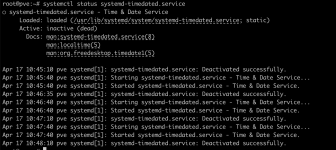
On one of our three nodes I observe the following:
Every minute at exactly the 46th second something (probably pveproxy I'm guessing) is querying the timezone. If I do
After exactly 30s the service "deactivated successfully". This goes on and on filling my journal.
My other two nodes are still running 8.4.17 with Linux 6.8.12-4-pve (2024-11-06T15:04Z) I didn't rebooted them after upgrade but I dont think the other node would cause this "issue"? This node joined the cluster with 9.1.7.
I recreated the cluster in a PVE Test-Setup and tried to match the configuration as close as possible. The Log-Spam doesn't happen there.
Furthermore I did the following observation: If I open the timezone settings in the WebUI the log messages doesn't appear either. When I close the settings the log messages appear again. In the following excerpt you can see the gap between 11:03:33 and 11:06:46 (yet again the 46th second).
I found this Commit (Fix #7175) in the Github Repo but cannot really judge if it has something to do with this (maybe just cosmetic) issue.
Now my question is: Is this really desired behavior or is this a bug? Did someone else observed this and know how to "fix" it?
Code:
Apr 14 10:12:46 proxmox3 dbus-daemon[3026]: [system] Activating via systemd: service name='org.freedesktop.timedate1' unit='dbus-org.freedesktop.timedate1.service' requested by ':1.457' (uid=33 pid=136911 comm="timedatectl show --property=Timezone --value>
Apr 14 10:12:46 proxmox3 systemd[1]: Starting systemd-timedated.service - Time & Date Service...
Apr 14 10:12:46 proxmox3 systemd[1]: Started systemd-timedated.service - Time & Date Service.
Apr 14 10:12:46 proxmox3 dbus-daemon[3026]: [system] Successfully activated service 'org.freedesktop.timedate1'
Apr 14 10:13:16 proxmox3 systemd[1]: systemd-timedated.service: Deactivated successfully.
Apr 14 10:13:46 proxmox3 dbus-daemon[3026]: [system] Activating via systemd: service name='org.freedesktop.timedate1' unit='dbus-org.freedesktop.timedate1.service' requested by ':1.459' (uid=33 pid=137683 comm="timedatectl show --property=Timezone --value>
Apr 14 10:13:46 proxmox3 systemd[1]: Starting systemd-timedated.service - Time & Date Service...
Apr 14 10:13:46 proxmox3 systemd[1]: Started systemd-timedated.service - Time & Date Service.
Apr 14 10:13:46 proxmox3 dbus-daemon[3026]: [system] Successfully activated service 'org.freedesktop.timedate1'
Apr 14 10:14:16 proxmox3 systemd[1]: systemd-timedated.service: Deactivated successfully.
Every minute at exactly the 46th second something (probably pveproxy I'm guessing) is querying the timezone. If I do
systemctl stop pveproxy the log messages stop. If I start the service again the log messages continue. Also it doesn't matter when I stop the service, the query remains at exactly the 46th second.After exactly 30s the service "deactivated successfully". This goes on and on filling my journal.
Code:
proxmox-ve: 9.1.0 (running kernel: 6.17.13-2-pve)
pve-manager: 9.1.7 (running version: 9.1.7/16b139a017452f16)
proxmox-kernel-helper: 9.0.4
proxmox-kernel-6.17: 6.17.13-2
proxmox-kernel-6.17.13-2-pve-signed: 6.17.13-2
proxmox-kernel-6.17.2-1-pve-signed: 6.17.2-1
amd64-microcode: 3.20251202.1~bpo13+1
ceph-fuse: 19.2.3-pve2
corosync: 3.1.10-pve2
criu: 4.1.1-1
frr-pythontools: 10.4.1-1+pve1
ifupdown2: 3.3.0-1+pmx12
ksm-control-daemon: 1.5-1
libjs-extjs: 7.0.0-5
libproxmox-acme-perl: 1.7.1
libproxmox-backup-qemu0: 2.0.2
libproxmox-rs-perl: 0.4.1
libpve-access-control: 9.0.6
libpve-apiclient-perl: 3.4.2
libpve-cluster-api-perl: 9.1.1
libpve-cluster-perl: 9.1.1
libpve-common-perl: 9.1.9
libpve-guest-common-perl: 6.0.2
libpve-http-server-perl: 6.0.5
libpve-network-perl: 1.2.5
libpve-rs-perl: 0.11.4
libpve-storage-perl: 9.1.1
libspice-server1: 0.15.2-1+b1
lvm2: 2.03.31-2+pmx1
lxc-pve: 6.0.5-4
lxcfs: 6.0.4-pve1
novnc-pve: 1.6.0-3
proxmox-backup-client: 4.1.5-1
proxmox-backup-file-restore: 4.1.5-1
proxmox-backup-restore-image: 1.0.0
proxmox-firewall: 1.2.1
proxmox-kernel-helper: 9.0.4
proxmox-mail-forward: 1.0.2
proxmox-mini-journalreader: 1.6
proxmox-offline-mirror-helper: 0.7.3
proxmox-widget-toolkit: 5.1.9
pve-cluster: 9.1.1
pve-container: 6.1.2
pve-docs: 9.1.2
pve-edk2-firmware: 4.2025.05-2
pve-esxi-import-tools: 1.0.1
pve-firewall: 6.0.4
pve-firmware: 3.18-2
pve-ha-manager: 5.1.3
pve-i18n: 3.7.0
pve-qemu-kvm: 10.1.2-7
pve-xtermjs: 5.5.0-3
qemu-server: 9.1.6
smartmontools: 7.4-pve1
spiceterm: 3.4.1
swtpm: 0.8.0+pve3
vncterm: 1.9.1
zfsutils-linux: 2.4.1-pve1
My other two nodes are still running 8.4.17 with Linux 6.8.12-4-pve (2024-11-06T15:04Z) I didn't rebooted them after upgrade but I dont think the other node would cause this "issue"? This node joined the cluster with 9.1.7.
I recreated the cluster in a PVE Test-Setup and tried to match the configuration as close as possible. The Log-Spam doesn't happen there.
Furthermore I did the following observation: If I open the timezone settings in the WebUI the log messages doesn't appear either. When I close the settings the log messages appear again. In the following excerpt you can see the gap between 11:03:33 and 11:06:46 (yet again the 46th second).
Code:
Apr 14 11:03:33 proxmox3 systemd[1]: Starting systemd-timedated.service - Time & Date Service...
Apr 14 11:03:33 proxmox3 systemd[1]: Started systemd-timedated.service - Time & Date Service.
Apr 14 11:03:33 proxmox3 dbus-daemon[3026]: [system] Successfully activated service 'org.freedesktop.timedate1'
Apr 14 11:06:16 proxmox3 systemd[1]: systemd-timedated.service: Deactivated successfully.
Apr 14 11:06:46 proxmox3 dbus-daemon[3026]: [system] Activating via systemd: service name='org.freedesktop.timedate1' unit='dbus-org.freedesktop.timedate1.service' requested by ':1.703' (uid=33 pid=179327 comm="timedatectl show --property=Timezone --value" label="unconfined")
Apr 14 11:06:46 proxmox3 systemd[1]: Starting systemd-timedated.service - Time & Date Service...
I found this Commit (Fix #7175) in the Github Repo but cannot really judge if it has something to do with this (maybe just cosmetic) issue.
Now my question is: Is this really desired behavior or is this a bug? Did someone else observed this and know how to "fix" it?