Sysprep on Windows Server 2025 - black screen

Garrus

New Member
Aug 9, 2025
2
0
1
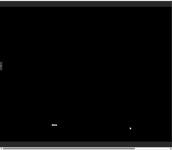
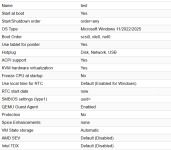
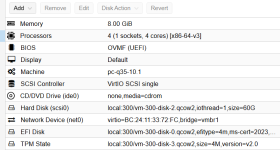
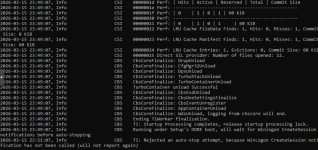
Hello. I installed Windows Server 2025 Standard (updated_feb_2026 iso) (see screenshots for virtual machine settings) on Proxmox version 9.1.4. The installation was successful, then I installed Virtio 0.1.285 and all available updates through Windows Update, and enabled Remote Desktop Services (Licensing and Session Host). I then decided to use the sysprep utility with the OOBE, Generalize, and Shutdown parameters. After turning on the VM, when prompted to accept the license agreement, I got a black screen with a language selection menu and a cursor. I rebooted the VM, restored it from a backup, and repeated the procedure. I downgraded the Virtio version (0.1.271), and tried changing the processor and system disk type in the configuration – the result was the same. I'm also attaching a screenshot of the last message in the C:\Windows\Panther\setupact.log file. The most interesting thing is that there's also a template with Windows Server 2025, installed in November-December 2024, but everything runs fine there. I'm not sure where to look anymore. What could be the problem?
 

Attachments
  • b76fa7d3-14fa-49a9-8b92-e359a9fd9735.jpg
    b76fa7d3-14fa-49a9-8b92-e359a9fd9735.jpg
    116.1 KB · Views: 4
  • 2026-03-16 140811.png
    2026-03-16 140811.png
    11.6 KB · Views: 5
  • 2026-03-16 140553.png
    2026-03-16 140553.png
    33.9 KB · Views: 5
  • 2026-03-16 140442.png
    2026-03-16 140442.png
    35.3 KB · Views: 5
Last edited:
I found a solution to the problem (problem with using the ru_UA locale): I created an unattend.xml file in the path C:\Windows\System32\Sysprep with the following content:

<?xml version="1.0" encoding="utf-8"?>
<unattend xmlns="urn:schemas-microsoft-com:unattend">
<settings pass="oobeSystem">
<component name="Microsoft-Windows-International-Core" processorArchitecture="amd64" publicKeyToken="31bf3856ad364e35" language="neutral" versionScope="nonSxS">
<InputLocale>ru-RU</InputLocale>
<SystemLocale>ru-RU</SystemLocale>
<UILanguage>ru-RU</UILanguage>
<UserLocale>ru-UA</UserLocale>
</component>
</settings>
</unattend>

Or change system and user locale from ru_UA to ru_RU or en-US before use sysprep.
 
Last edited: