

Attempting to setup a sync job between on server storage and USB drive. I have the portable drive mounted and configured as ext4 as is the storage drive on the server. Configured the sync job for a pull from the server to the portable drive. Test run generates the following error on all VM's.
sync group vm/100 failed - group lock failed: Input/output error (os error 5)
create_locked_backup_group failed
From logs I get this;
Jan 25 11:57:38 pbs proxmox-backup-proxy[942898]: GET //api2/json/backup?backup-id=100&backup-time=1735455604&backup-type=vm&benchmark=false&debug=false&store=ExtStore1: 400 Bad Request: [client [::ffff:127.0.0.1]:38242] Input/output error (os error 5)
Jan 25 11:57:38 pbs proxmox-backup-proxy[942898]: Failed to get owner of group 'vm/101' in datastore 'ExtStore1', root namespace - unable to read "/mnt/extdrv1/vm/101/owner" - No such file or directory (os error 2)
Jan 25 11:57:38 pbs proxmox-backup-proxy[942898]: GET //api2/json/backup?backup-id=101
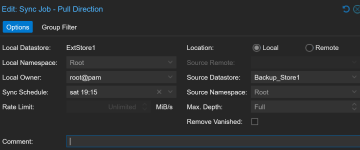
The sync job is configured as shown below;
Thanks for any help or need more information let me know.
sync group vm/100 failed - group lock failed: Input/output error (os error 5)
create_locked_backup_group failed
From logs I get this;
Jan 25 11:57:38 pbs proxmox-backup-proxy[942898]: GET //api2/json/backup?backup-id=100&backup-time=1735455604&backup-type=vm&benchmark=false&debug=false&store=ExtStore1: 400 Bad Request: [client [::ffff:127.0.0.1]:38242] Input/output error (os error 5)
Jan 25 11:57:38 pbs proxmox-backup-proxy[942898]: Failed to get owner of group 'vm/101' in datastore 'ExtStore1', root namespace - unable to read "/mnt/extdrv1/vm/101/owner" - No such file or directory (os error 2)
Jan 25 11:57:38 pbs proxmox-backup-proxy[942898]: GET //api2/json/backup?backup-id=101
The sync job is configured as shown below;
Thanks for any help or need more information let me know.
