Hello all!
I'm running Proxmox PVE 9.1.5 and syncing the authentication realm via LDAP against Active Directory.
I have some usernames with Korean (Hangul) characters, which are not being displayed properly in the PVE web UI or at the console.
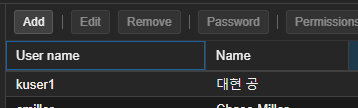
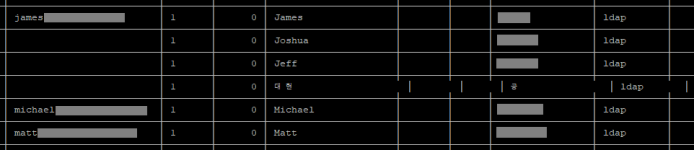
Here is the test user in the GUI:
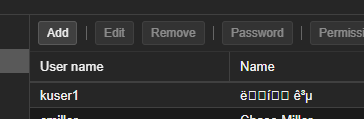
From the CLI, I get similar broken characters:

My
In the Windows user editor, this user's GivenName and SN files are:


In a query using
In the same terminal, I see that decoding the

After performing a PVE realm sync, the line for this test user in /etc/pve/user.cfg looks like this:
If I use the excellent CyberChef URL decoder, these URL-encoded bytes look correct:
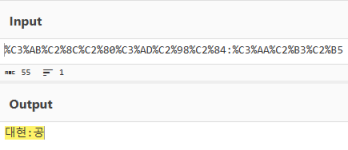
So it seems like the right bytes are successfully being pulled from the AD server and stored in the user database, but it's a display problem.
Does anyone have any thoughts (besides "don't use non-ASCII characters") on how to get the names to display properly?
-cheers,
speck
I'm running Proxmox PVE 9.1.5 and syncing the authentication realm via LDAP against Active Directory.
I have some usernames with Korean (Hangul) characters, which are not being displayed properly in the PVE web UI or at the console.
Here is the test user in the GUI:
From the CLI, I get similar broken characters:
My
/etc/pve/domains.cfg file has the following sync_attributes:
Code:
sync_attributes firstname=givenname,lastname=sn,email=mail,comment=descriptionIn the Windows user editor, this user's GivenName and SN files are:
In a query using
ldapsearch ... | grep -iE '(sn|Name) for this user account, I get the following attributes:
Code:
sn:: 6rO1
givenName:: 64yA7ZiE
distinguishedName:: Q04964yA7ZiEIOqzoSxPVT1UZXN0QWNjb3VudHMsREM9ZG9tYWluLERDPW5hbWUK
displayName: kuser1
name:: 64yA7ZiEIOqzoQ==
sAMAccountName: kuser1
userPrincipalName: kuser1@domain.name
In the same terminal, I see that decoding the
givenName and sn values looks to give correct output:After performing a PVE realm sync, the line for this test user in /etc/pve/user.cfg looks like this:
Code:
user:kuser1@REALM:1:0:%C3%AB%C2%8C%C2%80%C3%AD%C2%98%C2%84:%C3%AA%C2%B3%C2%B5::::If I use the excellent CyberChef URL decoder, these URL-encoded bytes look correct:
So it seems like the right bytes are successfully being pulled from the AD server and stored in the user database, but it's a display problem.
Does anyone have any thoughts (besides "don't use non-ASCII characters") on how to get the names to display properly?
-cheers,
speck
Last edited: