

Support for SEV-SNP in guest VMs
- Thread starter Pegah
- Start date
You are using an out of date browser. It may not display this or other websites correctly.
You should upgrade or use an alternative browser.
You should upgrade or use an alternative browser.

Oh thanks, that's good to know. If this is correct, I think we would need to build a separate firmware without SECURE_BOOT_ENABLE and SMM_REQUIRE to enable SEV-ES and SEV-SNP. That is, use this separate firmware with the `-bios` parameter only when SEV-ES and SEV-SNP are enabled.In any case, I opted to proceed with 202411, which allowed me to run SNP VMs—provided that OVMF was compiled without SECURE_BOOT_ENABLE and SMM_REQUIRE. The same applied when running SEV-ES VMs.
Last edited:

I have a Ryzen 7 3700X - which seems to say it supports SEV:
When I try to enable it in a VM however, I get:
I added the kernel config options:
however:
Am I missing something?
Code:
flags : ..... sev sev_es
Code:
$ cat /run/qemu-server/host-hw-capabilities.json
{ "amd-sev": { "cbitpos": 47, "reduced-phys-bits": 5, "sev-support": true, "sev-support-es": true, "sev-support-snp": false } }
When I try to enable it in a VM however, I get:
Code:
vm: sev_common_kvm_init: Failed to open /dev/sev 'No such file or directory'
kvm: failed to initialize kvm: Operation not permitted
kvm: falling back to tcg
kvm: warning: TCG doesn't support requested feature: CPUID[eax=07h,ecx=00h].EBX.avx512f [bit 16]
kvm: warning: TCG doesn't support requested feature: CPUID[eax=07h,ecx=00h].EBX.avx512dq [bit 17]
kvm: warning: TCG doesn't support requested feature: CPUID[eax=07h,ecx=00h].EBX.avx512cd [bit 28]
kvm: warning: TCG doesn't support requested feature: CPUID[eax=07h,ecx=00h].EBX.avx512bw [bit 30]
kvm: warning: TCG doesn't support requested feature: CPUID[eax=07h,ecx=00h].EBX.avx512vl [bit 31]
kvm: TCG doesn't support requested features
TASK ERROR: start failed: QEMU exited with code 1
I added the kernel config options:
Code:
$ cat /proc/cmdline
initrd=\EFI\proxmox\6.17.2-1-pve\initrd.img-6.17.2-1-pve root=/dev/mapper/pve-root ro quiet amd_pstate=active mem_encrypt=on kvm_amd.sev=1
however:
Code:
$ cat /sys/module/kvm_amd/parameters/sev
N
Am I missing something?
AMD SEV only works with AMD EPYC CPUs [1] and it needs to be enabled in BIOS.I have a Ryzen 7 3700X - which seems to say it supports SEV:
You will probably not find an AMD SEV setting in your BIOS.
I do not know why the CPU flags indicate that it supports AMD SEV.
Perhaps AMD SEV was planned for desktop hardware at some point.
This sev flag is not present in the current generation of AMD Ryzen desktop CPUs, and all support-sev flags in the host-hw-capabilities.json file should be false.
[1] https://pve.proxmox.com/pve-docs/pve-admin-guide.html#qm_memory_encryption_sev
I do not know why the CPU flags indicate that it supports AMD SEV.
Interesting. I'll consider it a false alarm then hahaha... I was kinda looking forward to tinkering.
@MarkusF is it expected that a VM cannot boot when both TPM and SEV-SNP are enabled? Without TPM, the VM boots normally, but when TPM is enabled, KVM exits right after the boot progress bar completes.AMD SEV only works with AMD EPYC CPUs [1] and it needs to be enabled in BIOS.
You will probably not find an AMD SEV setting in your BIOS.
I do not know why the CPU flags indicate that it supports AMD SEV.
Perhaps AMD SEV was planned for desktop hardware at some point.
This sev flag is not present in the current generation of AMD Ryzen desktop CPUs, and all support-sev flags in the host-hw-capabilities.json file should be false.
[1] https://pve.proxmox.com/pve-docs/pve-admin-guide.html#qm_memory_encryption_sev

Hi @tinduong1337 ,
please share the host's system logs/journal from around the time of the issue, the VM configuration
please share the host's system logs/journal from around the time of the issue, the VM configuration
qm config ID and the VM ID - Start task log as well as the output of pveversion -v.
Hi @tinduong1337 ,
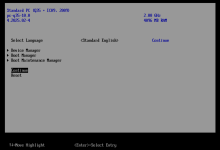
You should still be able to boot the SEV-SNP VM with a TPM device. To do this, pause the automatic system reset by pressing a key, then select 'Continue boot' on the blue screen.
Could you confirm whether this works for you?
I can reproduce this issue and will take a look.@MarkusF is it expected that a VM cannot boot when both TPM and SEV-SNP are enabled? Without TPM, the VM boots normally, but when TPM is enabled, KVM exits right after the boot progress bar completes.
You should still be able to boot the SEV-SNP VM with a TPM device. To do this, pause the automatic system reset by pressing a key, then select 'Continue boot' on the blue screen.
Could you confirm whether this works for you?
Hi @MarkusFHi @tinduong1337 ,
I can reproduce this issue and will take a look.
You should still be able to boot the SEV-SNP VM with a TPM device. To do this, pause the automatic system reset by pressing a key, then select 'Continue boot' on the blue screen.
Could you confirm whether this works for you?
Thank you for looking into it. Did you mean pressing `a` key, or any key? Either way it didn't work. I also tried press `Esc` to boot into the Boot Manager and select `Continue` but it didn't work either.
The VM is running Ubuntu 25.04
pveversion:
Code:
pveversion -v
proxmox-ve: 9.0.0 (running kernel: 6.14.11-4-pve)
pve-manager: 9.0.11 (running version: 9.0.11/3bf5476b8a4699e2)
proxmox-kernel-helper: 9.0.4
proxmox-kernel-6.14.11-4-pve-signed: 6.14.11-4
proxmox-kernel-6.14: 6.14.11-4
proxmox-kernel-6.14.8-2-pve-signed: 6.14.8-2
amd64-microcode: 3.20250311.1
ceph: 19.2.3-pve2
ceph-fuse: 19.2.3-pve2
corosync: 3.1.9-pve2
criu: 4.1.1-1
frr-pythontools: 10.3.1-1+pve4
ifupdown2: 3.3.0-1+pmx10
ksm-control-daemon: 1.5-1
libjs-extjs: 7.0.0-5
libproxmox-acme-perl: 1.7.0
libproxmox-backup-qemu0: 2.0.1
libproxmox-rs-perl: 0.4.1
libpve-access-control: 9.0.3
libpve-apiclient-perl: 3.4.0
libpve-cluster-api-perl: 9.0.6
libpve-cluster-perl: 9.0.6
libpve-common-perl: 9.0.11
libpve-guest-common-perl: 6.0.2
libpve-http-server-perl: 6.0.4
libpve-network-perl: 1.1.8
libpve-rs-perl: 0.10.10
libpve-storage-perl: 9.0.13
libspice-server1: 0.15.2-1+b1
lvm2: 2.03.31-2+pmx1
lxc-pve: 6.0.5-1
lxcfs: 6.0.4-pve1
novnc-pve: 1.6.0-3
proxmox-backup-client: 4.0.16-1
proxmox-backup-file-restore: 4.0.16-1
proxmox-backup-restore-image: 1.0.0
proxmox-firewall: 1.2.0
proxmox-kernel-helper: 9.0.4
proxmox-mail-forward: 1.0.2
proxmox-mini-journalreader: 1.6
proxmox-offline-mirror-helper: 0.7.2
proxmox-widget-toolkit: 5.0.6
pve-cluster: 9.0.6
pve-container: 6.0.13
pve-docs: 9.0.8
pve-edk2-firmware: 4.2025.02-4
pve-esxi-import-tools: 1.0.1
pve-firewall: 6.0.3
pve-firmware: 3.17-2
pve-ha-manager: 5.0.5
pve-i18n: 3.6.1
pve-qemu-kvm: 10.0.2-4
pve-xtermjs: 5.5.0-2
qemu-server: 9.0.23
smartmontools: 7.4-pve1
spiceterm: 3.4.1
swtpm: 0.8.0+pve2
vncterm: 1.9.1
zfsutils-linux: 2.3.4-pve1
Attachments
@MarkusF I do not know if we have an integration yet, or if perhaps you now have the hardware on hand, but I am willing to give you and the team some time on my bare metal with SEV-SNP assuming our allocations are filled.
The same goes for NVIDIA MIG solutions, which have gone looked over since the release in 2020 or so and the popularization from 2024 until now. See here: https://forum.proxmox.com/threads/nvidia-mig-multi-instance-gpu-on-proxmox.98461/
EDIT: I have RTX PRO 6000 Blackwell Edition, hopefully Max-Q allocations, in progress.
Both of these technologies will become far more imminent in use for users as time progresses -- I would 110% upgrade to basic for my cluster at minimum if these technologies were supported.
Regards
The same goes for NVIDIA MIG solutions, which have gone looked over since the release in 2020 or so and the popularization from 2024 until now. See here: https://forum.proxmox.com/threads/nvidia-mig-multi-instance-gpu-on-proxmox.98461/
EDIT: I have RTX PRO 6000 Blackwell Edition, hopefully Max-Q allocations, in progress.
Both of these technologies will become far more imminent in use for users as time progresses -- I would 110% upgrade to basic for my cluster at minimum if these technologies were supported.
Regards
Support for SEV-SNP was added in Proxmox VE version 8.4 [1].@MarkusF I do not know if we have an integration yet, or if perhaps you now have the hardware on hand, but I am willing to give you and the team some time on my bare metal with SEV-SNP assuming our allocations are filled.
Please refer to our SEV documentation [2].
[1] https://pve.proxmox.com/wiki/Roadmap#Proxmox_VE_8.4:~:text=possible.-,Initial,ignored
[2] https://pve.proxmox.com/pve-docs/pve-admin-guide.html#qm_memory_encryption
@MarkusF just following up to see if you've had a chance to look into SEV-SNP with TMP issue.Support for SEV-SNP was added in Proxmox VE version 8.4 [1].
Please refer to our SEV documentation [2].
[1] https://pve.proxmox.com/wiki/Roadmap#Proxmox_VE_8.4:~:text=possible.-,Initial,ignored
[2] https://pve.proxmox.com/pve-docs/pve-admin-guide.html#qm_memory_encryption
Hi @tinduong1337 ,
Support for this does not yet seem to be available upstream [2][3].
The workaround I suggested should work with the latest version of pve-edk2-firmware (4.2025.05-2).
[1] https://github.com/coconut-svsm/svsm
[2] https://github.com/coconut-svsm/svsm/blob/main/Documentation/docs/installation/INSTALL.md
[3] https://www.mail-archive.com/qemu-devel@nongnu.org/msg1147893.html
[4] https://github.com/AMDESE/linux-svsm
My research suggests that, in order to securely use vTMP in a SEV-SNP environment, you need to use the Coconut Secure VM Service Module (svsm) [1].@MarkusF just following up to see if you've had a chance to look into SEV-SNP with TMP issue.
Support for this does not yet seem to be available upstream [2][3].
Quote from the former Linux-SVSM project [4].The idea is that Linux SVSM will not only offload security operations,but will also be able to provide other services such as live VM migration; the privilege separation model of SVSM permits the existence of a virtual Trusted Platform Module (virtual TPM).
The workaround I suggested should work with the latest version of pve-edk2-firmware (4.2025.05-2).
You should still be able to boot the SEV-SNP VM with a TPM device. To do this, pause the automatic system reset by pressing a key, then select 'Continue boot' on the blue screen.
[1] https://github.com/coconut-svsm/svsm
[2] https://github.com/coconut-svsm/svsm/blob/main/Documentation/docs/installation/INSTALL.md
[3] https://www.mail-archive.com/qemu-devel@nongnu.org/msg1147893.html
[4] https://github.com/AMDESE/linux-svsm