

Storaged Used
- Thread starter API
- Start date
You are using an out of date browser. It may not display this or other websites correctly.
You should upgrade or use an alternative browser.
You should upgrade or use an alternative browser.
Command line 'du'
Sent from my Nexus 5
Sorry, I meant via the API.
the best could be through
pvesh get nodes/<nodemname>/storage
?
Marco
No, that returns info for the specific node. I need overall storage info.
No, that returns info for the specific node. I need overall storage info.
I know that the syntax involves the <node> but in the output I see all cluster-shared storages.
Since you asked about "storage directory" and that could be local to each node, if you mean a "directory" storage type
otherwise, I don't know how.
Marco
I know that the syntax involves the <node> but in the output I see all cluster-shared storages.
Since you asked about "storage directory" and that could be local to each node, if you mean a "directory" storage type
otherwise, I don't know how.
Marco
That's what I mean. A "directory" storage type.
That's what I mean. A "directory" storage type.
well, the default "local" storage is a "directory" storage type
in the output of pvesh nodes/<nodename>/storage I get, amongst the others:
{
"active" : 1,
"avail" : "2813050880",
"content" : "images,iso,vztmpl,backup,rootdir",
"shared" : 0,
"storage" : "local",
"total" : "34935173120",
"type" : "dir",
"used" : "32122122240"
}
so you should be able to process this output and get total, used, avail sizes. Or am I missing smething (it could easily be) ?
Marco

No, that returns info for the specific node. I need overall storage info.
# pvesh get /cluster/resources -type storage
well, the default "local" storage is a "directory" storage type
in the output of pvesh nodes/<nodename>/storage I get, amongst the others:
{
"active" : 1,
"avail" : "2813050880",
"content" : "images,iso,vztmpl,backup,rootdir",
"shared" : 0,
"storage" : "local",
"total" : "34935173120",
"type" : "dir",
"used" : "32122122240"
}
so you should be able to process this output and get total, used, avail sizes. Or am I missing smething (it could easily be) ?
Marco
Log into the GUI, click on the storage called "local" and tell me if that's equal to ~29.9 GB. If not, these two numbers don't match (32122122240/(1024^3) = used in GB).
Log into the GUI, click on the storage called "local" and tell me if that's equal to ~29.9 GB. If not, these two numbers don't match (32122122240/(1024^3) = used in GB).
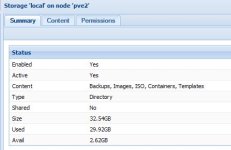
eg: used is
32122122240 = 1024*1024*1024*29.916
so 29,92 (rounded) is the same in bytes, and so on. At least on my system.
[edit]
also
pvesh get nodes/<nodename>/storage/local/status
gives directly the asked storage info:
{
"active" : 1,
"avail" : "2813050880",
"content" : "images,iso,vztmpl,backup,rootdir",
"shared" : 0,
"total" : "34935173120",
"type" : "dir",
"used" : "32122122240"
}
Marco
Last edited: