Still can't delete vm disk

Jun 19, 2023
2
0
6
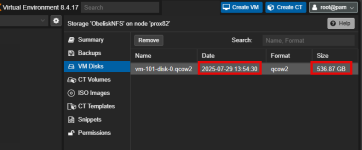
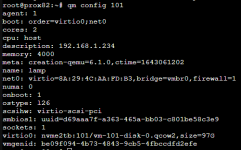
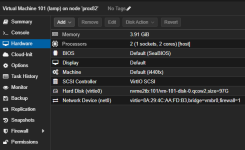
It seems I have a popular problem. In this case, VM101 is happily using a qcow2 on an NVME drive. I must have accidentally installed a VM with storage on an NFS share and maybe I moved it without deleting it. PVE is convinced (even after `qm disk rescan --vmid 101`) that this qcow2 on the NFS is tied to the running VM101, (Cannot remove image, a guest with VMID '101' exists! You can delete the image from the guest's hardware pane) even though we can all see it's stored on the NVME.

Update: I tried to force it with 'pvesm free ObeliskNFS:101/vm-101-disk-0.qcow2 ` which worked for some time, but then it threw an error: "TASK ERROR: 'storage-ObeliskNFS'-locked command timed out - aborting"

`pvesm list obelisk` shows that's gone, but did I break something and create an even more orphaned disk?
1774992657319.png1774992696585.png
1774992820427.png1774993361625.png
 

Attachments

  • 1774993154493.png
    1774993154493.png
    8.3 KB · Views: 5
Hello @br8k , welcome to the forum.

When you have an orphan disk, it should appear as "unusedX" in the VM's hardware configuration after doing "qm disk rescan". If it did not, there are more things to look at. One possibility - NFS is no longer marked as Image-carrying storage.

That said, a timeout on remove is possible with NFS and 0.5TB disk. Given that this is a simple file, you could have directly "rm"'ed it.

If the file is gone now - you are all set. You can just check directly with "ls" on the NFS mount.

I am not sure what your last screenshot is supposed to mean (the one with incorrect command line syntax: pvesm free [storage].


Blockbridge : Ultra low latency all-NVME shared storage for Proxmox - https://www.blockbridge.com/proxmox
 
Last edited:
Hello @br8k , welcome to the forum.

When you have an orphan disk, it should appear as "unusedX" in the VM's hardware configuration after doing "qm disk rescan". If it did not, there are more things to look at. One possibility - NFS is no longer marked as Image-carrying storage.

That said, a timeout on remove is possible with NFS and 0.5TB disk. Given that this is a simple file, you could have directly "rm"'ed it.

If the file is gone now - you are all set. You can just check directly with "ls" on the NFS mount.

I am not sure what your last screenshot is supposed to mean (the one with incorrect command line syntax: pvesm free [storage].


Blockbridge : Ultra low latency all-NVME shared storage for Proxmox - https://www.blockbridge.com/proxmox
Thank you for your time and your response was very helpful. I was concerned that something else in stealth mode might be pointing at that file. I mistakenly posted that image of the bad command.