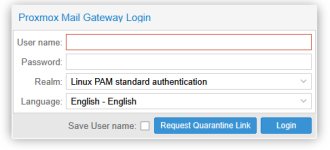
Spam Quarantine link no longer showing after upgrade.

V3_Exceed

Active Member
Sep 13, 2019
15
3
43
59
Good Evening,
I have just installed the Email gateway version 9. As per lots of instructions I edited the /etc/pmg/pmg.conf file to include:
-------------------------------
section: spamquar
...
quarantinelink 1
...
------------------------------
This worked great!. The link shows up on the login screen and I expect would function properly.

I then updated my new shiny email gateway to 9.0.7 and during the upgrade the installer said it was unable to parse this part of the pmg.conf. After rebooting and making sure the edits were still there, There is no link to the Spam quarantine link on the login page. This was actually the only reason I upgraded from Proxmox email gateway 8 to 9

I suspect that this is merely an oversight on some persons part. Can we please get this functionality returned? I have several clients who have asked for this or for some way for me to send them the spam quarantine link as their had expired.

Thanks very much for your time.
 
I have just installed the Email gateway version 9. As per lots of instructions I edited the /etc/pmg/pmg.conf file to include:
-------------------------------
section: spamquar
...
quarantinelink 1
...
------------------------------
This worked great!. The link shows up on the login screen and I expect would function properly.

I then updated my new shiny email gateway to 9.0.7 and during the upgrade the installer said it was unable to parse this part of the pmg.conf. After rebooting and making sure the edits were still there, There is no link to the Spam quarantine link on the login page. This was actually the only reason I upgraded from Proxmox email gateway 8 to 9
please share your /etc/pmg/pmg.conf - and if possible the error-message you got during the upgrade (/var/log/apt/term.log should have the information)
 
Thanks for the reply..

section: admin
email email@my email.net

section: mail
banner ESMTP Proxmox.techweavers.net
dnsbl_sites zen.spamhaus.org,b.barracudacentral.org
greylist6 1
helotests 1
maxsize 51943040
rejectunknown 0
rejectunknownsender 0
relaynomx 1
tls 1
verifyreceivers 450
section spamquar
...
quarantinelink 1
...

And the error message.....

Setting up librrds-perl:amd64 (1.7.2-4.2+pve4) ...
Setting up zfs-zed (2.4.1-pve1) ...
Setting up pmg-api (9.0.7) ...
file /etc/pmg/pmg.conf line 15 (section 'mail') - ignore config line: section spamquar
file /etc/pmg/pmg.conf line 16 (section 'mail') - unable to parse value of 'quarantinelink': unexpected property 'quarantinelink'
Analyzing/Upgrading existing Databases...done
file /etc/pmg/pmg.conf line 15 (section 'mail') - ignore config line: section spamquar
file /etc/pmg/pmg.conf line 16 (section 'mail') - unable to parse value of 'quarantinelink': unexpected property 'quarantinelink'
Setting up proxmox-default-kernel (2.0.2) ...
Setting up poppler-utils (25.03.0-5+deb13u2) ...
Setting up bind9-dnsutils (1:9.20.21-1~deb13u1) ...
Setting up libsmbclient0:amd64 (2:4.22.8+dfsg-0+deb13u1) ...
 
Also.. Prior to the update, just after the install the link was actually working. Well, working in that it showed up on the login page.
Thanks very much
..adam
 
Thanks for the reply..

section: admin
email email@my email.net

section: mail
banner ESMTP XXXXX
dnsbl_sites zen.spamhaus.org,b.barracudacentral.org
greylist6 1
helotests 1
maxsize 51943040
rejectunknown 0
rejectunknownsender 0
relaynomx 1
tls 1
verifyreceivers 450
section spamquar
...
quarantinelink 1
...

And the error message.....
please use code tags for config-file listings (and don't remove complete lines/whitespace, as this is quite relevant in this context)

Setting up pmg-api (9.0.7) ...
file /etc/pmg/pmg.conf line 15 (section 'mail') - ignore config line: section spamquar
file /etc/pmg/pmg.conf line 16 (section 'mail') - unable to parse value of 'quarantinelink': unexpected property 'quarantinelink'
Analyzing/Upgrading existing Databases...done
file /etc/pmg/pmg.conf line 15 (section 'mail') - ignore config line: section spamquar
file /etc/pmg/pmg.conf line 16 (section 'mail') - unable to parse value of 'quarantinelink': unexpected property 'quarantinelink'
based on that output my guess is - that there is no new-line between the last line of the section mail and `section: spamquar`

the config-file needs:
* empty lines between sections
* IIRC whitespace for each key in a section

Code:
....
section: admin
    advfilter 0
    custom_check 0
    dkim-use-domain header
    dkim_selector real
    dkim_sign 1
    dkim_sign_all_mail 1
    email my@adminmail.com
    statlifetime 16

section: spamquar
    authmode ldapticket
    lifetime 60
    quarantinelink 1
    reportstyle verbose

works here ...
 
Thank you for getting back to me with this.
My copy and paste didn't actually reflect the formatting I copied out of the console web edition.
I did have a space before the section tag, but also the three dots. (never trust Google)
In all fairness, it did work until I upgraded, so I would think the formatting became more important after the upgrade.
It is in fact working now, thank you very much. I have several clients who also thank you.

have a great rest of the week
..adam
 

Attachments

  • proxmox link.png
    proxmox link.png
    11.6 KB · Views: 4
  • Like
Reactions: Stoiko Ivanov