Hey guys,
I'm quite happy proxmox user since 5 years or so. Was mainly using it for different services: Truenas, Home Assistant, Opnsense, etc.
But I also wanted to get rid of my gaming and working rig and have this one also in proxmox. I tried over since last year different configurations with proper desktop hardware, but always had issues with sometimes crackling sound.
I passed trough whole usb controller for my soundcard but didnt help, also MSI interrupts etc.
I then thought I maybe have to go the full route for proper workstation/server hardware:
Xeon W-3375 (38 Core CPU)
Asrock SPC621D8-2L2T
2 x 64GB DDR4 2666 MHz ECC LRDIMM
Samsung PM1735 3.2 TB PCIe 4.0 x8 (ZFS encrypted for VMs)
WDS100T3X0C-00SJG0 (1TB NVME) for Proxmox OS
Nvidia RTX 4060 Ti
Nvidia Quadro T400
Wifi PCIE Card
USB 3.0 Controller PCIE Card
All of the hardware except, cpu, mobo and ram was also installed at Intel Desktop system with 14900k and before that 12700k.
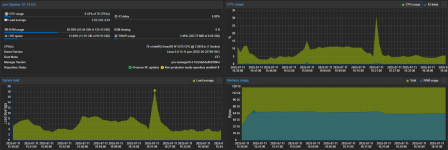
I did a complete new install of proxmox and were restoring the VMs via Proxmox Backup Server. But the performance in my windows machine isn't that great. System in windows feels sometimes a bit sluggish and gaming performance is dropping heavy between 144fps and 50fps for a game were I would normally have stable 144fps at all times. IO delay of proxmox is at max spike I saw 0.17% but most of the time its 0.01 - 0.00%.
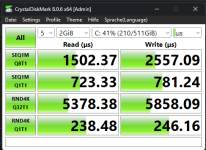
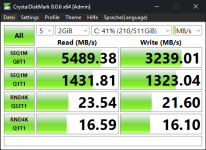
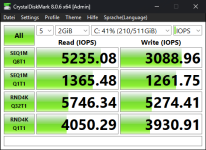
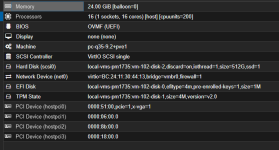
I'm really out of ideas what I could do to get proper performance. Attached you can find CrystalDiskMark in Windows VM, Proxmox Dashboard and Windows VM config.
Maybe someone has an idea to fix the performance, maybe some bios settings I'm missing.
I'm quite happy proxmox user since 5 years or so. Was mainly using it for different services: Truenas, Home Assistant, Opnsense, etc.
But I also wanted to get rid of my gaming and working rig and have this one also in proxmox. I tried over since last year different configurations with proper desktop hardware, but always had issues with sometimes crackling sound.
I passed trough whole usb controller for my soundcard but didnt help, also MSI interrupts etc.
I then thought I maybe have to go the full route for proper workstation/server hardware:
Xeon W-3375 (38 Core CPU)
Asrock SPC621D8-2L2T
2 x 64GB DDR4 2666 MHz ECC LRDIMM
Samsung PM1735 3.2 TB PCIe 4.0 x8 (ZFS encrypted for VMs)
WDS100T3X0C-00SJG0 (1TB NVME) for Proxmox OS
Nvidia RTX 4060 Ti
Nvidia Quadro T400
Wifi PCIE Card
USB 3.0 Controller PCIE Card
All of the hardware except, cpu, mobo and ram was also installed at Intel Desktop system with 14900k and before that 12700k.
I did a complete new install of proxmox and were restoring the VMs via Proxmox Backup Server. But the performance in my windows machine isn't that great. System in windows feels sometimes a bit sluggish and gaming performance is dropping heavy between 144fps and 50fps for a game were I would normally have stable 144fps at all times. IO delay of proxmox is at max spike I saw 0.17% but most of the time its 0.01 - 0.00%.
I'm really out of ideas what I could do to get proper performance. Attached you can find CrystalDiskMark in Windows VM, Proxmox Dashboard and Windows VM config.
Maybe someone has an idea to fix the performance, maybe some bios settings I'm missing.