

SDN, VNets and Subnets

pille99

Active Member
Sep 14, 2022
380
31
33
hello
i have an easy setup. 3 active networks and it seems it works flawless.

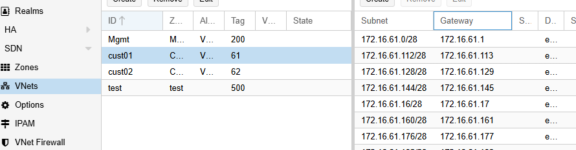
i have the issue with sdn, vnets. i created in the vnet my 16 subnets, /28er
1776849244041.png

but the VMs cant ping the gateways, like 1, or 17 and so on.

is there any trick ?
the vm just ad the NIC in the hardware tab "cust01". but how the VM itself knows in which network it belongs ? as i read proxmox does know it on its own. from the right config. for example: VM IP 172.16.61.2, with the gateway 172.16.61.1 and proxmox knows its belongs to the first subnet.
the VM cant ping the 1 gateway (also non other vm), no active firewalls on proxmox or vm. as i read with ip show bridgename i should see the gateways 172.16.6.1.1,17,33 and so on but i dont see any of it.

one important point: we havent yet a working dns. my last believe its because of the missing dns server " or the missing ipam !

any idea ? any tricks ?

regards
 
Hello,

what type of sdn do you use?

SDN SimpleNet will iptables SNAT all traffic from the VM to the "world".
It's something like iptables Masquerading for callup lines.

SDN SimpleNet is a innerconnecton from the VM to the "world".
You can't direct connect a port from the outer "world" to the VM.
 
Last edited:
the customer zone is "vlan"

i cant, and will not, at this point, connect to outsite. i just try that vm 1 from the subnet 0 can connect to the vm on subnet 1 and so on.
 
zones.cfg

Code:
vlan: Customer
        bridge vmbr1
        ipam pve
        nodes pve03-ch,pve02-ch,pve01-ch,pve04-ch


vlan: Mgmt
        bridge vmbr1
        ipam pve
        nodes pve03-ch,pve01-ch,pve02-ch,pve04-ch


vxlan: test
        ipam pve
        nodes pve04-ch,pve01-ch,pve02-ch,pve03-ch
        peers 10.10.12.10 10.10.12.11 10.10.12.12 10.10.12.13

vnets.cfg

Code:
vnet: cust01
        zone Customer
        alias VNet cust001.cloud
        tag 61

vnet: cust02
        zone Customer
        alias VNet cust002.cloud
        tag 62

vnet: Mgmt
        zone Mgmt
        alias VNet Mgmg
        tag 200

vnet: test
        zone test
        tag 500


subnet.cfg

Code:
subnet: Customer-172.16.61.64-28
        vnet cust01
        dnszoneprefix cust001.cloud
        gateway 172.16.61.65

subnet: Customer-172.16.61.112-28
        vnet cust01
        dnszoneprefix cust001.cloud
        gateway 172.16.61.113

subnet: Customer-172.16.61.128-28
        vnet cust01
        dnszoneprefix cust001.cloud
        gateway 172.16.61.129

subnet: Customer-172.16.61.144-28
        vnet cust01
        dnszoneprefix cust001.cloud
        gateway 172.16.61.145

subnet: Customer-172.16.61.160-28
        vnet cust01
        dnszoneprefix cust001.cloud
        gateway 172.16.61.161

subnet: Customer-172.16.61.176-28
        vnet cust01
        dnszoneprefix cust001.cloud
        gateway 172.16.61.177

subnet: Customer-172.16.61.192-28
        vnet cust01
        dnszoneprefix cust001.cloud
        gateway 172.16.61.193
 
zones.cfg

Code:
vlan: Customer
        bridge vmbr1
        ipam pve
        nodes pve03-ch,pve02-ch,pve01-ch,pve04-ch


vlan: Mgmt
        bridge vmbr1
        ipam pve
        nodes pve03-ch,pve01-ch,pve02-ch,pve04-ch


vxlan: test
        ipam pve
        nodes pve04-ch,pve01-ch,pve02-ch,pve03-ch
        peers 10.10.12.10 10.10.12.11 10.10.12.12 10.10.12.13

vnets.cfg

Code:
vnet: cust01
        zone Customer
        alias VNet cust001.cloud
        tag 61

vnet: cust02
        zone Customer
        alias VNet cust002.cloud
        tag 62

vnet: Mgmt
        zone Mgmt
        alias VNet Mgmg
        tag 200

vnet: test
        zone test
        tag 500


subnet.cfg

Code:
subnet: Customer-172.16.61.64-28
        vnet cust01
        dnszoneprefix cust001.cloud
        gateway 172.16.61.65

subnet: Customer-172.16.61.112-28
        vnet cust01
        dnszoneprefix cust001.cloud
        gateway 172.16.61.113

subnet: Customer-172.16.61.128-28
        vnet cust01
        dnszoneprefix cust001.cloud
        gateway 172.16.61.129

subnet: Customer-172.16.61.144-28
        vnet cust01
        dnszoneprefix cust001.cloud
        gateway 172.16.61.145

subnet: Customer-172.16.61.160-28
        vnet cust01
        dnszoneprefix cust001.cloud
        gateway 172.16.61.161

subnet: Customer-172.16.61.176-28
        vnet cust01
        dnszoneprefix cust001.cloud
        gateway 172.16.61.177

subnet: Customer-172.16.61.192-28
        vnet cust01
        dnszoneprefix cust001.cloud
        gateway 172.16.61.193

i cant see something wrong on that config.
i guess it comes from somewhere outside of the sdn. but i am running out of ideas
 
Ok,
Code:
vnet: cust01
        zone Customer
        alias VNet cust001.cloud
        tag 61

vnet: cust02
        zone Customer
        alias VNet cust002.cloud
        tag 62

You setup the vlan tag 61 and 62, so you isolate the communication.
Proxmox VE and your setup work fine.
You must go over a IPv4 Router to "remove" the vlan tags and control the rights.
 
Last edited:
You setup the vlan tag 61 and 62, so you isolate the communication.
Proxmox VE and your setup work fine.
You must go over a IPv4 Router to "remove" the vlan tags and control the rights.

with the vlan, as i understand, i isolate cust001 from cust002. and this is ok.
the issue is with the subnets - every custxxx has 16 x 28er ranges.

what exacly you mean with "go to the router ..." the traffic doesnt go over the router yet, it still stays in the cust001 vnet. am i wrong ?
 
Code:
Chain PREROUTING (policy ACCEPT)
target     prot opt source               destination

Chain INPUT (policy ACCEPT)
target     prot opt source               destination

Chain OUTPUT (policy ACCEPT)
target     prot opt source               destination

Chain POSTROUTING (policy ACCEPT)
target     prot opt source               destination

looks also good.
something is missing which connects the Subnet to the VM, from my point of view. the only thing which is missing is a working dns server which will be in the mgmt network. these network works fine. its just a zone and a vnet with vlan200. and it works.
 
Last edited:
Thanks, so you don't set the checkbox for SNAT by

So i setup your setting for vlan Zone "Customer" and VNet "cust01" on a virtual bridge.

If you don't install the DHCPd packed und enable it under VNets -> Subnet -> DHCP Ranges you don't get it.

Please check:
sysctl net.ipv4.ip_forward
 
Code:
root@pve01-ch:~# ip a | grep vmbr1
3: nic1: <BROADCAST,MULTICAST,UP,LOWER_UP> mtu 1500 qdisc fq_codel master vmbr1 state UP group default qlen 1000
6: vmbr1: <BROADCAST,MULTICAST,UP,LOWER_UP> mtu 1500 qdisc noqueue state UP group default qlen 1000
    inet 10.10.12.10/24 scope global vmbr1
27: vmbr1.61@vmbr1: <BROADCAST,MULTICAST,UP,LOWER_UP> mtu 1500 qdisc noqueue master cust01 state UP group default qlen 1000
28: vmbr1.62@vmbr1: <BROADCAST,MULTICAST,UP,LOWER_UP> mtu 1500 qdisc noqueue master cust02 state UP group default qlen 1000
29: vmbr1.200@vmbr1: <BROADCAST,MULTICAST,UP,LOWER_UP> mtu 1500 qdisc noqueue master Mgmt state UP group default qlen 1000
root@pve01-ch:~# ip a | grep "172.16.61."
root@pve01-ch:~#

shouldnt be on the second command the whole subnets listed ?
 
Last edited:
Yes i don't get it work on my system to.
So i don't know the problem.
Maybe change the separation on a other point of your setup.
Like: vmbr1.61 vmbr1.62
I must read the manual again, but not today.
 
the vmbr1.61 and so on comes from the zone and the vnet.
this config is exactly for environments with subnet secragation.
so, it should work.
as its not working on your site too - my guess is any setting which we not have. the question is which
 
as soon i only configure a zone and a vnet - put 2 VMs in, they are pingable
if i put 1 subnet like 172.x.x.x/24 - both works
if i put multiple subnets like 172.x.x.0/28 gw 1, and 172.x.x.16/28 gw 17 0 it doesnt work anymore. it can not even ping the own gateways.
but isnt that the purpose of "subnets" ?