

Good day,
I am trying to run the command "powershell.exe -NoProfile -ExecutionPolicy Bypass -File C:/install/rename_nics.ps1" from the CLI of Proxmox.
When I execute the following:
pvesh create /nodes/$(hostname)/qemu/${VM_ID}/agent/exec --command "powershell.exe" --command "-NoProfile -ExecutionPolicy Bypass -File C:/install/rename_nics.ps1"
It appears to run, and I receive a PID, but then I encounter an error.
It seems like the arguments are not being transferred correctly.
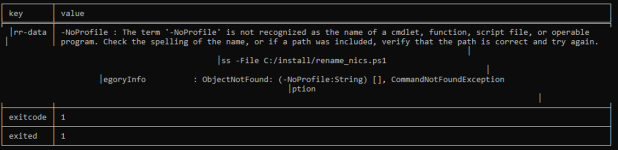
at the eventlog:

What is the correct way to pass arguments in a command?
I am trying to run the command "powershell.exe -NoProfile -ExecutionPolicy Bypass -File C:/install/rename_nics.ps1" from the CLI of Proxmox.
When I execute the following:
pvesh create /nodes/$(hostname)/qemu/${VM_ID}/agent/exec --command "powershell.exe" --command "-NoProfile -ExecutionPolicy Bypass -File C:/install/rename_nics.ps1"
It appears to run, and I receive a PID, but then I encounter an error.
It seems like the arguments are not being transferred correctly.
at the eventlog:
What is the correct way to pass arguments in a command?
Last edited:
