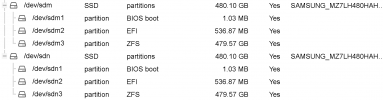
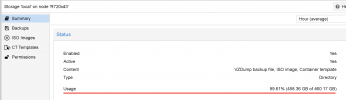
rpool no free space
- Thread starter stefgrifon
- Start date
You are using an out of date browser. It may not display this or other websites correctly.
You should upgrade or use an alternative browser.
You should upgrade or use an alternative browser.




Maybe its the Syslog? You can run
journalctl --vacuum-time=1d to reduce it to 1 day of logs or journalctl --vacuum-size=1G to reduce the size to 1GiB. Before you remove too much, you might want to have a look with journalctl to find out why the log is so big. Does it keep many days, or did you have many (passthrough related) errors in a certain period? If vacuuming helps, you probably want to configure it to not use so much space in the future.Thanks for your reply.Maybe its the Syslog? You can runjournalctl --vacuum-time=1dto reduce it to 1 day of logs orjournalctl --vacuum-size=1Gto reduce the size to 1GiB. Before you remove too much, you might want to have a look withjournalctlto find out why the log is so big. Does it keep many days, or did you have many (passthrough related) errors in a certain period? If vacuuming helps, you probably want to configure it to not use so much space in the future.
Unfortunately it did not help me.

Hello again,
I still have the same problem. I cannot find the solution. Can anyone help me please?
I still have the same problem. I cannot find the solution. Can anyone help me please?

What is your output of
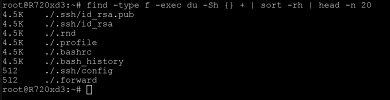
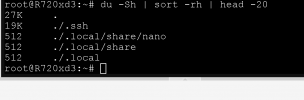
zfs list -o space -r rpool and find -type f -exec du -Sh {} + | sort -rh | head -n 20 and du -Sh | sort -rh | head -20?
What is your output ofzfs list -o space -r rpoolandfind -type f -exec du -Sh {} + | sort -rh | head -n 20anddu -Sh | sort -rh | head -20?
Hello,
I am sending you all the screenshots
Thanks

find -type f -exec du -Sh {} + | sort -rh | head -n 20
du -Sh | sort -rh | head -20
So missing discard or old snapshots aren`t a problem here.
I think the 2nd and 3rd commands only listed the biggest files/folders in your root users home directory because you executed them there. You could run this to see the 20 biggest files on your entire system:
I think the 2nd and 3rd commands only listed the biggest files/folders in your root users home directory because you executed them there. You could run this to see the 20 biggest files on your entire system:
find / -type f -exec du -Sh {} + | sort -rh | head -n 20I think you have found it, right?So missing discard or old snapshots aren`t a problem here.
I think the 2nd and 3rd commands only listed the biggest files/folders in your root users home directory because you executed them there. You could run this to see the 20 biggest files on your entire system:find / -type f -exec du -Sh {} + | sort -rh | head -n 20
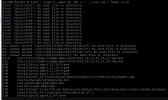
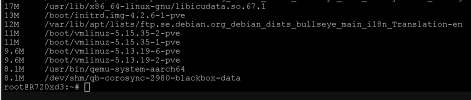
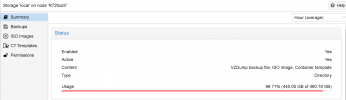
Looks like your 411GB Backup file is the problem.
Yes, but how did this happen? I cannot understand how I made this mistake.
I have deleted all the backups from a GUI.
So will i use this command?
Code:find /var/lib/pmg/backup -iname 'pmg-backup_*.tgz' -mtime +7 -delete
Thanks a lot for your helpIts a PVE backup of a VM where the VMID is 1000. If your backups are that big, maybe you should add a dedicated HDD for you backups or use a network share for it.
Here is the result: