Restore used backblaze s3 data

Feb 5, 2023
79
8
13
Österreich
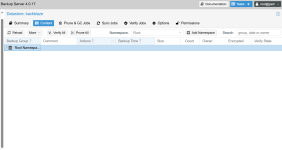
I have a Proxmox backup server with approximately 200 GB on Backblaze. Now I wanted to use this S3 bucket on my new backup server. Setup worked so far but I can't see any backups.
In the task I can see:


Code:
2025-10-26T10:24:00+01:00: Fetching object ct/107/2025-08-04T23:03:37Z/root.pxar.didx
2025-10-26T10:24:01+01:00: Fetching object ct/107/2025-08-05T23:03:51Z/catalog.pcat1.didx
2025-10-26T10:24:01+01:00: Fetching object ct/107/2025-08-05T23:03:51Z/index.json.blob
2025-10-26T10:24:01+01:00: Fetching object ct/107/2025-08-05T23:03:51Z/pct.conf.blob
2025-10-26T10:24:01+01:00: Fetching object ct/107/2025-08-05T23:03:51Z/root.pxar.didx
2025-10-26T10:24:01+01:00: Fetching object ct/107/2025-08-06T23:04:52Z/catalog.pcat1.didx

that mean there are backups or I'm wrong?
 
I have a Proxmox backup server with approximately 200 GB on Backblaze. Now I wanted to use this S3 bucket on my new backup server. Setup worked so far but I can't see any backups.
In the task I can see:


Code:
2025-10-26T10:24:00+01:00: Fetching object ct/107/2025-08-04T23:03:37Z/root.pxar.didx
2025-10-26T10:24:01+01:00: Fetching object ct/107/2025-08-05T23:03:51Z/catalog.pcat1.didx
2025-10-26T10:24:01+01:00: Fetching object ct/107/2025-08-05T23:03:51Z/index.json.blob
2025-10-26T10:24:01+01:00: Fetching object ct/107/2025-08-05T23:03:51Z/pct.conf.blob
2025-10-26T10:24:01+01:00: Fetching object ct/107/2025-08-05T23:03:51Z/root.pxar.didx
2025-10-26T10:24:01+01:00: Fetching object ct/107/2025-08-06T23:04:52Z/catalog.pcat1.didx

that mean there are backups or I'm wrong?
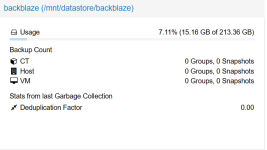
Yes, if you created the datastore on the new server and set the reuse existing datastore and overwrite in-use marker flags, the local datastore cache will be set into an s3-refresh maintenance mode and the contents fetched to a temporary location. While this is ongoing, you will not be able to operate on the datastore contents, which are only moved to the final location after their contents have successfully been fetched and the maintenance mode is cleared again.

Is the s3 refresh still ongoing? Was there any error during the fetching of the contents? (Check the systemd journal on the new PBS instance for errros).
 
Is the s3 refresh still ongoing? Was there any error during the fetching of the contents? (Check the systemd journal on the new PBS instance for errros).
Now I delete and greated again. No error in the logs:
Code:
Oct 26 20:17:00 pbs proxmox-backup-proxy[78807]: Using datastore cache with capacity 11813 for store backblaze
Oct 26 20:17:01 pbs CRON[85607]: pam_unix(cron:session): session opened for user root(uid=0) by root(uid=0)
Oct 26 20:17:01 pbs CRON[85609]: (root) CMD (cd / && run-parts --report /etc/cron.hourly)
Oct 26 20:17:01 pbs CRON[85607]: pam_unix(cron:session): session closed for user root

[/SPOILER]

Here the task log in pastebin
 
Okay, so according to the task log the datastore creation and fetching of the objects runs to completion without error. Please double check that the contents are showing up in the datastore cache base directory, e.g. via an ls -lahR <path-to-datastore-cache> and do a refresh of the view in the datastores contents tab.
 
What's the output of e.g stat ct/107/2025-08-05T23:03:51Z/index.json.blob executed from the datastore base folder? What does ls -lah ct/107 show?
 
ls -lah ct/107
with this commands
Code:
No such file or directory

With the command from your post before:


Code:
/mnt/datastore/backblaze/.chunks/fffa:
total 1.1M
drwxr-x--- 2 backup backup 4.0K Oct 26 19:56 .
drwxr-x--- 1 backup backup 1.1M Oct 26 19:56 ..

/mnt/datastore/backblaze/.chunks/fffb:
total 1.1M
drwxr-x--- 2 backup backup 4.0K Oct 26 19:56 .
drwxr-x--- 1 backup backup 1.1M Oct 26 19:56 ..

/mnt/datastore/backblaze/.chunks/fffc:
total 1.1M
drwxr-x--- 2 backup backup 4.0K Oct 26 19:56 .
drwxr-x--- 1 backup backup 1.1M Oct 26 19:56 ..

/mnt/datastore/backblaze/.chunks/fffd:
total 1.1M
drwxr-x--- 2 backup backup 4.0K Oct 26 19:56 .
drwxr-x--- 1 backup backup 1.1M Oct 26 19:56 ..

/mnt/datastore/backblaze/.chunks/fffe:
total 1.1M
drwxr-x--- 2 backup backup 4.0K Oct 26 19:56 .
drwxr-x--- 1 backup backup 1.1M Oct 26 19:56 ..

/mnt/datastore/backblaze/.chunks/ffff:
total 1.1M
drwxr-x--- 2 backup backup 4.0K Oct 26 19:56 .
drwxr-x--- 1 backup backup 1.1M Oct 26 19:56 ..
 
Then please show the output of ls -lah from the datastore cache base directory. Since the download works, the only thing which might fail is the moving in place from the temp dir to the final dir. But that should produce an error.
 
Can you check this while the s3-refresh is running? To do an S3 refresh go to the contents tab, click on the More button and do S3 refresh. Then check the output of ls -la within you cache directory again. Also, make sure to click on the Refresh button in the contents tab once the s3 refresh is finished.
 
Can you check this while the s3-refresh is running? To do an S3 refresh go to the contents tab, click on the More button and do S3 refresh. Then check the output of ls -la within you cache directory again. Also, make sure to click on the Refresh button in the contents tab once the s3 refresh is finished.
looks for me the same

Code:
root@pbs:/mnt/datastore/backblaze# ls -la
total 1064
drwxr-xr-x 3 backup backup    4096 Oct 31 00:00 .
drwxr-xr-x 4 root   root      4096 Oct 26 10:19 ..
drwxr-x--- 1 backup backup 1073152 Oct 26 19:56 .chunks
-rw-r--r-- 1 backup backup     309 Oct 31 00:00 .gc-status
-rw-r--r-- 1 backup backup       0 Oct 26 19:56 .lock
 
Then something might not right with either the datastore config or the mount points. The contents are fetched to a temp dir within the datastore, so if not event that shows up, but we see the contents being downloaded, then maybe you have overmounted that location or you datastore's path might not point
to the correct location.