Hi everyone,
I’m using Proxmox Backup Server (in my case as a VM, but this question should apply to any PBS installation type).
However, when I try to re-run the assistant / GUI workflow after reinstall, it doesn’t really fit the recovery case because:
Thanks a lot in advance for any pointers (especially regarding where PBS stores the mount configuration and the recommended reattach workflow).
I’m using Proxmox Backup Server (in my case as a VM, but this question should apply to any PBS installation type).
What I did (GUI workflow)
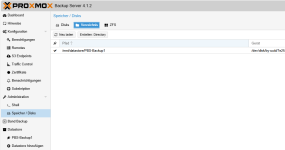
I attached a dedicated backup disk to PBS and then in the PBS web UI I created a mount and datastore like this:- Administration → Disks / Storage → Directory
- Created a new directory on the attached disk (formatted ext4)
- Let PBS mount it and then also use it as a datastore
My concern (disaster recovery / reinstall scenario)
If the PBS installation itself becomes unusable (VM broken, OS corruption, etc.), I want to be able to reinstall PBS and then reattach the existing disk with the backups.However, when I try to re-run the assistant / GUI workflow after reinstall, it doesn’t really fit the recovery case because:
- the disk already contains data and/or is already partitioned/formatted,
- and the GUI flow seems oriented around “creating” a new setup rather than “reusing an existing datastore”.
What I observed while trying to understand PBS’ behavior
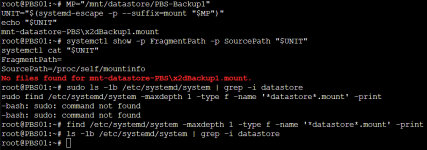
I tried to trace what PBS actually changes in the system when going through the steps above:- I don’t see an entry in /etc/fstab for that mount.
- It looks like PBS creates some kind of systemd mount unit somewhere under /etc/systemd/system/ (or similar), but I haven’t pinned down exactly where and which unit name is used.
Questions
- What exactly does PBS do under the hood when you create a directory on a disk via the GUI and “mount it” (ext4, directory storage)?
- Does it create a systemd .mount unit?
- Where is that configuration stored?
- How is it named / derived (UUID, device path, mountpoint)?
- What is the correct recovery procedure after reinstalling PBS if I want to reattach the local disk and reuse the existing backups?
- What are the steps to mount the disk properly again?
- How do I re-register the existing path as a PBS datastore without reinitializing/overwriting anything?
- Is there an official doc / best-practice guide for this scenario?
Thanks a lot in advance for any pointers (especially regarding where PBS stores the mount configuration and the recommended reattach workflow).
Last edited: