

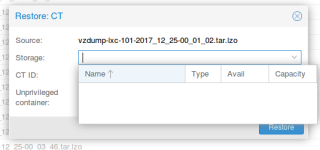
Restore CT empty Storage

jmanhique

Renowned Member
Aug 2, 2015
19
0
66
proxmox_restore.png


Hello everyone and happy holidays!!!

Has anyone faced similar situation? I'm trying to restore containers from backup and the storage option (should give me LVM-thin storage) is empty. I've already restarted services without success.

Version is:

proxmox-ve: 5.0-19 (running kernel: 4.10.17-2-pve)
pve-manager: 5.0-30 (running version: 5.0-30/5ab26bc)
pve-kernel-4.10.17-2-pve: 4.10.17-19
libpve-http-server-perl: 2.0-6
lvm2: 2.02.168-pve3
corosync: 2.4.2-pve3
libqb0: 1.0.1-1
pve-cluster: 5.0-12
qemu-server: 5.0-15
pve-firmware: 2.0-2
libpve-common-perl: 5.0-16
libpve-guest-common-perl: 2.0-11
libpve-access-control: 5.0-6
libpve-storage-perl: 5.0-14
pve-libspice-server1: 0.12.8-3
vncterm: 1.5-2
pve-docs: 5.0-9
pve-qemu-kvm: 2.9.0-3
pve-container: 2.0-15
pve-firewall: 3.0-2
pve-ha-manager: 2.0-2
ksm-control-daemon: 1.2-2
glusterfs-client: 3.8.8-1
lxc-pve: 2.0.8-3
lxcfs: 2.0.7-pve4
criu: 2.11.1-1~bpo90
novnc-pve: 0.6-4
smartmontools: 6.5+svn4324-1
zfsutils-linux: 0.6.5.9-pve16~bpo90

Best Regards
 
Please can you post your storage configuration /etc/pve/storage.cfg ?

Sure, here it is:

dir: local
path /var/lib/vz
content backup,iso,vztmpl

lvmthin: local-lvm
thinpool data
vgname pve
content rootdir,images

dir: usb_backup
path /usb_backup
content backup
maxfiles 4
nodes pve4
shared 0

dir: backup2
path /backup
content backup
maxfiles 4
nodes pve2
shared 0

dir: backup2-alt
path /backup-alt
content backup
maxfiles 4
nodes pve2
shared 0

dir: backup-3
path /backup
content backup
maxfiles 1
nodes pve3
shared 0
 
storage config looks ok, so maybe it is a permission problem - did you already tried as administrator or 'root' user?
 
Please can you post the output from the following command:

# pvesh get /nodes/localhost/storage -content rootdir
 
Please can you post the output from the following command:

# pvesh get /nodes/localhost/storage -content rootdir
Yes, here it goes:

200 OK
[
{
"active" : 1,
"avail" : 794619084800,
"content" : "rootdir,images,iso,vztmpl",
"enabled" : 1,
"shared" : 1,
"storage" : "pve-storage-templates",
"total" : 996498604032,
"type" : "nfs",
"used" : 152001642496
},
{
"active" : 1,
"avail" : 4661346610604,
"content" : "rootdir,images",
"enabled" : 1,
"shared" : 0,
"storage" : "local-lvm",
"total" : 4671624183808,
"type" : "lvmthin",
"used" : 10277573204
}
]
 
That lists 2 storages which should be displayed on the GUI. So maybe it is a browser problem - please test using another browser an d clean the browser cache.
 
That lists 2 storages which should be displayed on the GUI. So maybe it is a browser problem - please test using another browser an d clean the browser cache.

Tried another browser (the third one) and it works fine. Thanks for the support and attention.