

[SOLVED] remove hard disk from VM
- Thread starter muekno
- Start date
You are using an out of date browser. It may not display this or other websites correctly.
You should upgrade or use an alternative browser.
You should upgrade or use an alternative browser.


The VM is a Opentext OES server based on SUSE SLES and has one 30G system drive running fine.
@SteveITS yes and I could it remove, but unfortually I did it twise, I only saw one as unused and it is away now but there is still one seen in the storage and not as unused disk.
Thanks for answering.
mkk
@SteveITS yes and I could it remove, but unfortually I did it twise, I only saw one as unused and it is away now but there is still one seen in the storage and not as unused disk.
Thanks for answering.
mkk
Again. Please share what you see there and a picture of the VM'sthere is still one seen in the storage and not as unused disk.
Hardware tab. There's too many unknown variables to give accurate and succinct advice.
Last edited:
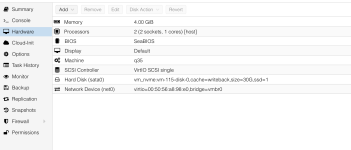

Since the ID matches,
The full error message would be helpful. The task status (double click) at the bottom might have more information.
Are there existing snapshots that might reference it? I ran into this once where the removal only partially worked like in this case.
Check if it shows up here and how often
qm rescan should add it back as unused disk in Hardware. You can then try to remove it from there again.The full error message would be helpful. The task status (double click) at the bottom might have more information.
Are there existing snapshots that might reference it? I ran into this once where the removal only partially worked like in this case.
Check if it shows up here and how often
Bash:
grep -sR "vm-115-disk" /etc/pve/qemu-server
Last edited: