[SOLVED] Remove button for VM operation in GUI not working

VirtualHD

New Member
May 29, 2024
11
1
3
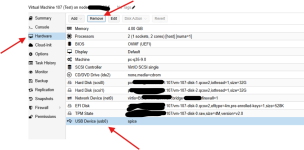
Running already on latest PVE Version 8.3.4 but facing on all VM objects, remove button starts no action. Add new devices are working fine, but to remove eg. Disk or NIC will start now action. Make no differences if VM is powered on or off.
Also no Pop-Up or something happen. Can´t see any blocked exceptions on Edge Browser. Browser Version 133.0.3065.82
Any idea to get this functionality in the GUI?
 
Hi @bbgeek17. Thanks for fast response.
Tried already second browser (Chrome) with the same behavior. Also private window on Edge will not solve anything. Sorry, I´m not aware how to use the developer tools console.
All functions to add new devices is working fine, but remove or detach devices start no action or pop-up.
 
All functions to add new devices is working fine, but remove or detach devices start no action or pop-up.
Can you describe step by step what exactly you are trying to do? I.e starting after login, what are you doing?

Note, nobody else has reported this from 10s/100s of thousands using PVE.


Blockbridge : Ultra low latency all-NVME shared storage for Proxmox - https://www.blockbridge.com/proxmox
 
It´s very simple task. Select on a VM a Device like in this example "USB Devices" and push the "Remove" Button.
With this action, nothing will pop-up or started where a can accept the "deletion" process of this dedicated Device.
By the way: Make no differences if VM is powered off or powered On.
 

Attachments

  • Screenshot 2025-02-26 152543.png
    Screenshot 2025-02-26 152543.png
    111 KB · Views: 6
Yes, we have fully automated our PVE installations with Ansible. To install PVE, modify NTP, Realms....
As i tested now, it looks each "remove" action will not successful. Also remove of Network bridge will not work over Gui. :oops:
And i use the "root" account for this removal process to to be sure, it will be not permission related.
 
Running Ansible commands is not the same as downloading/running external scripts, so you didnt really answer my question.
Nor did you report back on the console errors.

Run:
sudo debsums -s
sudo debsums -ac

Also, what is the output of :
pveversion
pveversion -v
apt update


Blockbridge : Ultra low latency all-NVME shared storage for Proxmox - https://www.blockbridge.com/proxmox
 
will keep you updated on the topic: We found the problem related to an misconfiguration on the proxmox-widget-toolkit/proxmoxlib.js.
Corrected the entries there, and now every GUI button action works fine again.
Thanks for your inputs!
 
In my experience, this is most commonly caused by modifications to the pveproxy javascript; Usually the modification that is used to hide the no-subscription pop-up.