Ok, so I ran into an odd problem with a host a few weeks ago, and I'm just now getting the time to try to resolve it.
First, a bit of background information: I have a host with eight drives: two 960GB SSDs and six 18tb Seagate Ironwolf. Host is a Dell R720 with PERC H310 Mini with all drives set as non-RAID passthrough mode. I installed PVE 8.4 on this host to join it to a cluster of two other R720's running 8.4 set up a bit differently, with six drives in each: two 960SSD's set as RAID 1 in the H310 controller, and the other four drives being 18tb Seagate Ironwolf. These two have been running rock-solid for many months. (This R720 was originally part of the cluster, but with two 1TB hard drives in hardware RAID 1 for the boot volume; the purpose was to set it up identically to the other two, but during the first install attempt something happened to cause the controller to refuse to recognize any non-RAID drives when there was also a RAID volume; seems to be an uncommon but known issue, so I pivoted and set it up with a ZFS mirror on the two 960GB SSDs -- eventually I want to reinstall the other two hosts with passthrough on all drives and ZFS boot).
The install with ZFS to the two SSDs went well, and I set up the storage for two of the 18tb drives as a ZFS mirror and the other four 18tb drives as ZFS RAIDZ2, with the same pool and storage name as on the other two hosts.
I then joined the new host ot the cluster.
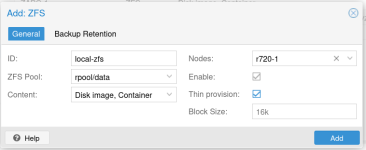
When I did this, the ZFS storage on the two 18tb drives in the mirror configuration went away, and so did the ZFS storage on the boot SSDs. I was able to recreate the storage pointing to the mirrored 18tb drives easily enough, but not the ZFS storage on the boot SSDs, as I wasn't completely sure where it needed to point and if any options were required..
Ok, so I have two questions:
1.) How could I have prevented the removal of the two storages on the new host when joining the cluster;
2.) How do I recreate the proper ZFS storage on the boot SSDs?
Here's some info from the new host:
Output of
Output of
I believe the storage should point to rpool/data, but I wanted to ask before I set that up as such since I'm a relative newbie on ZFS.
First, a bit of background information: I have a host with eight drives: two 960GB SSDs and six 18tb Seagate Ironwolf. Host is a Dell R720 with PERC H310 Mini with all drives set as non-RAID passthrough mode. I installed PVE 8.4 on this host to join it to a cluster of two other R720's running 8.4 set up a bit differently, with six drives in each: two 960SSD's set as RAID 1 in the H310 controller, and the other four drives being 18tb Seagate Ironwolf. These two have been running rock-solid for many months. (This R720 was originally part of the cluster, but with two 1TB hard drives in hardware RAID 1 for the boot volume; the purpose was to set it up identically to the other two, but during the first install attempt something happened to cause the controller to refuse to recognize any non-RAID drives when there was also a RAID volume; seems to be an uncommon but known issue, so I pivoted and set it up with a ZFS mirror on the two 960GB SSDs -- eventually I want to reinstall the other two hosts with passthrough on all drives and ZFS boot).
The install with ZFS to the two SSDs went well, and I set up the storage for two of the 18tb drives as a ZFS mirror and the other four 18tb drives as ZFS RAIDZ2, with the same pool and storage name as on the other two hosts.
I then joined the new host ot the cluster.
When I did this, the ZFS storage on the two 18tb drives in the mirror configuration went away, and so did the ZFS storage on the boot SSDs. I was able to recreate the storage pointing to the mirrored 18tb drives easily enough, but not the ZFS storage on the boot SSDs, as I wasn't completely sure where it needed to point and if any options were required..
Ok, so I have two questions:
1.) How could I have prevented the removal of the two storages on the new host when joining the cluster;
2.) How do I recreate the proper ZFS storage on the boot SSDs?
Here's some info from the new host:
Output of
zpool status
Code:
  pool: ZABC-1
 state: ONLINE
  scan: scrub repaired 0B in 14:35:14 with 0 errors on Sun Nov  9 14:59:15 2025
config:

    NAME                        STATE     READ WRITE CKSUM
    ZABC-1                      ONLINE       0     0     0
      raidz2-0                  ONLINE       0     0     0
        scsi-35000c500e5f9b9af  ONLINE       0     0     0
        scsi-35000c500e5f6c625  ONLINE       0     0     0
        scsi-35000c500e5f77055  ONLINE       0     0     0
        scsi-35000c500e5f7acab  ONLINE       0     0     0

errors: No known data errors

  pool: rpool
 state: ONLINE
  scan: scrub repaired 0B in 00:00:17 with 0 errors on Sun Nov  9 00:24:21 2025
config:

    NAME                              STATE     READ WRITE CKSUM
    rpool                             ONLINE       0     0     0
      mirror-0                        ONLINE       0     0     0
        scsi-35002538fa35068e2-part3  ONLINE       0     0     0
        scsi-35002538fa35067a8-part3  ONLINE       0     0     0

errors: No known data errors

  pool: zbackups
 state: ONLINE
  scan: scrub repaired 0B in 22:37:16 with 0 errors on Sun Nov  9 23:01:21 2025
config:

    NAME                        STATE     READ WRITE CKSUM
    zbackups                    ONLINE       0     0     0
      mirror-0                  ONLINE       0     0     0
        scsi-35000c500e5f6abc8  ONLINE       0     0     0
        scsi-35000c500e5f76d90  ONLINE       0     0     0

errors: No known data errors
Output of
zfs list
Code:
NAME                     USED  AVAIL  REFER  MOUNTPOINT
ZABC-1                  20.4T  11.2T   140K  /ZABC-1
ZABC-1/vm-101-disk-0     245G  11.4T  42.1G  -
ZABC-1/vm-101-disk-1    16.9T  19.2T  8.85T  -
ZABC-1/vm-102-disk-0    9.89G  11.2T  1.76G  -
ZABC-1/vm-102-disk-1    56.8G  11.2T  27.8G  -
ZABC-1/vm-105-disk-0    48.2G  11.2T  6.94G  -
ZABC-1/vm-106-disk-0     219G  11.4T  66.2G  -
ZABC-1/vm-107-disk-0     206G  11.4T  53.5G  -
ZABC-1/vm-108-disk-0    68.9G  11.3T  18.2G  -
ZABC-1/vm-110-disk-0    68.2G  11.3T  17.4G  -
ZABC-1/vm-120-disk-0    60.6G  11.3T  9.80G  -
ZABC-1/vm-130-disk-0    3.12M  11.2T   128K  -
ZABC-1/vm-130-disk-1    25.3G  11.2T  5.01G  -
ZABC-1/vm-150-disk-0    26.7G  11.2T  10.4G  -
ZABC-1/vm-170-disk-0    3.12M  11.2T   122K  -
ZABC-1/vm-170-disk-1    37.8G  11.2T  5.30G  -
ZABC-1/vm-170-disk-2    2.02T  12.2T  1.00T  -
ZABC-1/vm-170-disk-3    6.09M  11.2T    93K  -
ZABC-1/vm-180-disk-0    28.1G  11.2T  7.76G  -
ZABC-1/vm-181-disk-0    30.9G  11.2T  8.78G  -
ZABC-1/vm-203-disk-0     103G  11.3T  51.0G  -
ZABC-1/vm-500-disk-0    41.0G  11.2T  8.49G  -
ZABC-1/vm-501-disk-0    34.9G  11.2T  2.35G  -
ZABC-1/vm-700-disk-0    3.13M  11.2T   134K  -
ZABC-1/vm-700-disk-1    53.7G  11.2T  21.2G  -
ZABC-1/vm-700-disk-2    6.09M  11.2T    93K  -
ZABC-1/vm-701-disk-0    3.22M  11.2T   134K  -
ZABC-1/vm-701-disk-1    45.4G  11.2T  9.96G  -
ZABC-1/vm-701-disk-2    6.09M  11.2T    93K  -
ZABC-1/vm-740-disk-0    3.21M  11.2T   122K  -
ZABC-1/vm-740-disk-1    47.4G  11.2T  3.14G  -
ZABC-1/vm-740-disk-2    6.09M  11.2T    93K  -
ZABC-1/vm-791-disk-0    3.23M  11.2T   140K  -
ZABC-1/vm-791-disk-1    51.0G  11.2T  6.76G  -
ZABC-1/vm-791-disk-2    6.45M  11.2T    93K  -
rpool                   8.37G   852G   104K  /rpool
rpool/ROOT              3.41G   852G    96K  /rpool/ROOT
rpool/ROOT/pve-1        3.41G   852G  3.41G  /
rpool/data                96K   852G    96K  /rpool/data
rpool/var-lib-vz        4.90G   852G  4.90G  /var/lib/vz
zbackups                14.9T  1.32T    96K  /zbackups
zbackups/vm-911-disk-0     3M  1.32T    92K  -
zbackups/vm-911-disk-1  32.5G  1.35T  4.15G  -
zbackups/vm-911-disk-2     6M  1.32T    64K  -
zbackups/vm-911-disk-3  14.9T  9.16T  7.04T  -
I believe the storage should point to rpool/data, but I wanted to ask before I set that up as such since I'm a relative newbie on ZFS.