R/W Speed difference between two VM's 40GB vs 2GB

Keld

New Member
Jan 15, 2025
9
1
3
Greetings everyone,

I have three VM's.
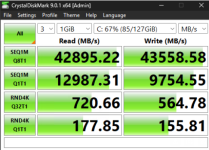
1: Working with 42GB r/w speed per second
2: Malware isolated VM for reverse analysis and application testing (arg: -hypervisor flag set to hide VM from malware)
3: Another vm, pretty vanilla with 2gb r/w seq

all three VM's are on the same physical processor, zfs storage pool and settings (excluding from vm two now which is working property) mirrored.

After about 9 hours of troubleshooting VM#2 I was able to figure out that disabling the Hypervisor flag absolutely murdered my 4k random IOPS from ~700mb down to 20MB. Reenabling this flag the speeds went sky high once more giving me full speed of my known good VM.

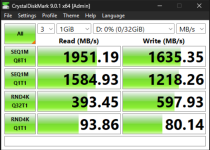
VM#3 having sightly different R/W issues, the Random IO's are fine (reaching the same as VM#1 and 2) but the sequential r/w seem capped at 2GB a second while VM#1&2 are now getting anywhere from 24GB to 42GB a second.

All three VM's are setup identical and am trying for hours trying to figure out why the one remaining VM is getting capped at 2gb while the other two are getting 10's of gb.
I added both a VirtIO and SCSI disk to VM#3 and it appears both disk are capped at ~2gb per second for both R/W.

Anything I am overlooking maybe outside the config that would be causing this limit? Both VM's have the latest guest tools installed (0.1.285) which I assume has both drivers up to date the same on each VM. With the VM's on the same storage, same host, with the following settings below, its leading me to think there is something different external to the VM that is limiting the R/W of the disk.

[VM#1]
agent: 1
bios: ovmf
boot: order=scsi0;net0
cores: 4
cpu: x86-64-v2-AES
efidisk0: local-zfs:vm-101-disk-0,efitype=4m,pre-enrolled-keys=1,size=1M
machine: pc-q35-9.0,viommu=virtio
memory: 12288
meta: creation-qemu=9.0.2,ctime=1737426023
name: Windows11
net0: virtio=BC:24:11:2C:D5:62,bridge=vmbr0,firewall=1
numa: 0
ostype: win11
scsi0: local-zfs:vm-101-disk-3,cache=writeback,size=128G
scsihw: virtio-scsi-single
smbios1: uuid=8aaef5f8-511f-4b28-91d9-639ebe140c5a
sockets: 1
tpmstate0: local-zfs:vm-101-disk-2,size=4M,version=v2.0
vmgenid: f61bd622-7b5b-4ff3-9bd0-00e42fa53be0

[VM#3]
agent: 1
bios: ovmf
boot: order=virtio0;net0;ide2
cores: 4
cpu: x86-64-v2-AES
efidisk0: local-zfs:vm-106-disk-0,efitype=4m,pre-enrolled-keys=1,size=1M
ide2: local:iso/virtio-win-0.1.285.iso,media=cdrom,size=771138K
machine: pc-q35-9.0,viommu=virtio
memory: 12288
meta: creation-qemu=9.0.2,ctime=1751256788
name: DiskTestIssueWithTemplate
net0: virtio=BC:24:11:50:50:64,bridge=vmbr0
numa: 0
ostype: win11
scsi0: local-zfs:vm-106-disk-3,backup=0,cache=writeback,iothread=1,size=32G
scsihw: virtio-scsi-single
smbios1: uuid=c406870d-66ab-4949-a377-7975bfb9ecc6
sockets: 1
tpmstate0: local-zfs:vm-106-disk-1,size=4M,version=v2.0
virtio0: local-zfs:vm-106-disk-2,backup=0,cache=writeback,iothread=1,size=64G
vmgenid: f2aa089c-4e50-421f-807f-2eaed0b2978b


My other question as for VM#2, is if I want to hide Hypervisor then is there any reasonable secondary sub flag/option to get the Random 4k IO's higher then 20ish MB a second (preferably without just multiple performance tweaks) or is disabling hypervisor an all or nothing option as to what is making a direct impact to the r/w?

Thanks for any feedback as to these two questions.
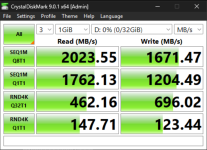
 
The only obvious difference I see is that VM#3 has iothread=1 on both its' disks, while VM#1 does not. Try disabling it for VM#3 & retest.
 
The only obvious difference I see is that VM#3 has iothread=1 on both its' disks, while VM#1 does not. Try disabling it for VM#3 & retest.
Yes, I did try that and left it on. Ill tripple check to make sure Im not crazy. My understanding is iothread gives its own dedicated CPU for HD processing and shouldn't impact its transfer but I'll give it a go and post back.

Image 1 is with IO thread.
Image 2 is without IOThread.
Image 3 is of VM#1 working properly as expected.

Thanks for the feedback, btw.
 

Attachments

  • 1.png
    1.png
    209.7 KB · Views: 3
  • 2.png
    2.png
    217.9 KB · Views: 3
  • 3.png
    3.png
    109.7 KB · Views: 3
Last edited:
Stability in speed is not achieved by using writeback.
It is best not to assume that it will always deliver consistent results.

Writeback heavily depends on CPU/RAM speed, regardless of the disk type or disk speed.
 
Last edited:
Ah! Thanks, I guess that clears most of my confusion. Maybe I can flush it with
echo 3 > /proc/sys/vm/drop_caches and retest first thing tomorrow.
I guess my confusion comes from why is VM#3 consistently getting those high speeds as compared to VM#1. It seems consistent and assuming crystal disk write random junk data that only VM#3 are getting the ram speed and the other VM is not, does this imply that ARC is not functioning properly for VM#1 or just that it’s full at time of testing?

Thanks for pointing me in the right direction, I have some reading on this subject to do now :)
 
Last edited:
The behavior of writeback is independent of disk type.

This behavior should also be observable with physical disk passthrough.

https://pve.proxmox.com/wiki/Performance_Tweaks#Disk_Cache

Therefore, I believe it is largely unaffected by factors like ARC hit rates, and is unrelated to ZFS's ARC.
* An ARC is a single allocation in ZFS. If it is affected, everything is affected. Since this is not the situation at hand, we can exclude it from our discussion this time.

The memory allocated for writeback is part of the Linux host cache, so it should be visible in `free -m` under buff/cache or in the `free` output.

When using cdm, due to various factors, the effect cannot be observed with around 2GB of memory. Testing with 8GB or 16GB will allow you to confirm the increase.

*Using writeback does not guarantee a consistent speed, as fluctuations occur due to system load and other factors, such as the impact of workloads utilizing RAM in addition to disk storage.
 
Last edited:
The OP's issue is one of a differential; i.e. the different disk speed rates achieved between 2 similar (looking) VMs. So in my opinion any answer must focus on explaining this DIFFERENCE. It is hard to believe that time & time again the cache is slanted to helping only VM#1.

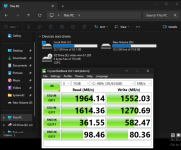
I note that for VM#1 the disk (C: drive) appears to be properly used, currently showing 67% usage, while VM#3 appears to show 0% usage (D: drive). This obviously tallies with the fact that I believe VM#3 is merely a testing VM as shown above. Possibly this is somehow effecting the above differential, by the fact that the actual Vdisk within ZFS, has to be actually created/written each time you are testing it with read/writes. (I don't use ZFS, but the same similar operation exists in other protocols, such as qcow etc.).Maybe first copy some mass data to that D: drive & then delete it to make room for the disk test. Then retest.

Just trying/stabbing in the dark. Good luck.
 
The OP's issue is one of a differential; i.e. the different disk speed rates achieved between 2 similar (looking) VMs. So in my opinion any answer must focus on explaining this DIFFERENCE. It is hard to believe that time & time again the cache is slanted to helping only VM#1.

I note that for VM#1 the disk (C: drive) appears to be properly used, currently showing 67% usage, while VM#3 appears to show 0% usage (D: drive). This obviously tallies with the fact that I believe VM#3 is merely a testing VM as shown above. Possibly this is somehow effecting the above differential, by the fact that the actual Vdisk within ZFS, has to be actually created/written each time you are testing it with read/writes. (I don't use ZFS, but the same similar operation exists in other protocols, such as qcow etc.).Maybe first copy some mass data to that D: drive & then delete it to make room for the disk test. Then retest.

Just trying/stabbing in the dark. Good luck.
This makes sense, sadly that means I am may facing an issue then.
I took the VIRTIO disc, wrote the raw contents to the D: drive multiple times, rebooted and ran test on both the C and D drive (attached). One of course is VirtIO and the other is SCSI but the speeds seem exactly the same.

My setup at the host level is RAID 10 PCIE 9100 4TB (Rated at 14-15GB R/W a second each). I am attempting to build a baseline as to what to be expected as I am really not sure (taking in to account of course the storage is shared with other VM's etc). Sadly, filling the drive and rewriting the data did not make a difference.

Thanks again for everyone who's replyed. I will continue to dig. If anyone else has any suggestions let me know and I'll promptly test it out and confirm the results.

root@threadripper:~# qm showcmd 101 --pretty
qm showcmd 106 --pretty
/usr/bin/kvm \
-id 101 \
-name 'Windows11Dev,debug-threads=on' \
-no-shutdown \
-chardev 'socket,id=qmp,path=/var/run/qemu-server/101.qmp,server=on,wait=off' \
-mon 'chardev=qmp,mode=control' \
-chardev 'socket,id=qmp-event,path=/var/run/qmeventd.sock,reconnect-ms=5000' \
-mon 'chardev=qmp-event,mode=control' \
-pidfile /var/run/qemu-server/101.pid \
-daemonize \
-smbios 'type=1,uuid=8aaef5f8-511f-4b28-91d9-639ebe140c5a' \
-drive 'if=pflash,unit=0,format=raw,readonly=on,file=/usr/share/pve-edk2-firmware//OVMF_CODE_4M.secboot.fd' \
-drive 'if=pflash,unit=1,id=drive-efidisk0,format=raw,file=/dev/zvol/rpool/data/vm-101-disk-0,size=540672' \
-smp '4,sockets=1,cores=4,maxcpus=4' \
-nodefaults \
-boot 'menu=on,strict=on,reboot-timeout=1000,splash=/usr/share/qemu-server/bootsplash.jpg' \
-vnc 'unix:/var/run/qemu-server/101.vnc,password=on' \
-global 'kvm-pit.lost_tick_policy=discard' \
-cpu 'qemu64,+aes,enforce,hv_ipi,hv_relaxed,hv_reset,hv_runtime,hv_spinlocks=0x1fff,hv_stimer,hv_synic,hv_time,hv_vapic,hv_vpindex,+kvm_pv_eoi,+kvm_pv_unhalt,+pni,+popcnt,+sse4.1,+sse4.2,+ssse3' \
-m 12288 \
-readconfig /usr/share/qemu-server/pve-q35-4.0.cfg \
-device 'vmgenid,guid=f61bd622-7b5b-4ff3-9bd0-00e42fa53be0' \
-device 'usb-tablet,id=tablet,bus=ehci.0,port=1' \
-chardev 'socket,id=tpmchar,path=/var/run/qemu-server/101.swtpm' \
-tpmdev 'emulator,id=tpmdev,chardev=tpmchar' \
-device 'tpm-tis,tpmdev=tpmdev' \
-device 'VGA,id=vga,bus=pcie.0,addr=0x1' \
-chardev 'socket,path=/var/run/qemu-server/101.qga,server=on,wait=off,id=qga0' \
-device 'virtio-serial,id=qga0,bus=pci.0,addr=0x8' \
-device 'virtserialport,chardev=qga0,name=org.qemu.guest_agent.0' \
-device 'virtio-balloon-pci,id=balloon0,bus=pci.0,addr=0x3,free-page-reporting=on' \
-iscsi 'initiator-name=iqn.1993-08.org.debian:01:83eb7a8459c' \
-device 'virtio-scsi-pci,id=virtioscsi0,bus=pci.3,addr=0x1' \
-drive 'file=/dev/zvol/rpool/data/vm-101-disk-3,if=none,id=drive-scsi0,cache=writeback,format=raw,aio=io_uring,detect-zeroes=on' \
-device 'scsi-hd,bus=virtioscsi0.0,channel=0,scsi-id=0,lun=0,drive=drive-scsi0,id=scsi0,bootindex=100' \
-netdev 'type=tap,id=net0,ifname=tap101i0,script=/usr/libexec/qemu-server/pve-bridge,downscript=/usr/libexec/qemu-server/pve-bridgedown,vhost=on' \
-device 'virtio-net-pci,mac=BC:24:11:2C:D5:62,netdev=net0,bus=pci.0,addr=0x12,id=net0,rx_queue_size=1024,tx_queue_size=256,bootindex=101' \
-device virtio-iommu-pci \
-rtc 'driftfix=slew,base=localtime' \
-machine 'hpet=off,type=pc-q35-9.0+pve0'
/usr/bin/kvm \
-id 106 \
-name 'DiskTestIssueWithTemplate,debug-threads=on' \
-no-shutdown \
-chardev 'socket,id=qmp,path=/var/run/qemu-server/106.qmp,server=on,wait=off' \
-mon 'chardev=qmp,mode=control' \
-chardev 'socket,id=qmp-event,path=/var/run/qmeventd.sock,reconnect-ms=5000' \
-mon 'chardev=qmp-event,mode=control' \
-pidfile /var/run/qemu-server/106.pid \
-daemonize \
-smbios 'type=1,uuid=c406870d-66ab-4949-a377-7975bfb9ecc6' \
-drive 'if=pflash,unit=0,format=raw,readonly=on,file=/usr/share/pve-edk2-firmware//OVMF_CODE_4M.secboot.fd' \
-drive 'if=pflash,unit=1,id=drive-efidisk0,format=raw,file=/dev/zvol/rpool/data/vm-106-disk-0,size=540672' \
-smp '4,sockets=1,cores=4,maxcpus=4' \
-nodefaults \
-boot 'menu=on,strict=on,reboot-timeout=1000,splash=/usr/share/qemu-server/bootsplash.jpg' \
-vnc 'unix:/var/run/qemu-server/106.vnc,password=on' \
-global 'kvm-pit.lost_tick_policy=discard' \
-cpu 'qemu64,+aes,enforce,hv_ipi,hv_relaxed,hv_reset,hv_runtime,hv_spinlocks=0x1fff,hv_stimer,hv_synic,hv_time,hv_vapic,hv_vpindex,+kvm_pv_eoi,+kvm_pv_unhalt,+pni,+popcnt,+sse4.1,+sse4.2,+ssse3' \
-m 12288 \
-readconfig /usr/share/qemu-server/pve-q35-4.0.cfg \
-device 'vmgenid,guid=f2aa089c-4e50-421f-807f-2eaed0b2978b' \
-device 'usb-tablet,id=tablet,bus=ehci.0,port=1' \
-chardev 'socket,id=tpmchar,path=/var/run/qemu-server/106.swtpm' \
-tpmdev 'emulator,id=tpmdev,chardev=tpmchar' \
-device 'tpm-tis,tpmdev=tpmdev' \
-device 'VGA,id=vga,bus=pcie.0,addr=0x1' \
-chardev 'socket,path=/var/run/qemu-server/106.qga,server=on,wait=off,id=qga0' \
-device 'virtio-serial,id=qga0,bus=pci.0,addr=0x8' \
-device 'virtserialport,chardev=qga0,name=org.qemu.guest_agent.0' \
-device 'virtio-balloon-pci,id=balloon0,bus=pci.0,addr=0x3,free-page-reporting=on' \
-iscsi 'initiator-name=iqn.1993-08.org.debian:01:83eb7a8459c' \
-drive 'file=/var/lib/vz/template/iso/virtio-win-0.1.285.iso,if=none,id=drive-ide2,media=cdrom,format=raw,aio=io_uring' \
-device 'ide-cd,bus=ide.1,unit=0,drive=drive-ide2,id=ide2,bootindex=102' \
-device 'virtio-scsi-pci,id=virtioscsi0,bus=pci.3,addr=0x1' \
-drive 'file=/dev/zvol/rpool/data/vm-106-disk-3,if=none,id=drive-scsi0,cache=writeback,format=raw,aio=io_uring,detect-zeroes=on' \
-device 'scsi-hd,bus=virtioscsi0.0,channel=0,scsi-id=0,lun=0,drive=drive-scsi0,id=scsi0' \
-drive 'file=/dev/zvol/rpool/data/vm-106-disk-2,if=none,id=drive-virtio0,cache=writeback,format=raw,aio=io_uring,detect-zeroes=on' \
-device 'virtio-blk-pci,drive=drive-virtio0,id=virtio0,bus=pci.0,addr=0xa,bootindex=100' \
-netdev 'type=tap,id=net0,ifname=tap106i0,script=/usr/libexec/qemu-server/pve-bridge,downscript=/usr/libexec/qemu-server/pve-bridgedown,vhost=on' \
-device 'virtio-net-pci,mac=BC:24:11:50:50:64,netdev=net0,bus=pci.0,addr=0x12,id=net0,rx_queue_size=1024,tx_queue_size=256,bootindex=101' \
-device virtio-iommu-pci \
-rtc 'driftfix=slew,base=localtime' \
-machine 'hpet=off,type=pc-q35-9.0+pve0'
root@threadripper:~#
 

Attachments

  • 1.png
    1.png
    126.6 KB · Views: 3
  • 2.png
    2.png
    125.1 KB · Views: 3
Last edited:
Memory is allocated for each drive's I/O operations (though it's unclear when it gets freed), and I suspect the issue arises on drives where there isn't enough available memory to allocate it.

For example, running an 8GB benchmark on both drives C and E in CDM would consume 16GB of free memory from the host.
* If there isn't enough, I think you simply won't achieve that speed.

I don't want to test it to the point of exhausting my environment's free memory, and I'm not interested enough to request logs for verification...