Hi!
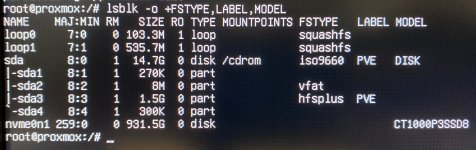
I'm trying to install Proxmox VE 9 on my new home lab server (Minisforum MS-A2), but the installer doesn't recognize the SSD MNVe (Hikvision G4000E PCIe 4.0 NVMe SSD) that I'd like to use. I've conducted multiple tests (see attached picture) and attempted various solutions suggested for issues with Linux not detecting or recognizing an NVMe SSD, yet none of them worked.
At this point, I'm seeking assistance from the community. Has anyone encountered a similar issue and managed to resolve it?
P.S. Before, I had another home server (Minisforum MS-01) where these two Hikvision G4000E PCIe 4.0 NVMe SSDs were functioning perfectly under both PVE 8 and PVE 9 installations (please see attached picture).
I'm trying to install Proxmox VE 9 on my new home lab server (Minisforum MS-A2), but the installer doesn't recognize the SSD MNVe (Hikvision G4000E PCIe 4.0 NVMe SSD) that I'd like to use. I've conducted multiple tests (see attached picture) and attempted various solutions suggested for issues with Linux not detecting or recognizing an NVMe SSD, yet none of them worked.
At this point, I'm seeking assistance from the community. Has anyone encountered a similar issue and managed to resolve it?
P.S. Before, I had another home server (Minisforum MS-01) where these two Hikvision G4000E PCIe 4.0 NVMe SSDs were functioning perfectly under both PVE 8 and PVE 9 installations (please see attached picture).