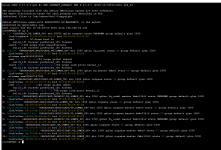
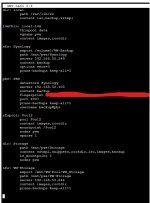
I have a 3 node cluster running on a variety of hardware. All three nodes and the truenas storage for virtual disks have 10 Gbps NICs. The separate NICs I am using for the cluster network are all only 1 Gbps.
Upon rebooting a node for a kernel update, it lost connection to the truenas NFS share. I went into truenas and added the cluster static IP as an allowed connection, and boom mounted in PVE webUI instantly.
I have run into this in the past, and have been unable to find a solution googling. Is there some way to set NIC priority, or assign the mapping of a file share to only a specific NIC? The Truenas box has 4 NVMe drives in a ZFS and I really need the 10 Gbps networking to get the virtual disks served to the hypervisor with as much bandwidth as possible.
I would be happy to post any requested configs or logs, I am just unsure of what would be needed for this.
Thanks to everyone who helps.
Upon rebooting a node for a kernel update, it lost connection to the truenas NFS share. I went into truenas and added the cluster static IP as an allowed connection, and boom mounted in PVE webUI instantly.
I have run into this in the past, and have been unable to find a solution googling. Is there some way to set NIC priority, or assign the mapping of a file share to only a specific NIC? The Truenas box has 4 NVMe drives in a ZFS and I really need the 10 Gbps networking to get the virtual disks served to the hypervisor with as much bandwidth as possible.
I would be happy to post any requested configs or logs, I am just unsure of what would be needed for this.
Thanks to everyone who helps.