

PVE freezes within first 5 minutes. No console

Giovanni

Renowned Member
Apr 1, 2009
114
12
83
Howdy,

My PVE 5.0 install has been running fine for awhile and today after I needed to reboot the system has not been stable at all.

The system boots normally, then becomes accessible via SSH. It boots the first KVM (my pfsense firewall) and I have a 120 second timer before my LXC containers kick off the boot.

Usually when my LXC container load the system hangs totally, I can't do anything at all. I have a KVM (Supermicro board) and my only recovery recourse is to hard shutdown. ZFS pools are healthy, all zfs mount points are mounted at boot.

The LXC containers seem to be crashing starting networking, only thing I have noticed is tail -f /var/log/* is that it usually crashes when it tries to bring up ovs-ctl interfaces.

I don't know what else to do at this point. I cannot get my logs or do anything at all to recover my box. Its also my internet gateway so all my home network is down. Any help would be appreciated, is there a way to stop proxmox from booting or doing the container startup??
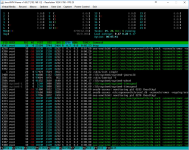
 
Booting via single user mode is the only way to get stable server.

As you can see openvswitch/db.sock has a bunch of PIDs for some reason. Not sure if its corrupted but it sounds like it, my system always crashes when it tries to bring up an LXC container on my bond0 interface.

Usually before the server dies, this is seen (tail of /var/log/*)

Code:
==> /var/log/messages <==
Aug  1 02:16:28 pve pve-manager[6455]: <root@pam> starting task UPID:pve:00002681:00004C95:598046EC:qmstart:112:root@pam:

==> /var/log/syslog <==
Aug  1 02:16:28 pve pve-manager[6455]: <root@pam> starting task UPID:pve:00002681:00004C95:598046EC:qmstart:112:root@pam:
Aug  1 02:16:28 pve pve-manager[9857]: start VM 112: UPID:pve:00002681:00004C95:598046EC:qmstart:112:root@pam:
Aug  1 02:16:28 pve systemd[1]: Started 112.scope.
Aug  1 02:16:28 pve systemd-udevd[9876]: Could not generate persistent MAC address for tap112i0: No such file or directory
Aug  1 02:16:29 pve ovs-vsctl: ovs|00001|vsctl|INFO|Called as /usr/bin/ovs-vsctl del-port tap112i0
Aug  1 02:16:29 pve ovs-vsctl: ovs|00002|db_ctl_base|ERR|no port named tap112i0
Aug  1 02:16:29 pve ovs-vsctl: ovs|00001|vsctl|INFO|Called as /usr/bin/ovs-vsctl del-port fwln112i0
Aug  1 02:16:29 pve ovs-vsctl: ovs|00002|db_ctl_base|ERR|no port named fwln112i0
Aug  1 02:16:29 pve ovs-vsctl: ovs|00001|vsctl|INFO|Called as /usr/bin/ovs-vsctl add-port vmbr2 tap112i0 tag=666

==> /var/log/daemon.log <==
Aug  1 02:16:33 pve systemd[1]: Started PVE VM Manager.
Aug  1 02:16:33 pve systemd[1]: Reached target Multi-User System.
Aug  1 02:16:33 pve systemd[1]: Reached target Graphical Interface.
Aug  1 02:16:33 pve systemd[1]: Starting Update UTMP about System Runlevel Changes...
Aug  1 02:16:33 pve systemd[1]: Started Update UTMP about System Runlevel Changes.
Aug  1 02:16:33 pve systemd[1]: Startup finished in 31.816s (kernel) + 2min 49.269s (userspace) = 3min 21.086s.

Here is the config for the network /etc/network/interfaces
Code:
auto lo
iface lo inet loopback

iface eno1 inet manual

iface eno2 inet manual

auto enp2s0f0
iface enp2s0f0 inet manual

auto enp2s0f1
iface enp2s0f1 inet manual

allow-vmbr2 bond0
iface bond0 inet manual
        ovs_bonds enp2s0f0 enp2s0f1
        ovs_type OVSBond
        ovs_bridge vmbr2
        ovs_options bond_mode=balance-slb

auto vmbr0
iface vmbr0 inet static
        address  192.168.1.2
        netmask  255.255.255.0
        gateway  192.168.1.1
        bridge_ports eno1
        bridge_stp off
        bridge_fd 0
#ddwrt

auto vmbr2
iface vmbr2 inet manual
        ovs_type OVSBridge
        ovs_ports bond0
#LAN bridge

auto vmbr1
iface vmbr1 inet manual
        bridge_ports eno2
        bridge_stp off
        bridge_fd 0
#WAN bridge

# ip link
Code:
root@pve:~# ip link
1: lo: <LOOPBACK,UP,LOWER_UP> mtu 65536 qdisc noqueue state UNKNOWN mode DEFAULT group default qlen 1000
    link/loopback 00:00:00:00:00:00 brd 00:00:00:00:00:00
2: eno1: <BROADCAST,MULTICAST,UP,LOWER_UP> mtu 1500 qdisc mq master vmbr0 state UP mode DEFAULT group default qlen 1000
    link/ether ac:1f:6b:01:60:5c brd ff:ff:ff:ff:ff:ff
3: enp2s0f0: <NO-CARRIER,BROADCAST,MULTICAST,UP> mtu 1500 qdisc pfifo_fast master ovs-system state DOWN mode DEFAULT group default qlen 1000
    link/ether 00:26:55:d9:34:7e brd ff:ff:ff:ff:ff:ff
4: eno2: <NO-CARRIER,BROADCAST,MULTICAST,UP> mtu 1500 qdisc mq master vmbr1 state DOWN mode DEFAULT group default qlen 1000
    link/ether ac:1f:6b:01:60:5d brd ff:ff:ff:ff:ff:ff
5: enp2s0f1: <NO-CARRIER,BROADCAST,MULTICAST,UP> mtu 1500 qdisc pfifo_fast master ovs-system state DOWN mode DEFAULT group default qlen 1000
    link/ether 00:26:55:d9:34:7f brd ff:ff:ff:ff:ff:ff
6: vmbr0: <BROADCAST,MULTICAST,UP,LOWER_UP> mtu 1500 qdisc noqueue state UP mode DEFAULT group default qlen 1000
    link/ether ac:1f:6b:01:60:5c brd ff:ff:ff:ff:ff:ff
7: vmbr1: <NO-CARRIER,BROADCAST,MULTICAST,UP> mtu 1500 qdisc noqueue state DOWN mode DEFAULT group default qlen 1000
    link/ether ac:1f:6b:01:60:5d brd ff:ff:ff:ff:ff:ff
8: ovs-system: <BROADCAST,MULTICAST> mtu 1500 qdisc noop state DOWN mode DEFAULT group default qlen 1000
    link/ether 96:6b:42:11:16:af brd ff:ff:ff:ff:ff:ff
9: vmbr2: <BROADCAST,MULTICAST,UP,LOWER_UP> mtu 1500 qdisc noqueue state UNKNOWN mode DEFAULT group default qlen 1000
    link/ether 00:26:55:d9:34:7e brd ff:ff:ff:ff:ff:ff
10: bond0: <BROADCAST,MULTICAST,UP,LOWER_UP> mtu 1500 qdisc noqueue state UNKNOWN mode DEFAULT group default qlen 1000
    link/ether fa:24:b2:61:2b:c8 brd ff:ff:ff:ff:ff:ff

ovs
Code:
root@pve:~# ovs-vsctl show
914c00d8-e724-4f9e-9961-8e54ce745523
    Bridge "vmbr2"
        Port "vmbr2"
            Interface "vmbr2"
                type: internal
        Port "bond0"
            Interface "enp2s0f0"
            Interface "enp2s0f1"
    ovs_version: "2.7.0"
 

Attachments

  • proxmox.PNG
    proxmox.PNG
    750.8 KB · Views: 3