It was pretty roller coaster for installing Windows Server 2025 on 9.1.1
Latest ISO won't boot, and eventually the evaluation ISO works! I almost wanted to use the thumb drive given by Microsoft because i also can't find the RTM ISO link. This seems to be a very common issue reported globally.
I am using SSD for this setup, so the wear of the SSD is quite a concerned. My skill is very rusty because the last setup I did was back to 2008 and I was also using SSD (back then nobody dare to use consumer SSD but I went ahead with calculated risk, the servers last 10yr).....
Everything was finally installed, then additional installation for Guest Agent after the virtio disc installation file was installed. Disabled Dfrag from Task Schedular if not the memory is always running at 24% at idling mode. Windows Server 2025 was tyring to do all kind of "act smart" intelligent thingy although i turned on things like SSD, NUMA etc at the disk level settings in Proxmox VE.
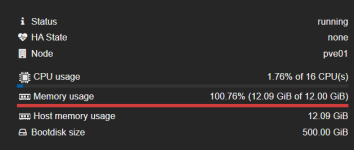
Memory usage was being reported at 100.74% consistently at the summary but within the Windows console itself, anti malware is taking about 200-250MB ram consistently all the time. I am yet to resolve this, is it a bug? Memory of the host is 16GB and i assigned 12GB to the VM. No other VMs are hosted at the moment.
We are going to install an accounting system that link to multiple external locations and observe the performance. I will share more later. At the moment, the memory "bug" issue is not perfect but it seems not OK for the moment. Do share with me if you know how to get rid of the 100.74% memory usage at the PVE summary.
Here are the VM settings for your reference in case you are going to setup similar one as mine:
Latest ISO won't boot, and eventually the evaluation ISO works! I almost wanted to use the thumb drive given by Microsoft because i also can't find the RTM ISO link. This seems to be a very common issue reported globally.
I am using SSD for this setup, so the wear of the SSD is quite a concerned. My skill is very rusty because the last setup I did was back to 2008 and I was also using SSD (back then nobody dare to use consumer SSD but I went ahead with calculated risk, the servers last 10yr).....
Everything was finally installed, then additional installation for Guest Agent after the virtio disc installation file was installed. Disabled Dfrag from Task Schedular if not the memory is always running at 24% at idling mode. Windows Server 2025 was tyring to do all kind of "act smart" intelligent thingy although i turned on things like SSD, NUMA etc at the disk level settings in Proxmox VE.
Memory usage was being reported at 100.74% consistently at the summary but within the Windows console itself, anti malware is taking about 200-250MB ram consistently all the time. I am yet to resolve this, is it a bug? Memory of the host is 16GB and i assigned 12GB to the VM. No other VMs are hosted at the moment.
We are going to install an accounting system that link to multiple external locations and observe the performance. I will share more later. At the moment, the memory "bug" issue is not perfect but it seems not OK for the moment. Do share with me if you know how to get rid of the 100.74% memory usage at the PVE summary.
Here are the VM settings for your reference in case you are going to setup similar one as mine:
️ Proxmox Hardware Settings
- BIOS: OVMF (UEFI) — Required for Windows Server 2025.
- Machine: q35 — Provides the modern PCIe bus architecture needed for high performance.
- Processors: Type: x86-64-v3 — The optimal modern standard that provides high performance (AVX/AVX2 support) while maintaining the ability to migrate between different physical servers if needed. NUMA Enabled
- Memory: Fixed (No Ballooning) — Set Minimum and Maximum to the same value (e.g., 16384 MiB) to prevent the "100% RAM" freeze.
- Hard Disk: VirtIO Block or SCSI with Discard and SSD Emulation checked. Discard & IOThread enabled.
- Network: VirtIO (paravirtualized) with Multiqueue set to the number of CPU cores.
Installation & Boot Settings
- Boot Order: ISO/DVD at the top (#1) and enabled.
- Secure Boot: Disabled in the BIOS (ESC menu) if the ISO fails to boot initially.
- Manual Boot: Use the Boot From File method (EFI > BOOT > BOOTX64.EFI) if the "Press any key" prompt is missed.
- Drivers: Always "Load Driver" during setup using the VirtIO-Win ISO (vioscsi > 2k25 > amd64).
Post-Installation "Must-Dos"
- Guest Agent: Install qemu-ga-x86_64.msi immediately to fix memory reporting and shutdown commands.
- Defrag: Disable the "Scheduled Optimization" task; Proxmox and the physical SSD handle this better.