

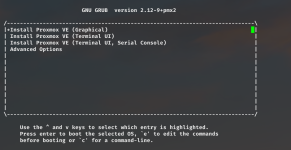
We have a number of OCP servers, specifically Quanta Leopard ORv2-DDR4, that we're trying to install PVE on. The issue that we're having is that the servers don't have any sort of graphical console whatsoever. The only console access is via Serial over LAN through the IPMI interface. The servers will boot off a PVE installation USB drive, and I can get to the Grub boot menu, but the server won't boot into any of the "Install Proxmox VE" options. I've tried Graphical, Terminal UI and Terminal UI, Serial Console. Each option starts to boot, but nothing is output after "Loading initial ramdisk..."
We had similar issues installing VMware ESXi on these servers in the past, and we had to make a custom ISO that caused the ESXi installation to boot using a serial interface using a 115200 BAUD rate.
I don't know if there's a similar option we can use for Proxmox VE as well. I went into Advanced Options in Grub, but I can't see anything that might help, except maybe the Automated option.
Initial Grub screen:
No output after this:

We had similar issues installing VMware ESXi on these servers in the past, and we had to make a custom ISO that caused the ESXi installation to boot using a serial interface using a 115200 BAUD rate.
I don't know if there's a similar option we can use for Proxmox VE as well. I went into Advanced Options in Grub, but I can't see anything that might help, except maybe the Automated option.
Initial Grub screen:
No output after this:
