Proxmox VE 9 NFS mount options to NetApp Ontap volumes

ghandalf

New Member
Mar 26, 2025
12
2
3
Hi,

I'm currently setting up a Proxmox cluster and I want to use the NFS volumes from my NetApp cluster.

I wanted to ask the community about their experience with NetApp and Proxmox using NFS shares.

I have used previously ovirt and there I was using NFS v3 for nearly over a decade now and I never had issues with it. Especially NetApp head failures or upgrades and therefore also head fail-overs never have caused any VM outages and I never had a VM pausing.

In ovirt, the volumes have been mounted with this options:
Code:
nfs-root-01:/oVirt_DC_nfs_root_01 /rhev/data-center/mnt/nfs-root-01:_oVirt__DC__nfs__root__01 nfs rw,relatime,vers=3,rsize=65536,wsize=65536,namlen=255,soft,nolock,nosharecache,proto=tcp,timeo=600,retrans=6,sec=sys,mountaddr=172.16.4.3,mountvers=3,mountport=635,mountproto=udp,local_lock=all,addr=172.16.4.3 0 0

-> oVirt was using soft as mount options, as there was also a special service running (sanlock -> yes was also in use for NFS), for Proxmox, I would use hard option.

When I mount a NFS volume with version 3 on Proxmox, it looks like this:
Code:
nfs-root-01:/pve_DC_nfs_root_01 /mnt/pve/nfs-v3-root-01 nfs rw,relatime,vers=3,rsize=65536,wsize=65536,namlen=255,hard,proto=tcp,timeo=600,retrans=2,sec=sys,mountaddr=172.16.4.3,mountvers=3,mountport=635,mountproto=udp,local_lock=none,addr=172.16.4.3 0 0

It is similar, but some options are still different and now I don't know, if I should use them also with Proxmox or not.

Experience from other users would be great here, as I have no experience with Proxmox and NetApp NFS shares... and I don't want to find it out the hard way, when there is a NetApp issue and then all VMs will go in pause state or so...

Just in case -> there is no other storage option available -> no iSCIS and no ceph...

Best regards,
Florian Schmid
 
  • Like
Reactions: waltar
As seen you use the netapp for the vm images so why don't use nfs v4.2 ? Most nfs options are default and not defined at mount time but I would take nconnect in your /etc/pve/storage.cfg with setting on depending on your network bandwitdh too.
Wondering about that small rsize+wsize settings, do you set them ?
 
Hello Waltar,

I had serious issues in the past with NFS v4.1, that's why I still use NFS v3 and in NFS v3, rsize=65536,wsize=65536 is maximum.

Do you also use NetApp and have you experience with fail-overs and NFS v4.2?
 
We support couple of netapp's and other ha-nfs systems but none of them is used at a pve cluster as there we just have single nfs-server with v4.2.
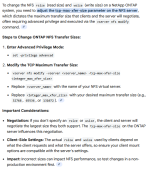
Netapp is able to do 4.2 too and there is no limit of rsize/wsize=65536 for nfs v3 as even have fileservers coupled by 10Gbit with v3 and rsize/wsize=1048576. "65536" is the default client auto-negotiate max on ontap but not the max ontap support. 1762434795134.png
 
Last edited:
We use netapp NFS 4.2 shares with pNFS to get 8 connections in parallel.

Code:
nfs: Storage41
    export /Storage1
    path /mnt/pve/Storage41
    server svm4-data
    content import,images
    options max_connect=16,sec=sys,nconnect=8,vers=4.2

Together with this sysctl property:
Code:
sunrpc.tcp_max_slot_table_entries = 128
... taken from https://www.suse.com/de-de/support/kb/doc/?id=000019281

Resulting in this parallel connections:
Code:
# ss -n | grep 192.168.2.8
tcp   ESTAB 0      0                  192.168.2.2:1010          192.168.2.8:2049    
tcp   ESTAB 0      0                  192.168.2.2:949           192.168.2.8:2049    
tcp   ESTAB 0      0                  192.168.2.2:792           192.168.2.8:2049    
tcp   ESTAB 0      0                  192.168.2.2:868           192.168.2.8:2049    
tcp   ESTAB 0      0                  192.168.2.2:958           192.168.2.8:2049    
tcp   ESTAB 0      0                  192.168.2.2:929           192.168.2.8:2049    
tcp   ESTAB 0      0                  192.168.2.2:1021          192.168.2.8:2049    
tcp   ESTAB 0      0                  192.168.2.2:799           192.168.2.8:2049
 
  • Like
Reactions: ghandalf
Parallel nfs for random I/O of pve images ... how does it makes sense to split even small I/O this way ?
 
Hi,

thank you very much for your answers!

@beckerr
how is Proxmox behaving on NetApp updates, when a head fail over is happening?
This is my biggest concern against NFS v4.1 and v4.2, that the timeout is too long and causing the VMs to pause.
 
Yes, failover (and giveback, of course) are interesting points.

Intuitively, one would assume that multipathing with multiple NFS4 sessions to different nodes could be a solution here.
And I think the correct keyword for this is “NFS trunking.”
https://docs.netapp.com/us-en/ontap/nfs-trunking/index.html#how-to-use-trunking

Although NFS trunking can distribute connections across multiple LIFs, all LIFs must be located on the same(!) node. LIFs that are not “at home” do not count, too. This option therefore does not appear to be able to speed up node failover.

In my opinion, when moving a LIF to another node, you should expect an interruption of 45 to 90 seconds until the affected NFS4 sessions are fully restored. NFS3 is definitely faster here because it is stateless, even when proto=tcp is used.

IMHO, this could be mitigated somewhat by temporarily moving important VMs to unaffected storage or manually switching VMs that are in keepalive groups before one of the VMs briefly stalls.
 
Hi,

thank you very much for your answer.

I have tested today a lot with nconnect and I will use nconnect=4 with NFSv3.
I have asked a lot of stuff also on NetApp mailing list and got some nice feedback, too.

Actually, after checking a lot of NFS related documentation from NetApp and from here, I came to the conclusion, that NFSv3 is still the best solution in terms of stability in case of a fail-over on NetApp side.
Together with nconnect, we will gain a huge performance increase and don't need NFSv4.x

Also, rsize/wsize was mentioned, I have checked our NetApp Grafana dashboard and there the block size used by our VMs are not even near 64k, so an increase here should also not make a lot of change.
Even in the NetApp NFS best practice, I have seen that the latency can increase a lot with higher rsize/wsize, so I will stay here also on 64k.

This is now my config for all my NetApp volumes on Proxmox:
Code:
pvesm add nfs nfs-v3-data-02 --server nfs-data-02 --export /pve_DC_nfs_data_02 --path /mnt/pve/nfs-v3-data-02 --content import,snippets,images --options vers=3,nconnect=4 --prune-backups keep-all=1

Best regards,
Flo
 
  • Like
Reactions: waltar