[SOLVED] Proxmox VE 8.3 - HBA passthrough issue on R730xd

Wuruwhi

New Member
Dec 24, 2024
4
1
3
Hi there,

I know there are already many threads about HBA passthrough issues on this forum and I went through a lot of them trying out a few suggested solutions. I might have missed one that would fix my problem.

Goal:
Being able to pass the HBA card directly to a TrueNAS VM to handle my storage.​

Setup:
Dell PowerEdge R730xd with a couple of HDDs in the front and 2 SSDs in the back.​
HBA 330 card in IT mode​
Proxmox 8.3 installed on one of the SSDs formatted with ext4: pve-manager/8.3.0/c1689ccb1065a83b (running kernel: 6.8.12-4-pve)
Start is using Grub.​
Code:
BootCurrent: 0006
BootOrder: 0006,0001,0002
Boot0000* BRCM MBA Slot 0100 v21.6.3    BBS(128,BRCM MBA Slot 0100 v21.6.3,0x0)................b...........G.........................................................A....................B.R.C.M. .M.B.A. .S.l.o.t. .0.1.0.0. .v.2.1...6...3...
Boot0001* Integrated NIC 1 Port 1 Partition 1   VenHw(3a191845-5f86-4e78-8fce-c4cff59f9daa)
Boot0002* Cruzer Blade  PciRoot(0x0)/Pci(0x1a,0x0)/USB(0,0)/USB(4,0)/USB(0,0)
Boot0006* proxmox       HD(2,GPT,70a2fe31-e315-465c-a8f1-0a3f2e1ddf93,0x800,0x200000)/File(\EFI\proxmox\shimx64.efi)

IOMMU is enabled in the R730xd bios:​
Code:
root@prox:~# dmesg | grep -e DMAR -e IOMMU
[    0.009741] ACPI: DMAR 0x000000007BAFE000 0000F8 (v01 DELL   PE_SC3   00000001 DELL 00000001)
[    0.009777] ACPI: Reserving DMAR table memory at [mem 0x7bafe000-0x7bafe0f7]
[    0.934109] DMAR: Host address width 46
[    0.934110] DMAR: DRHD base: 0x000000fbffc000 flags: 0x0
[    0.934120] DMAR: dmar0: reg_base_addr fbffc000 ver 1:0 cap 8d2078c106f0466 ecap f020df
[    0.934123] DMAR: DRHD base: 0x000000c7ffc000 flags: 0x1
[    0.934128] DMAR: dmar1: reg_base_addr c7ffc000 ver 1:0 cap 8d2078c106f0466 ecap f020df
[    0.934130] DMAR: ATSR flags: 0x0
[    0.934132] DMAR: ATSR flags: 0x0
[    0.934134] DMAR-IR: IOAPIC id 10 under DRHD base  0xfbffc000 IOMMU 0
[    0.934136] DMAR-IR: IOAPIC id 8 under DRHD base  0xc7ffc000 IOMMU 1
[    0.934138] DMAR-IR: IOAPIC id 9 under DRHD base  0xc7ffc000 IOMMU 1
[    0.934139] DMAR-IR: HPET id 0 under DRHD base 0xc7ffc000
[    0.934140] DMAR-IR: x2apic is disabled because BIOS sets x2apic opt out bit.
[    0.934141] DMAR-IR: Use 'intremap=no_x2apic_optout' to override the BIOS setting.
[    0.934945] DMAR-IR: Enabled IRQ remapping in xapic mode
[    1.473513] DMAR: No RMRR found
[    1.473515] DMAR: No SATC found
[    1.473518] DMAR: dmar0: Using Queued invalidation
[    1.473523] DMAR: dmar1: Using Queued invalidation
[    1.556478] DMAR: Intel(R) Virtualization Technology for Directed I/O
root@prox:~# dmesg | grep 'remapping'
[    0.934945] DMAR-IR: Enabled IRQ remapping in xapic mode
[    0.934946] x2apic: IRQ remapping doesn't support X2APIC mode

Running lspci -nnk shows the following output:
Code:
03:00.0 Serial Attached SCSI controller [0107]: Broadcom / LSI SAS3008 PCI-Express Fusion-MPT SAS-3 [1000:0097] (rev 02)
        DeviceName: Integrated RAID
        Subsystem: Dell HBA330 Mini [1028:1f53]
        Kernel driver in use: mpt3sas
        Kernel modules: mpt3sas

As shown, the mpt3sas driver is loaded and the HBA card is being used by Proxmox, so if I try to pass it to a VM it crashes Proxmox as it cannot being used both by the host and the VM.

I tried to pass it to vfio.conf in the /etc/modprobe.d/ directory with the two following lines:
Code:
options vfio-pci ids=1000:0097
softdep mpt3sas pre: vfio-pci

Then running update-initramfs -u and rebooting. Proxmox did not like it and cannot successfully boot anymore.

Question:
How to prevent Proxmox from needing the HBA card but still booting from the SSD?
My fear is that the backplane with the SSDs uses the HBA card.​

Happy Holidays to all. Cheers,
 
Last edited:
Is there a way to tell which bays are connected to the HBA card and also prevent some, like the 2 at the back, to be going through it?
 
Following as I am about to start exactly the same install, Dell r730xd with HBA330 and boot SSDs in the back. I have the goal to pass through the HBA to a VM. I haven't flashed to IT mode as I thought the HBA330 was a true HBA card. What steps did you take to flash to IT mode, and do you think it is necessary for the HBA330?

I'll be installing this in 1-2 days, will let you know how it goes.
 
  • Like
Reactions: Wuruwhi
Trying to find out how the R730xd rear flex bay is connected - looks like it is normally connected through the front backplane. Here is advice from a user who needed to install a separate PCI storage controller in order to boot from the rear drives: https://www.dell.com/community/en/c...a8de771961?commentId=647fa23ef4ccf8a8de7b6e3b

Also a post confirming that the rear drives use the HBA card, and outlining some other options if you want to pass through the entire HBA card to a VM on Proxmox:
https://www.reddit.com/r/homelab/comments/1d3egxh/booting_r730xd_from_something_other_than_the/
 
Last edited:
  • Like
Reactions: Wuruwhi
This looks promising: using a cheap mini SAS cable to connect the rear flex bay drives directly to the motherboard for use as boot drives. This would then separate those 2 drives from the HBA card, which could then be passed through to the TrueNAS VM. Apparently the server would complain about misconfiguration on boot and require a keystroke, but the BIOS can be set to ignore that error.

See discussion at: https://www.reddit.com/r/homelab/comments/13ejva2/boot_drive_for_poweredge_r730/ including the link for a suitable cable.

I would try this but I'm in a remote part of West Africa and it's not too easy to order things off Amazon! Will take me a month or 2 to get a cable to try. The supplied cable already in the system has a 90 degree bend making it impossible to plug into the motherboard site.
 
  • Like
Reactions: Wuruwhi
Trying to find out how the R730xd rear flex bay is connected - looks like it is normally connected through the front backplane. Here is advice from a user who needed to install a separate PCI storage controller in order to boot from the rear drives: https://www.dell.com/community/en/c...a8de771961?commentId=647fa23ef4ccf8a8de7b6e3b

Also a post confirming that the rear drives use the HBA card, and outlining some other options if you want to pass through the entire HBA card to a VM on Proxmox:
https://www.reddit.com/r/homelab/comments/1d3egxh/booting_r730xd_from_something_other_than_the/
Right after replying yesterday, I actually opened up the server to follow where the expansion bay SAS cable was leading to and, as expected and also as mentioned by you, it does go to the HBA card.

I went through the Reddit and Dell link you shared. Interesting read, thank you.

I purchased the SAS-to-SAS cable that was referenced, and added a SAS-to-SATA cable as well. Sadly, I won’t receive them before the 31st.
First test will be:
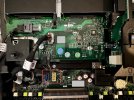
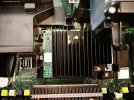
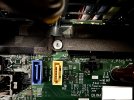
SAS-to-SAS from expansion bay to the SAS port on the motherboard sitting next to the HBA card (see attached photo).​

If not successful, I’ll try:
SAS-to-SATA from expansion bay to the SATA ports on the motherboard sitting just below the expansion bay card (see attached photo).​

Yesterday, I tried the LightLuck solution from his thread, but to no avail.

I’ll report back here with my results once I have received the cables.
 

Attachments

  • IMG_3224.jpeg
    IMG_3224.jpeg
    982.1 KB · Views: 16
  • IMG_3231.jpeg
    IMG_3231.jpeg
    939.1 KB · Views: 16
  • IMG_3229.jpeg
    IMG_3229.jpeg
    729.2 KB · Views: 16
Last edited:
Question:
How to prevent Proxmox from needing the HBA card but still booting from the SSD?
My fear is that the backplane with the SSDs uses the HBA card.
uhh... dont do that? How can you logically disconnect the host bus containing the system boot device from the host?

Consider the wisdom of what you're doing. If your host serves no purpose other then feeding your vm, why not just run the vm on the metal instead? Trunas can run virtualization load too...
 
uhh... dont do that? How can you logically disconnect the host bus containing the system boot device from the host?

Consider the wisdom of what you're doing. If your host serves no purpose other then feeding your vm, why not just run the vm on the metal instead? Trunas can run virtualization load too...
Thanks for pointing that out - I think it's established that we can't boot from a device connected to the host bus that we are trying to pass through to a VM. That was my initial mistake when purchasing this server as well, I had assumed wrongly that the rear drives in the R730xd would be on a separate controller.

I can't speak for OP, but my reason for wanting to use Proxmox and virtualise TrueNAS is that I have 2 other Proxmox servers, so this will act as a third server and help with cluster/quorom. I find Proxmox easier to manage VMs than TrueNAS. I had considered the option you mentioned as well - running TrueNAS on bare metal, and running a qdevice VM inside TrueNAS to act as the 3rd vote in a 3 node cluster. I might end up going with this option.
 
uhh... dont do that? How can you logically disconnect the host bus containing the system boot device from the host?

Consider the wisdom of what you're doing. If your host serves no purpose other then feeding your vm, why not just run the vm on the metal instead? Trunas can run virtualization load too...

Hey there,

@alexskysilk: For disconnecting logically the drives, I’m with you on this as well. My question was an open question out there. :)

Thanks for raising the question regarding which OS should be the baseline. It’s a fair one and I feel it’s more and more needed as TrueNAS has made good avancements in the last few years.
I currently run an old PC with Unraid and it has a few containers on it as well. Replicating this with TrueNAS would work. However the needs I have and that are behind the reason of buying the R730xd need more than what TrueNAS or Unraid can offer. (I think)

I need a reliable NAS solution to store my data but also that would be easy to move onto some other hardware in case of a server failure. TrueNAS fills this need.
I have a couple containers for running a media server and tools. Here again TrueNAS can fill that need.

Where I think it stops, it’s for VMs, I know it supports it, but I will be playing around with a few machines and setups, and I don’t feel safe enough to do it on my NAS system as this one needs stability and I don’t want to screw things up.
Moreover, that server will also be part of a cluster and the cluster is running various VMs, segregated into several networks and it’s already handled by Proxmox. The goal is to expand the cluster to give more room to the VMs in the cluster in regards to CPU and RAM, hence the R730xd, and as an added bonus it can host my NAS as well giving it more room compared to my old PC who is maxed out.
Since the test VMs will be in their own bubble, it won't interfere with what is already running in the cluster and I do not know enough about TrueNAS' management of VM to feel safe it won't impact the system as a whole.

It’s fair to say that I am more used to hypervisors (especially ESXi) than TrueNAS. And I do not know if TrueNAS can be deployed in a cluster fashion way to handle VMs divided into several networks (bubbles of a couple VMs) nor if it allows VMs to move from one server to another when ressources are needed.
Though I’d be interested in testing it out if it can, but since the actual cluster is running Proxmox, it would easier for now to have Proxmox as a base for this server.

If you have more knowledge to share, go for it. Always happy to learn more. :)

———

As for my current issue, I couldn’t wait for the cable to arrive :rolleyes:, so I took the one already in and rerouted it to the port on the motherboard directly. It’s a bit tight because of the 90° connector, but it will do until the new cable arrives.
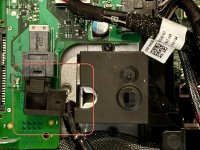
And… it does what I was looking for. Now the expansion bay is handled by the motherboard directly and not by the HBA, and passing the HBA through to a VM works like a charm and without crashing the host system.
I really thought it was to do with a misconfiguration on my part and not a hardware problem/easy fix, otherwise I would have opened it up earlier instead of trying to modify config files.

@andy.linton, hopefully that will do the trick for you as well.
 

Attachments

  • IMG_3237.jpeg
    IMG_3237.jpeg
    626.9 KB · Views: 13
Last edited:
  • Like
Reactions: andy.linton
I need a reliable NAS solution to store my data but also that would be easy to move onto some other hardware in case of a server failure.
but I will be playing around with a few machines and setups, and I don’t feel safe enough to do it on my NAS system as this one needs stability and I don’t want to screw things up.
You really need to think through what you're after- those two ideas are in direct contradiction. If you're labbing/learning, it doesnt really matter which way you go, but if the intent is to have a stable platform for your applications, consider getting another environment for the latter. Dont experiment on your production environment or you wont really get any utility from it. This applies regardless of which underlying OS you choose for the host.

It’s fair to say that I am more used to hypervisors (especially ESXi) than TrueNAS.
both PVE and Truenas use KVM. insofar as the capabilities of virtualization are concerned that's the same.
Moreover, that server will also be part of a cluster and the cluster is running various VMs, segregated into several networks and it’s already handled by Proxmox.
Understand that the needs/design criteria of a cluster are different from your stated use case. Dont look at the fulfillment of your current plan to be a dependency of a future cluster since any storage decisions you make now will likely not be ideal for cluster use anyway. You can deploy your current NAS with truenas safely, knowing that if/when you choose to deploy a cluster you'd end up keeping your current NAS as a backup device, or reconfigure it for use as an iscsi/nfs target. It would not make sense to try to reconfigure it as a cluster member unless you intend to redeploy it as a ceph node- in which case everything would have to come off of it anyway.
but since the actual cluster is running Proxmox, it would easier for now to have Proxmox as a base for this server.
You know you can run pve nodes as virtual machines....
 
  • Like
Reactions: Wuruwhi