Proxmox Unresponsive due to Full Storage Space

infinitegsltd

New Member
Mar 15, 2026
4
0
1
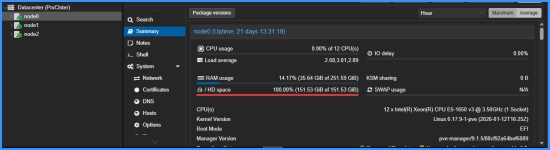
Please can someone help me to resolve this, the storage space on some of my nodes are full and all efforts to delete some logs/ files in order to rectify and find a way to add more storage is not working, the deletion simply comes up with a notification saying "Cannot remove image, a guest with VMID '2104' exists! You can delete the image from the guest's hardware pane"

I will greatly appreciate any help in getting this resolved. Thank you.

1773615164671.png

1773614921259.png
 
Wouldn't it be best to delete the VM with ID 2104?
There are some contents I need on that and I am not sure If I will be able to restore after deletion. I tried migrating to another Node but it is not working which I find strange, I am looking to delete some ISO images and move some of the VMs to another Node but none of that is working at present as well...
 
Last edited:
Try via SSH. Find used space like this
Bash:
du -shc /* | sort -h
# Go deeper
du -shc /bigdirectory/* | sort -h
# And so on...
du -shc /bigdirectory/.../* | sort -h
If you share some information about your storage I can give you more fitting commands. Let's start with
Bash:
lsblk -o+FSTYPE,LABEL,MODEL
pvesm list local
 
the deletion simply comes up with a notification saying "Cannot remove image, a guest with VMID '2104' exists! You can delete the image from the guest's hardware pane"
This means that you are trying to delete a Virtual Disk/Image that matches the index ID of an existing VM. If you cannot see this disk in the VM hardware platform then you need to scan the disk in: qm disk rescan (man qm). Or, if you insist doing doing it manually, rename the disk to any other name and delete it.


Blockbridge : Ultra low latency all-NVME shared storage for Proxmox - https://www.blockbridge.com/proxmox
 
  • Like
Reactions: infinitegsltd
Try via SSH. Find used space like this
Bash:
du -shc /* | sort -h
# Go deeper
du -shc /bigdirectory/* | sort -h
# And so on...
du -shc /bigdirectory/.../* | sort -h
If you share some information about your storage I can give you more fitting commands. Let's start with
Bash:
lsblk -o+FSTYPE,LABEL,MODEL
pvesm list local
Ok, thank you. I am looking for a way to resolve on the Proxmox dashboard level and Shell is not working on Proxmox due to this so I will have to explore an alternative way to get it resolved.
 
This means that you are trying to delete a Virtual Disk/Image that matches the index ID of an existing VM. If you cannot see this disk in the VM hardware platform then you need to scan the disk in: qm disk rescan (man qm). Or, if you insist doing doing it manually, rename the disk to any other name and delete it.


Blockbridge : Ultra low latency all-NVME shared storage for Proxmox - https://www.blockbridge.com/proxmox
I will try this and hope it works, thank you.