

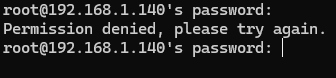
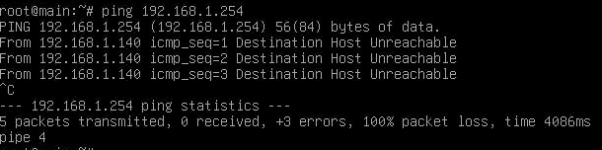
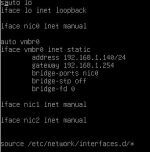
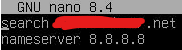
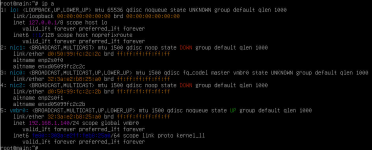
As the titles said, I've spent the last day tinkering with a brand new homelab that refuses to work with me... Essentially I have a small server running on a asrock motherboard that allows me to oob into it where I've installed Proxmox. Unfourtunatly I'm unable to connect to it from my own command console (Due to it giving a "permission denied" error even with the correct password), I'm also unable to ping any servers, local or otherwise, I'm certain I've set the right gateway to "192.168.1.254", and I have tried various different DNS solutions in order to see which one wants to work as I have a "Pi.hole" running on a seperate raspbery pi (My previous testing grounds).
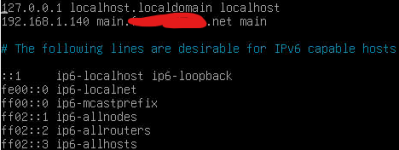
I had thought I was supposed to connect my DNS as the pi.hole's dns but when that didn't work I set it to my routers default dns, then I set it to 1.1.1.1 and 8.8.8.8 and none of that worked either, I thought maybe something was up with my domain as I had bought a domain from cloudflare and was utilising it with this server as a "main.****.net" in its hostname settings, was that perhaps incorrect? Attempting to find answers has only led to more confusion on whether I'm supposed to use the domain name there or not.
I had thought I was supposed to connect my DNS as the pi.hole's dns but when that didn't work I set it to my routers default dns, then I set it to 1.1.1.1 and 8.8.8.8 and none of that worked either, I thought maybe something was up with my domain as I had bought a domain from cloudflare and was utilising it with this server as a "main.****.net" in its hostname settings, was that perhaps incorrect? Attempting to find answers has only led to more confusion on whether I'm supposed to use the domain name there or not.
Attachments
-
 Screenshot 2026-04-25 200151.png5.7 KB · Views: 9
 -
 Screenshot 2026-04-25 200544.png36.4 KB · Views: 8
 -
 Screenshot 2026-04-25 200624.png27.5 KB · Views: 8
 -
 Screenshot 2026-04-25 200644.png26.5 KB · Views: 7
 -
 Screenshot 2026-04-25 200728.png5.2 KB · Views: 6
 -
 Screenshot 2026-04-25 200810.png135.8 KB · Views: 9


