

Proxmox not booting after pve lvm name change

alois

Member
Dec 24, 2021
3
0
21
39
Hello,

After changing the name of pve lvm in the shell with
vgrename pve pve1
And updating the name in the storage.cfg
nano /etc/pve/storage.cfg (and running systemctl try-reload-or-restart pvedaemon pveproxy pvestatd)

Proxmox wouldn't boot anymore
ALERT! /dev/mapper/pve-root does not exist. Dropping to shell!

I want to add a failed ssd (is in read only mode) with a proxmox installation on it to a proxmox test machine to recover some config files
For this I need to change the name of active installation pve lvm because cant have 2 lvms with the same name

Thank you and happy new year
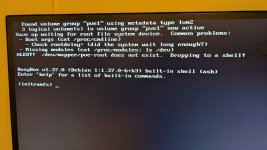
 
If you rename VG containing boot / root, you need to modify grub (or whatever mechanism you use for booting) configuration. And possibly /etc/fstab and other places.
 
When running "efibootmgr -v" I get
Boot0008* proxmox HD(2,GPT,8e487f4f-e967-470e-bd3f-18cf38e33ea7,0x800,0x200000)/File(\EFI\proxmox\shimx64.efi)

Where do I have to edit GRUB boot options, opening /etc/default/grub is not the file I need to process the name change on the boot drive, I think

When searching on google I get alot of answer about changing the boot config of VM's but I'm probably not using the correct search words..
 
Are there any hints in files in and below /boot directory?
Search for pve string.
For instance in /boot/grub2/grub.cfg
 
In /boot/grub/grub.cfg I found the bootmenu listings,

menuentry 'Proxmox VE GNU/Linux' --class proxmox --class gnu-linux --class gnu --class os $menuentry_id_option 'gnulinux-simple-11bef152-6498-4279-9002>
load_video
insmod gzio
if [ x$grub_platform = xxen ]; then insmod xzio; insmod lzopio; fi
insmod part_gpt
insmod lvm
insmod ext2
set root='lvmid/ljlR8x-btn6-g9r4-oyyE-2P9N-Zf34-RIcqgf/NSqnyB-N2e1-thbW-sO07-fUcm-WZ1l-ANJZPe'
if [ x$feature_platform_search_hint = xy ]; then
search --no-floppy --fs-uuid --set=root --hint='lvmid/ljlR8x-btn6-g9r4-oyyE-2P9N-Zf34-RIcqgf/NSqnyB-N2e1-thbW-sO07-fUcm-WZ1l-ANJZPe' 11bef15>
else
search --no-floppy --fs-uuid --set=root 11bef152-6498-4279-9002-dc19f0f70ec3
fi
echo 'Loading Linux 6.17.2-1-pve ...'
linux /boot/vmlinuz-6.17.2-1-pve root=/dev/mapper/pve-root ro quiet
echo 'Loading initial ramdisk ...'
initrd /boot/initrd.img-6.17.2-1-pve

The third line from below mentions root=/dev/mapper/pve-root
Which comes back a the boot error after changing the name of the vg containing the boot partitions
But looks to like a common name/variable, but where can I change the paths ?
/proc/cmdline gives
"BOOT_IMAGE=/boot/vmlinuz-6.17.2-1-pve root=/dev/mapper/pve-root ro quiet"

PXL_20260101_210146356.jpg
 
Last edited:
"BOOT_IMAGE=/boot/vmlinuz-6.17.2-1-pve root=/dev/mapper/pve-root ro quiet"
Try changing pve-root to pve1-root

First temporarily for one reboot - see e.g.
https://documentation.ubuntu.com/real-time/latest/how-to/modify-kernel-boot-parameters/
and it that succeeds, you can change it permanently (*), if you want (but AFAIU you only need it temporary).

(*) I'm not sure whether the proper place is /etc/default/grub or /boot/grub/grub.cfg
If the former, then after editing the file, run update-grub

Remember to make a copy of the original file before editing it, to have a backup of the (previously) working version.

Good luck! :)
 
> Proxmox wouldn't boot anymore
> ALERT! /dev/mapper/pve-root does not exist. Dropping to shell!

> I want to add a failed ssd (is in read only mode) with a proxmox installation on it to a proxmox test machine to recover some config files
For this I need to change the name of active installation pve lvm because cant have 2 lvms with the same name

You really complicated your life here.

In future, physically remove your primary PVE boot/root disk before booting into a rescue environment to recover files from the same-name lvm environment, and you won't have name conflicts.

After you recover your files from the R/O, worst case scenario (and probably the least amount of troubleshooting time involved) you might have to reinstall your primary PVE to get lvm/thin working properly again. Then redefine your storage, networking and possibly restore all LXC/VM from backups.

Personally I would set a 1.5 - 2-hour time limit / alarm, if you're still beating your head against the wall trying to get things working again at that point then I would plan to do the above.
 
Last edited: