

[SOLVED] Proxmox is not loading

demavares

New Member
Jan 13, 2026
4
2
1
Hello community. A few days ago I updated my Proxmox using `apt-get update`, but now when it restarts it gets stuck on the following screen and doesn't load:
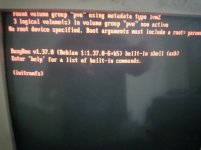
02.jpg

To get it to load, I have to restart it and press the "e" key, then go here and where it says "root=" I enter dev/dm-1, which is my hard drive, and that way I can load Proxmox.
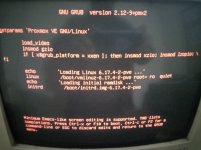
01.jpg
 
apt-get update does not make changes to the system. It only refreshes the information about available packages, so it cannot be the cause.
Glad to know that you found a work-around to boot. Maybe /etc/default/grub got corrupted (can you show that file)? What is the output of proxmox-boot-tool status?

PS: Is this an old amber CRT? Cool! The white-balance of the camera does not do it justice unfortunately.
 
  • Like
Reactions: Johannes S
My /etc/default/gru

GRUB_DEFAULT=0
GRUB_TIMEOUT=5
GRUB_DISTRIBUTOR=`( . /etc/os-release && echo ${NAME} )`
GRUB_CMDLINE_LINUX_DEFAULT="quiet"
GRUB_CMDLINE_LINUX=""
 
Your file is much smaller than mine and GRUB_DISTRIBUTOR is completely different. How did you install Proxmox and what version did you initially install? I did not see the requested output of proxmox-boot-tool status. Have you tried a proxmox-boot-tool refresh to see if that fixes the boot configuration?

EDIT: I case proxmox-boot-tool does not manage your ESP, a update-grub might help (please show the output, in CODE-tags).
 
Last edited:
Your file is much smaller than mine and GRUB_DISTRIBUTOR is completely different. How did you install Proxmox and what version did you initially install? I did not see the requested output of proxmox-boot-tool status. Have you tried a proxmox-boot-tool refresh to see if that fixes the boot configuration?

EDIT: I case proxmox-boot-tool does not manage your ESP, a update-grub might help (please show the output, in CODE-tags).
root@pve:~# proxmox-boot-tool status
Re-executing '/usr/sbin/proxmox-boot-tool' in new private mount namespace..
E: /etc/kernel/proxmox-boot-uuids does not exist.
 
I fixed it.

1. Use the command lsblk -f to locate the vfat partition.

2. Run proxmox-boot-tool init /dev/XXX (Replace /dev/XXX with your actual partition. In my case it was /dev/sda2).

3. Run proxmox-boot-tool refresh.

4. Run proxmox-boot-tool status
Re-executing '/usr/sbin/proxmox-boot-tool' in new private mount namespace..
System currently booted with legacy bios
8A44-F6FB is configured with: grub (versions: 6.17.4-2-pve)
 
Last edited: