

Proxmox becomes non responsive during clone process, very slow cloning and High IO delay

lucacraft89

New Member
Mar 10, 2024
9
2
3
Hi, when I clone any vm or from a template not only it takes around 5 hours for a 20GB disk it also locks up the rest in its entirety, from the UI to the other VMs, i am using a crucial BX500 2TB SSD NTFS formatted because I am coming from Hyper-V but the OS it's on a separate SSD in addition to all of this I am getting high IO delay. I'll put some more info below.

/etc/fstab:
Code:
/dev/pve/root / ext4 errors=remount-ro 0 1
/dev/pve/swap none swap sw 0 0
proc /proc proc defaults 0 0
UUID=9C3A01853A015E20 /crucial ntfs3 defaults,uid=1000,gid=1000,force 0 0

This is also weird because testing the drive using dd I am getting at least 120 MB/s for writes

Specs:
HP ProLiant DL380 G7
HP Smart Array Card P410i
2x Intel(R) Xeon(R) CPU X5650 @ 2.67GHz
144GB DDR3 ECC RAM

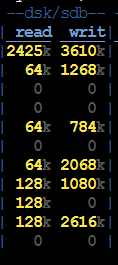
This is the Disk Usage during the clone and never goes above 4096 both for writes and reads and occasionally it all goes to 0 for at least 4 minutes:

Command: dstat -D sdb
1710074042521.png

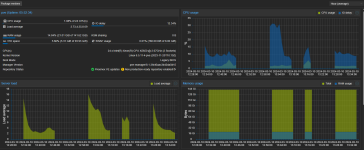
Also as a plus these are the graphs: (I don't think that they are supposed to look like this)1710074294557.png
 
Last edited:
> i am using a crucial BX500 2TB SSD NTFS formatted because I am coming from Hyper-V

There's your problem. BX500 drive with a non-native filesystem.

https://forums.tomshardware.com/threads/ssd-crucical-bx500-super-slow.3728770/

https://forums.anandtech.com/threads/crucial-bx500-slowdown.2606861/


MX500 drives are more "pro" level, the Bx500 are more like desktop-rated and not as good.
Using ntfs-3g is also not ideal as it is a FUSE filesystem and quite a bit slower than something native like ext4 or XFS.

https://en.wikipedia.org/wiki/NTFS-3G
 
  • Like
Reactions: leesteken
Thanks for the reply, i suspected when buying the SSD that mx500 would be faster but did not think much of it, also you are right that NFS is quite trash especially on Linux but i didn't want to lose any data and I do not possession of another big SSD for the transfer, any solution like converting NFS to ext4 but i have no idea.
 
any solution like converting NFS to ext4
If you are talking about virtual disks of VMs: you can move a virtual disk from one storage to any other Datastore via: "<vm> --> Hardware --> <select a disk> --> top drop down menu 'Disk Action': Move storage".
 
  • Like
Reactions: Kingneutron
No i wanted to convert the physicsl disk's filesystem without data loss
Oh! This is like building a new house without tearing it down first - and while leaving the furniture in place ;-)

Classic rotating-rust disks are really cheap nowadays - as no one wants to use them anymore. Make a backup first...
 
  • Like
Reactions: Kingneutron
Nice take for explaining, i mean you are right so in my case i'll have to make a copy of the disk on another one, wipe and format ext4 the ssd and copy evertything back over??

if i have to copy is a cp -r * of the root of the disk and same for restoring??
 
if i have to copy is a cp -r * of the root of the disk and same for restoring??
That I can not tell.

NTFS and ext4 (or any other file system) may have different semantics/capabilities. For example the concept of an owner and access rights is implemented completely differently! Another example: NTFS has "alternate datastreams" which have no direct equivalent on ext4, but these are not often used.

But a reality check tells me that a "cp -a" would probably fit your needs. (Your "-r" does not copy hidden files.) Please read man cp.

Personally I would tend to use rsync -a or rely on good old tar.
 
  • Like
Reactions: Kingneutron
Midnight Commander is quite useful for copying files and will try to keep permissions.

After the copy you will likely have to chmod/chown everything on your ext4 destination tho
 
  • Like
Reactions: UdoB