Hi everyone,
I’m having an issue with the performance of the entire environment. The biggest problems are with Windows VMs, and users are complaining a lot. To be completely honest, I’m using the Community version here at the customer’s site, but the issues already existed on Proxmox 8.2, so we upgraded to 8.4.16.
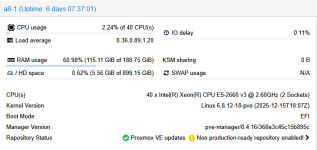
Proxmox is running Ceph version 18.2.7, and I’m using 4 physical servers, a 10G network, and MTU newly set to 9000/9216 everywhere.
The disks are Kingston 1.92 TB SSDs, server edition.
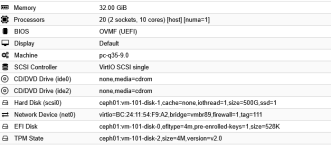
On the VMs, I’ve tried various settings, but the disk performance is still slow.
The winsat disk command looks like this:
Windows System Assessment Tool
> Running: Feature Enumeration ''
> Run Time 00:00:00.00
> Running: Storage Assessment '-ran -read -n 0'
> Run Time 00:00:00.66
> Running: Storage Assessment '-seq -read -n 0'
> Run Time 00:00:03.30
> Running: Storage Assessment '-seq -write -drive C:'
> Run Time 00:00:01.81
> Running: Storage Assessment '-flush -drive C: -seq'
> Run Time 00:00:04.78
> Running: Storage Assessment '-flush -drive C: -ran'
> Run Time 00:00:00.89
> Dshow Video Encode Time 0.00000 s
> Dshow Video Decode Time 0.00000 s
> Media Foundation Decode Time 0.00000 s
> Disk Random 16.0 Read 208.66 MB/s 7.8
> Disk Sequential 64.0 Read 3517.66 MB/s 9.3
> Disk Sequential 64.0 Write 1752.58 MB/s 8.9
> Average Read Time with Sequential Writes 1.946 ms 6.9
> Latency: 95th Percentile 2.398 ms 7.4
> Latency: Maximum 4.990 ms 8.5
> Average Read Time with Random Writes 0.206 ms 8.9
> Total Run Time 00:00:11.72
Now the output is better — by adjusting the configuration I achieved random read performance of 200 MB/s, whereas before it was around 85–100 MB/s. But I still think it could be better.
Before today’s last configuration change, there were very frequent health warnings — Bluestore errors or slow ops on individual OSDs. NODEs and VM config in Attach files
Any idea? Thanks
I’m having an issue with the performance of the entire environment. The biggest problems are with Windows VMs, and users are complaining a lot. To be completely honest, I’m using the Community version here at the customer’s site, but the issues already existed on Proxmox 8.2, so we upgraded to 8.4.16.
Proxmox is running Ceph version 18.2.7, and I’m using 4 physical servers, a 10G network, and MTU newly set to 9000/9216 everywhere.
The disks are Kingston 1.92 TB SSDs, server edition.
On the VMs, I’ve tried various settings, but the disk performance is still slow.
The winsat disk command looks like this:
Windows System Assessment Tool
> Running: Feature Enumeration ''
> Run Time 00:00:00.00
> Running: Storage Assessment '-ran -read -n 0'
> Run Time 00:00:00.66
> Running: Storage Assessment '-seq -read -n 0'
> Run Time 00:00:03.30
> Running: Storage Assessment '-seq -write -drive C:'
> Run Time 00:00:01.81
> Running: Storage Assessment '-flush -drive C: -seq'
> Run Time 00:00:04.78
> Running: Storage Assessment '-flush -drive C: -ran'
> Run Time 00:00:00.89
> Dshow Video Encode Time 0.00000 s
> Dshow Video Decode Time 0.00000 s
> Media Foundation Decode Time 0.00000 s
> Disk Random 16.0 Read 208.66 MB/s 7.8
> Disk Sequential 64.0 Read 3517.66 MB/s 9.3
> Disk Sequential 64.0 Write 1752.58 MB/s 8.9
> Average Read Time with Sequential Writes 1.946 ms 6.9
> Latency: 95th Percentile 2.398 ms 7.4
> Latency: Maximum 4.990 ms 8.5
> Average Read Time with Random Writes 0.206 ms 8.9
> Total Run Time 00:00:11.72
Now the output is better — by adjusting the configuration I achieved random read performance of 200 MB/s, whereas before it was around 85–100 MB/s. But I still think it could be better.
Before today’s last configuration change, there were very frequent health warnings — Bluestore errors or slow ops on individual OSDs. NODEs and VM config in Attach files
Any idea? Thanks