Hello all,
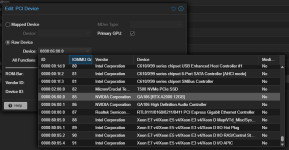
I'm having some problems while trying to passthrough the GPU to a VM, here is my IOMMU configuration and lspci, the GPU itself is the Reaper AMD Radeon™ RX 9060 XT 16GB:
IOMMU:
lspci -vv:
The GPU is splitted between two IOMMU groups: 83 and 84, no idea why, I tried to change the PCI slot, but still the device remains splitted, I also try to setup a VFIO for this device but without success, that's the configuration that I'm currently using, btw, my system supports ACS and it's enable in the BIOS:
I just followed this tutorial: https://syncbricks.com/gpu-passthrough-in-proxmox-ve/
/etc/default/grub:
/etc/modules:
/etc/modprobe.d/vfio.conf:
/etc/modprobe.d/blacklist.conf:
No vfio device is showing up on lspci after rebooting, and also no AMD device is listed to add on the VM.
I also tried to map the devices into a single one on the web ui and add it to the VM without success.

Anyone having this issue with this GPU? What I'm missing?
I'm having some problems while trying to passthrough the GPU to a VM, here is my IOMMU configuration and lspci, the GPU itself is the Reaper AMD Radeon™ RX 9060 XT 16GB:
IOMMU:
Code:
IOMMU Group 83:
        03:00.0 PCI bridge [0604]: Advanced Micro Devices, Inc. [AMD/ATI] Navi 10 XL Upstream Port of PCI Express Switch [1002:1478] (rev 25)
IOMMU Group 84:
        04:00.0 PCI bridge [0604]: Advanced Micro Devices, Inc. [AMD/ATI] Navi 10 XL Downstream Port of PCI Express Switch [1002:1479] (rev 25)
lspci -vv:
Code:
03:00.0 PCI bridge: Advanced Micro Devices, Inc. [AMD/ATI] Navi 10 XL Upstream Port of PCI Express Switch (rev 25) (prog-if 00 [Normal decode])
        Subsystem: Tul Corporation / PowerColor Device 1478
        Physical Slot: 6
        Control: I/O+ Mem+ BusMaster+ SpecCycle- MemWINV- VGASnoop- ParErr- Stepping- SERR+ FastB2B- DisINTx-
        Status: Cap+ 66MHz- UDF- FastB2B- ParErr- DEVSEL=fast >TAbort- <TAbort- <MAbort- >SERR- <PERR- INTx-
        Latency: 0, Cache Line Size: 32 bytes
        Interrupt: pin A routed to IRQ 29
        NUMA node: 0
        IOMMU group: 83
        Region 0: Memory at c7200000 (32-bit, non-prefetchable) [size=16K]
        Bus: primary=03, secondary=04, subordinate=05, sec-latency=0
        I/O behind bridge: 6000-6fff [size=4K] [16-bit]
        Memory behind bridge: c7100000-c71fffff [size=1M] [32-bit]
        Prefetchable memory behind bridge: 383400000000-38380fffffff [size=16640M] [32-bit]
        Secondary status: 66MHz- FastB2B- ParErr- DEVSEL=fast >TAbort- <TAbort- <MAbort- <SERR- <PERR-
        BridgeCtl: Parity- SERR+ NoISA- VGA- VGA16+ MAbort- >Reset- FastB2B-
                PriDiscTmr- SecDiscTmr- DiscTmrStat- DiscTmrSERREn-
        Capabilities: [48] Vendor Specific Information: Len=08 <?>
        Capabilities: [50] Power Management version 3
                Flags: PMEClk- DSI- D1- D2- AuxCurrent=0mA PME(D0+,D1-,D2-,D3hot+,D3cold+)
                Status: D0 NoSoftRst+ PME-Enable- DSel=0 DScale=0 PME-
        Capabilities: [58] Express (v2) Upstream Port, IntMsgNum 0
                DevCap: MaxPayload 512 bytes, PhantFunc 0
                        ExtTag+ AttnBtn- AttnInd- PwrInd- RBE+ SlotPowerLimit 26W TEE-IO-
                DevCtl: CorrErr+ NonFatalErr+ FatalErr+ UnsupReq+
                        RlxdOrd- ExtTag+ PhantFunc- AuxPwr- NoSnoop+
                        MaxPayload 256 bytes, MaxReadReq 512 bytes
                DevSta: CorrErr+ NonFatalErr- FatalErr- UnsupReq+ AuxPwr- TransPend-
                LnkCap: Port #0, Speed 32GT/s, Width x16, ASPM L1, Exit Latency L1 <64us
                        ClockPM- Surprise- LLActRep- BwNot- ASPMOptComp+
                LnkCtl: ASPM Disabled; LnkDisable- CommClk+
                        ExtSynch- ClockPM- AutWidDis- BWInt- AutBWInt-
                LnkSta: Speed 8GT/s (downgraded), Width x16
                        TrErr- Train- SlotClk+ DLActive- BWMgmt- ABWMgmt-
                DevCap2: Completion Timeout: Not Supported, TimeoutDis- NROPrPrP- LTR+
                         10BitTagComp+ 10BitTagReq+ OBFF Not Supported, ExtFmt+ EETLPPrefix+, MaxEETLPPrefixes 4
                         EmergencyPowerReduction Not Supported, EmergencyPowerReductionInit-
                         FRS-
                         AtomicOpsCap: Routing+ 32bit- 64bit- 128bitCAS-
                DevCtl2: Completion Timeout: 50us to 50ms, TimeoutDis-
                         AtomicOpsCtl: EgressBlck-
--
04:00.0 PCI bridge: Advanced Micro Devices, Inc. [AMD/ATI] Navi 10 XL Downstream Port of PCI Express Switch (rev 25) (prog-if 00 [Normal decode])
        Subsystem: Advanced Micro Devices, Inc. [AMD/ATI] Navi 10 XL Downstream Port of PCI Express Switch
        Control: I/O+ Mem+ BusMaster+ SpecCycle- MemWINV- VGASnoop- ParErr- Stepping- SERR+ FastB2B- DisINTx+
        Status: Cap+ 66MHz- UDF- FastB2B- ParErr- DEVSEL=fast >TAbort- <TAbort- <MAbort- >SERR- <PERR- INTx-
        Latency: 0, Cache Line Size: 32 bytes
        Interrupt: pin A routed to IRQ 35
        NUMA node: 0
        IOMMU group: 84
        Bus: primary=04, secondary=05, subordinate=05, sec-latency=0
        I/O behind bridge: 6000-6fff [size=4K] [16-bit]
        Memory behind bridge: c7100000-c71fffff [size=1M] [32-bit]
        Prefetchable memory behind bridge: 383400000000-38380fffffff [size=16640M] [32-bit]
        Secondary status: 66MHz- FastB2B- ParErr- DEVSEL=fast >TAbort- <TAbort- <MAbort- <SERR- <PERR-
        BridgeCtl: Parity- SERR+ NoISA- VGA- VGA16+ MAbort- >Reset- FastB2B-
                PriDiscTmr- SecDiscTmr- DiscTmrStat- DiscTmrSERREn-
        Capabilities: [50] Power Management version 3
                Flags: PMEClk- DSI- D1- D2- AuxCurrent=0mA PME(D0+,D1-,D2-,D3hot+,D3cold+)
                Status: D3 NoSoftRst+ PME-Enable+ DSel=0 DScale=0 PME-
        Capabilities: [58] Express (v2) Downstream Port (Slot-), IntMsgNum 0
                DevCap: MaxPayload 512 bytes, PhantFunc 0
                        ExtTag+ RBE+ TEE-IO-
                DevCtl: CorrErr+ NonFatalErr+ FatalErr+ UnsupReq+
                        RlxdOrd- ExtTag+ PhantFunc- AuxPwr- NoSnoop+
                        MaxPayload 256 bytes, MaxReadReq 512 bytes
                DevSta: CorrErr+ NonFatalErr- FatalErr- UnsupReq+ AuxPwr- TransPend-
                LnkCap: Port #0, Speed 32GT/s, Width x16, ASPM L1, Exit Latency L1 <1us
                        ClockPM- Surprise- LLActRep+ BwNot+ ASPMOptComp+
                LnkCtl: ASPM Disabled; LnkDisable- CommClk+
                        ExtSynch- ClockPM- AutWidDis- BWInt+ AutBWInt+
                LnkSta: Speed 32GT/s, Width x16
                        TrErr- Train- SlotClk+ DLActive- BWMgmt- ABWMgmt-
                DevCap2: Completion Timeout: Not Supported, TimeoutDis- NROPrPrP- LTR+
                         10BitTagComp+ 10BitTagReq+ OBFF Not Supported, ExtFmt+ EETLPPrefix+, MaxEETLPPrefixes 4
                         EmergencyPowerReduction Not Supported, EmergencyPowerReductionInit-
                         FRS- ARIFwd-
                         AtomicOpsCap: Routing+
                DevCtl2: Completion Timeout: 50us to 50ms, TimeoutDis- ARIFwd-
                         AtomicOpsCtl: EgressBlck-
                         IDOReq- IDOCompl- LTR- EmergencyPowerReductionReq-
                         10BitTagReq- OBFF Disabled, EETLPPrefixBlk-
                LnkCap2: Supported Link Speeds: 2.5-32GT/s, Crosslink- Retimer+ 2Retimers+ DRS-
                LnkCtl2: Target Link Speed: 32GT/s, EnterCompliance- SpeedDis-, Selectable De-emphasis: -3.5dB
--
        Capabilities: [c0] Subsystem: Advanced Micro Devices, Inc. [AMD/ATI] Navi 10 XL Downstream Port of PCI Express Switch
        Capabilities: [100 v1] Vendor Specific Information: ID=0001 Rev=1 Len=010 <?>
        Capabilities: [150 v2] Advanced Error Reporting
                UESta:  DLP- SDES- TLP- FCP- CmpltTO- CmpltAbrt- UnxCmplt- RxOF- MalfTLP-
                        ECRC- UnsupReq- ACSViol- UncorrIntErr- BlockedTLP- AtomicOpBlocked- TLPBlockedErr-
                        PoisonTLPBlocked- DMWrReqBlocked- IDECheck- MisIDETLP- PCRC_CHECK- TLPXlatBlocked-
                UEMsk:  DLP- SDES- TLP- FCP- CmpltTO- CmpltAbrt- UnxCmplt- RxOF- MalfTLP-
                        ECRC- UnsupReq- ACSViol- UncorrIntErr- BlockedTLP- AtomicOpBlocked- TLPBlockedErr-
                        PoisonTLPBlocked- DMWrReqBlocked- IDECheck- MisIDETLP- PCRC_CHECK- TLPXlatBlocked-
                UESvrt: DLP+ SDES+ TLP- FCP+ CmpltTO- CmpltAbrt- UnxCmplt- RxOF+ MalfTLP+
                        ECRC- UnsupReq- ACSViol- UncorrIntErr+ BlockedTLP- AtomicOpBlocked- TLPBlockedErr-
                        PoisonTLPBlocked- DMWrReqBlocked- IDECheck- MisIDETLP- PCRC_CHECK- TLPXlatBlocked-
                CESta:  RxErr- BadTLP- BadDLLP- Rollover- Timeout- AdvNonFatalErr+ CorrIntErr- HeaderOF-
                CEMsk:  RxErr- BadTLP- BadDLLP- Rollover- Timeout- AdvNonFatalErr+ CorrIntErr- HeaderOF-
                AERCap: First Error Pointer: 00, ECRCGenCap+ ECRCGenEn- ECRCChkCap+ ECRCChkEn-
                        MultHdrRecCap- MultHdrRecEn- TLPPfxPres- HdrLogCap-
                HeaderLog: 00000000 00000000 00000000 00000000
        Capabilities: [270 v1] Secondary PCI Express
                LnkCtl3: LnkEquIntrruptEn- PerformEqu+
                LaneErrStat: 0
        Capabilities: [2a0 v1] Access Control Services
                ACSCap: SrcValid+ TransBlk+ ReqRedir+ CmpltRedir+ UpstreamFwd+ EgressCtrl- DirectTrans+
                ACSCtl: SrcValid+ TransBlk- ReqRedir+ CmpltRedir+ UpstreamFwd+ EgressCtrl- DirectTrans-
        Capabilities: [400 v1] Data Link Feature <?>
        Capabilities: [410 v1] Physical Layer 16.0 GT/s <?>
        Capabilities: [450 v1] Lane Margining at the Receiver
                PortCap: Uses Driver-
                PortSta: MargReady+ MargSoftReady-
        Capabilities: [500 v1] Physical Layer 32.0 GT/s <?>
        Kernel driver in use: pcieport
The GPU is splitted between two IOMMU groups: 83 and 84, no idea why, I tried to change the PCI slot, but still the device remains splitted, I also try to setup a VFIO for this device but without success, that's the configuration that I'm currently using, btw, my system supports ACS and it's enable in the BIOS:
I just followed this tutorial: https://syncbricks.com/gpu-passthrough-in-proxmox-ve/
/etc/default/grub:
Code:
GRUB_CMDLINE_LINUX_DEFAULT="quiet intel_iommu=on iommu=pt pcie_acs_override=downstream,multifunction nofb nomodeset video=vesafb:off,efifb:off"/etc/modules:
Code:
vfio
vfio_iommu_type1
vfio_pci
vfio_virqfd
/etc/modprobe.d/vfio.conf:
Code:
options vfio-pci ids=1002:1478,1002:1479 disable_vga=1/etc/modprobe.d/blacklist.conf:
Code:
blacklist amdgpu
blacklist radeon
No vfio device is showing up on lspci after rebooting, and also no AMD device is listed to add on the VM.
I also tried to map the devices into a single one on the web ui and add it to the VM without success.
Anyone having this issue with this GPU? What I'm missing?