Hi everybody,
this is my first time installing and using Proxmox.
Currently, I'm having a problem while creating my first VM. It won't boot with a network card it keeps throwing this error message:
can't add ovs port 'fwln101o0' - command '/usr/bin/ovs-vsctl -- add-port ens4 fwln101o0 -- set Interface fwln101o0 'mtu_request=1500' -- set Interface fwln101o0 'type=internal'' failed: open3: exec of /usr/bin/ovs-vsctl -- add-port ens4 fwln101o0 -- set Interface fwln101o0 mtu_request=1500 -- set Interface fwln101o0 type=internal failed: No such file or directory at /usr/share/perl5/PVE/Tools.pm line 517.
kvm: -netdev type=tap,id=net0,ifname=tap101i0,script=/var/lib/qemu-server/pve-bridge,downscript=/var/lib/qemu-server/pve-bridgedown: network script /var/lib/qemu-server/pve-bridge failed with status 512
TASK ERROR: start failed: QEMU exited with code 1
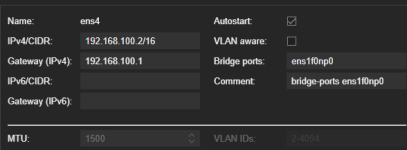
I checked the bridge, and it seems to be working. I downloaded my ISO through Proxmox.
Once I check the "No network device" checkbox my VM starts normally and I can set up my Ubuntu.
I would be very thankful for any advice on how I can fix this.
this is my first time installing and using Proxmox.
Currently, I'm having a problem while creating my first VM. It won't boot with a network card it keeps throwing this error message:
can't add ovs port 'fwln101o0' - command '/usr/bin/ovs-vsctl -- add-port ens4 fwln101o0 -- set Interface fwln101o0 'mtu_request=1500' -- set Interface fwln101o0 'type=internal'' failed: open3: exec of /usr/bin/ovs-vsctl -- add-port ens4 fwln101o0 -- set Interface fwln101o0 mtu_request=1500 -- set Interface fwln101o0 type=internal failed: No such file or directory at /usr/share/perl5/PVE/Tools.pm line 517.
kvm: -netdev type=tap,id=net0,ifname=tap101i0,script=/var/lib/qemu-server/pve-bridge,downscript=/var/lib/qemu-server/pve-bridgedown: network script /var/lib/qemu-server/pve-bridge failed with status 512
TASK ERROR: start failed: QEMU exited with code 1
I checked the bridge, and it seems to be working. I downloaded my ISO through Proxmox.
Once I check the "No network device" checkbox my VM starts normally and I can set up my Ubuntu.
I would be very thankful for any advice on how I can fix this.