

Hello,
I have a problem after importing NIOS (infoblox) QCOW2 to a VM using :
when i start a VM, its always say "Fatal Error During infoblox startup", Has anyone ever had experience importing NIOS (Infoblox) to Proxmox? Please help me about this.
Thank you
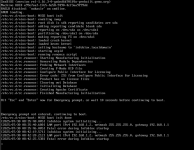
I have a problem after importing NIOS (infoblox) QCOW2 to a VM using :
Code:
qm importdisk 124 /mnt/pve/cephfs/import/nios-9.0.6-53318-82020f7ffaad-2025-03-26-05-08-05-fixed-500G.qcow2 local-lvmwhen i start a VM, its always say "Fatal Error During infoblox startup", Has anyone ever had experience importing NIOS (Infoblox) to Proxmox? Please help me about this.
Thank you

