Hi,
I have noticed a significant loss in IOPS and a noticeable increase in latency whenever ZFS is used, regardless of whether I am using a single disk or RAID 10.
RAW Disk or RAID 1, when used without ZFS, performs much better with significantly lower latency.
I have attached the test results for further analysis.
Could this performance issue be related to specific ZFS settings or is it a known problem with ZFS on NVMe drives?
Tests on: Server 2 (ProxMox Host)
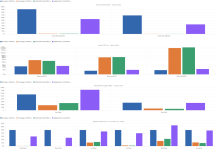
Below are two servers: Server 1 is the one we want to replace with Server 2.
But Server 2 is significantly slower than Server 1, even though the hardware should be much better.
The PostgreSQL configuration is the same.
Can anyone point me in the right direction as to where the difference between the two servers might lie?
When I set `synchronous_commit = off` in PostgreSQL, my performance increases by 3x to 4x.
But this is also set to “on” on Server 1.
Server 1 (ProxMox Host):
Server 2 (ProxMox Host):
But Server 2 is significantly slower than Server 1, even though the hardware should be much better.
The PostgreSQL configuration is the same.
Can anyone point me in the right direction as to where the difference between the two servers might lie?
When I set `synchronous_commit = off` in PostgreSQL, my performance increases by 3x to 4x.
But this is also set to “on” on Server 1.
Server 1 (ProxMox Host):
- Dell PowerEdge R450
- CPU(s) 64 x Intel(R) Xeon(R) Silver 4314 CPU @ 2.40GHz (2 Sockets)
- 4x Synology_SAT5210-960G (RAIDZ)
- 512GB Memory
Server 2 (ProxMox Host):
- Asus RS700-E12-RS12U/2KW/12N
- CPU(s) 96 x Intel(R) Xeon(R) 6520P (2 Sockets)
- 4x Samsung DC PM9A3, 960GB (RAIDZ)
- 1024 Memory
root@PVE-A-02:/opt/tacticalmesh# qm config 100
agent: 1
allow-ksm: 0
balloon: 0
boot: order=scsi0;net0
cores: 4
cpu: host
memory: 81920
meta: creation-qemu=10.1.2,ctime=1771507589
name: LS-ALM-12
net0: virtio=BC:24:11:6E:C6:4E,bridge=DMZ,tag=1012
numa: 0
ostype: l26
scsi0: VM-DISK:vm-100-disk-0,backup=0,cache=writeback,discard=on,iothread=1,size=128G,ssd=1
scsihw: virtio-scsi-single
smbios1: uuid=deebaf23-743c-4ad9-8b3b-6165b3210722
sockets: 1
vmgenid: 6cc65519-3406-45b7-8c18-ae43aeb5b8c2
agent: 1
allow-ksm: 0
balloon: 0
boot: order=scsi0;net0
cores: 4
cpu: host
memory: 81920
meta: creation-qemu=10.1.2,ctime=1771507589
name: LS-ALM-12
net0: virtio=BC:24:11:6E:C6:4E,bridge=DMZ,tag=1012
numa: 0
ostype: l26
scsi0: VM-DISK:vm-100-disk-0,backup=0,cache=writeback,discard=on,iothread=1,size=128G,ssd=1
scsihw: virtio-scsi-single
smbios1: uuid=deebaf23-743c-4ad9-8b3b-6165b3210722
sockets: 1
vmgenid: 6cc65519-3406-45b7-8c18-ae43aeb5b8c2
root@PVE-A-00:~# qm config 104
agent: 1
allow-ksm: 0
balloon: 0
boot: order=scsi0;net0
cores: 4
cpu: host
memory: 65536
meta: creation-qemu=10.1.2,ctime=1773411102
name: demo-01
net0: virtio=BC:24:11:09:B4 7,bridge=vmbr0
numa: 0
ostype: l26
scsi0: VM-DISK:vm-104-disk-0,backup=0,cache=writeback,discard=on,iothread=1,size=128G,ssd=1
scsihw: virtio-scsi-single
smbios1: uuid=7cdeeba6-e7ec-4b96-82a6-d2608af7d1ae
sockets: 1
vmgenid: ad503f69-7b2c-4ab9-9142-1337a1116755
agent: 1
allow-ksm: 0
balloon: 0
boot: order=scsi0;net0
cores: 4
cpu: host
memory: 65536
meta: creation-qemu=10.1.2,ctime=1773411102
name: demo-01
net0: virtio=BC:24:11:09:B4
7,bridge=vmbr0numa: 0
ostype: l26
scsi0: VM-DISK:vm-104-disk-0,backup=0,cache=writeback,discard=on,iothread=1,size=128G,ssd=1
scsihw: virtio-scsi-single
smbios1: uuid=7cdeeba6-e7ec-4b96-82a6-d2608af7d1ae
sockets: 1
vmgenid: ad503f69-7b2c-4ab9-9142-1337a1116755
[postgres@LS-ALM-12 ~]$ /usr/pgsql-17/bin/pgbench -p 7012 -c 10 -j 2 -T 60 test
pgbench (17.8)
starting vacuum...end.
transaction type: <builtin: TPC-B (sort of)>
scaling factor: 10
query mode: simple
number of clients: 10
number of threads: 2
maximum number of tries: 1
duration: 60 s
number of transactions actually processed: 310715
number of failed transactions: 0 (0.000%)
latency average = 1.931 ms
initial connection time = 14.512 ms
tps = 5178.910382 (without initial connection time)
pgbench (17.8)
starting vacuum...end.
transaction type: <builtin: TPC-B (sort of)>
scaling factor: 10
query mode: simple
number of clients: 10
number of threads: 2
maximum number of tries: 1
duration: 60 s
number of transactions actually processed: 310715
number of failed transactions: 0 (0.000%)
latency average = 1.931 ms
initial connection time = 14.512 ms
tps = 5178.910382 (without initial connection time)
[postgres@localhost ~]$ /usr/pgsql-17/bin/pgbench -c 10 -j 2 -T 60 -r test_db
pgbench (17.9)
starting vacuum...end.
transaction type: <builtin: TPC-B (sort of)>
scaling factor: 10
query mode: simple
number of clients: 10
number of threads: 2
maximum number of tries: 1
duration: 60 s
number of transactions actually processed: 138512
number of failed transactions: 0 (0.000%)
latency average = 4.332 ms
initial connection time = 10.964 ms
tps = 2308.460925 (without initial connection time)
pgbench (17.9)
starting vacuum...end.
transaction type: <builtin: TPC-B (sort of)>
scaling factor: 10
query mode: simple
number of clients: 10
number of threads: 2
maximum number of tries: 1
duration: 60 s
number of transactions actually processed: 138512
number of failed transactions: 0 (0.000%)
latency average = 4.332 ms
initial connection time = 10.964 ms
tps = 2308.460925 (without initial connection time)
I have noticed a significant loss in IOPS and a noticeable increase in latency whenever ZFS is used, regardless of whether I am using a single disk or RAID 10.
RAW Disk or RAID 1, when used without ZFS, performs much better with significantly lower latency.
I have attached the test results for further analysis.
Could this performance issue be related to specific ZFS settings or is it a known problem with ZFS on NVMe drives?
Tests on: Server 2 (ProxMox Host)
- Asus RS700-E12-RS12U/2KW/12N
- CPU(s) 96 x Intel(R) Xeon(R) 6520P (2 Sockets)
- 8x Samsung DC PM9A3, 960GB (RAID10)
- 1024 Memory
root@PVE-A-00:~# zfs set sync=always VM-DISK
root@PVE-A-00:~# zfs set direct=always VM-DISK
root@PVE-A-00:~# pveperf /VM-DISK
CPU BOGOMIPS: 460800.00
REGEX/SECOND: 7054854
HD SIZE: 3186.04 GB (VM-DISK)
FSYNCS/SECOND: 750.10
root@PVE-A-00:~# zfs set direct=standard VM-DISK
root@PVE-A-00:~# zfs set sync=standard VM-DISK
root@PVE-A-00:~# pveperf /VM-DISK
CPU BOGOMIPS: 460800.00
REGEX/SECOND: 7045722
HD SIZE: 3186.04 GB (VM-DISK)
FSYNCS/SECOND: 1479.15
root@PVE-A-00:~# zfs set direct=disabled VM-DISK
root@PVE-A-00:~# zfs set sync=disabled VM-DISK
root@PVE-A-00:~# pveperf /VM-DISK
CPU BOGOMIPS: 460800.00
REGEX/SECOND: 7053767
HD SIZE: 3186.04 GB (VM-DISK)
FSYNCS/SECOND: 113598.18
root@PVE-A-00:~# zfs set direct=always VM-DISK
root@PVE-A-00:~# pveperf /VM-DISK
CPU BOGOMIPS: 460800.00
REGEX/SECOND: 7054854
HD SIZE: 3186.04 GB (VM-DISK)
FSYNCS/SECOND: 750.10
root@PVE-A-00:~# zfs set direct=standard VM-DISK
root@PVE-A-00:~# zfs set sync=standard VM-DISK
root@PVE-A-00:~# pveperf /VM-DISK
CPU BOGOMIPS: 460800.00
REGEX/SECOND: 7045722
HD SIZE: 3186.04 GB (VM-DISK)
FSYNCS/SECOND: 1479.15
root@PVE-A-00:~# zfs set direct=disabled VM-DISK
root@PVE-A-00:~# zfs set sync=disabled VM-DISK
root@PVE-A-00:~# pveperf /VM-DISK
CPU BOGOMIPS: 460800.00
REGEX/SECOND: 7053767
HD SIZE: 3186.04 GB (VM-DISK)
FSYNCS/SECOND: 113598.18
Attachments
Last edited: