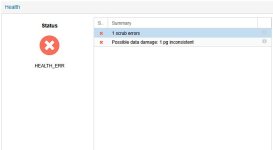
Can anyone help me with this error? Everything was working fine, but suddenly I logged into my Proxmox GUI and saw this error.
logs after running this command ceph osd repair all
logs after running this command ceph osd repair all

rmally Ceph repairs a defective PG automatically, unless you have not created enough data copies.
A PG with the data it contains is defective. You also seem to have little experience with Ceph, so I advise you to backup all VMs or move them to another storage and rebuild the pool.
There are also possibilities with Ceph to delete this PG, but you have to find out which data refers to this PG and delete it. However, this is only possible with a lot of background knowledge of Ceph. Instructions are available from IBM, Redhat or ceph.org.
The PG is distributed across several OSDs, depending on the setting on your pool.How can I verify how many OSDs and data are in this PG? I want to move it to another node, delete this PG, and create a new one.
The PG is distributed across several OSDs, depending on the setting on your pool.
You cannot simply delete a PG.
There are various ways (all on CLI) to find out who is using this PG. This works differently with an RBD than if you have stored data in CephFS. If you can find out which VM/LXC is using this PG, you have to delete this vDisk from your VM/LXC and then you can delete the PG from the pool on the CLI.
However, this is not a procedure for beginners and you should first familiarize yourself with the Ceph documentation, as this is very complex.
Since you are not an experienced Ceph administrator, seek professional help or delete the pool and create a new one.
Since you have a defective PG with only one scrub error, I suspect that your Ceph setup is not supported anyway and should not be used.
How big is your Cluster?
How many Nodes and OSDs?
We use essential cookies to make this site work, and optional cookies to enhance your experience.